
What is TACoS on Amazon? The PPC Metric That Shows Real Growth
What is TACoS? No, not the food. In Amazon advertising, TACoS stands for Total Advertising Cost of Sales, and it’s one of the most important metrics sellers use to measure long-term growth.
If you’re selling products on Amazon and running ads to boost your product listings, TACoS is the metric you should really be looking at, and we’ll show you why in this guide.
Overview
What Does TACoS Mean on Amazon?
TACoS stands for Total Advertising Cost of Sales. It tells you how much money you spend on ads compared to your total sales. Understanding how your ad spend affects your overall business gives you a bigger-picture view of performance and makes it easier to evaluate not only how well your ads are performing, but also how well they are helping grow your business.
Formula
TACoS = (Ad Spend ÷ Total Revenue) × 100
TACoS vs ACoS: What’s the Difference?
The main difference is that ACoS only looks at sales made from ads, while TACoS looks at all sales, including both ad sales and organic sales. This helps you understand not just how well your ads are working, but also how your overall business is growing.
ACoS stands for Advertising Cost of Sales and it shows how much you spend on ads compared to the sales that were made from those ads.
Formula: ACoS = (Ad Spend ÷ Ad Revenue) × 100
For example, if you spend $50 on ads, then your ads eventually make $200 in sales, and your total sales are $500.
Then your ACoS would be:
ACoS = (50 ÷ 200) × 100 = 25%
And your TACoS would be:
TACoS = (50 ÷ 500) × 100 = 10%
So, even though your ads cost 25% of your ad-generated sales, they only made up 10% of your total sales. After looking at the TACoS value, the ad spend may seem more reasonable than it did when only looking at ACoS. This is why it’s important to track both metrics together. ACoS helps you understand how your ads are performing, while TACoS helps you see how your ads support your overall business growth.
How does TACoS Affect Your Business?
TACoS affects your business by showing whether your ads are helping your business grow over time. A healthy TACoS can mean your ads are increasing sales, improving product rankings, and helping more shoppers find your products naturally on Amazon. As organic sales grow, you may rely less on ads, which can help lower TACoS over time.
What’s an appropriate TACoS at Different Selling stages?
A good TACoS can change depending on how new or popular your product is. New products usually need more ads, while older products with strong sales often need fewer ads. There is no perfect TACoS for every seller, but here are some general benchmarks if you need it.
| Selling Stage | Common TACoS Range | What It Means |
|---|---|---|
| New Products | 15%-25%+ | Spending more on ads to get noticed |
| Growing Products | 10%-20% | Organic sales are starting to grow |
| Mature Products | 5%-10% | Strong rankings and steady organic sales |
New Products
New products usually have a higher TACoS because sellers spend more money on ads to help people notice their products.
Experts say a TACoS between 15% and 25% is normal during product launches.
Because the goal is to grow the product and gain visibility, a higher TACoS is usually normal during this stage.
Growing Products
As more people start buying the product, organic sales usually grow too. This means sellers may not need to rely on ads as much anymore.
Many growing products aim for a TACoS around 10% to 20%.
When TACoS slowly goes down over time, it may be a good sign that the business is growing or maintaining healthy sales levels.
Mature Products
Older products with strong rankings and steady sales often have a lower TACoS because they do not need as many ads to stay visible.
Many mature products aim for a TACoS between 5% and 10%.
However, a very low TACoS may not always be ideal. In some cases, it may mean a seller is not advertising enough and could be missing opportunities to grow more in the long term.
How to Improve TACoS on Amazon
Improving your TACoS takes time, but small changes can make a big difference. As a starting point, make sure that you have the following:
Make Your Product Page Better
A better product page helps more shoppers trust your product and buy it. Amazon also likes listings that are clear, helpful, and easy to understand.
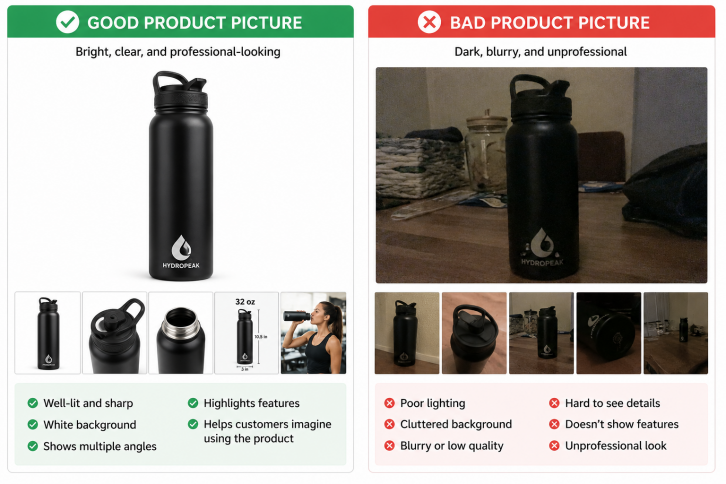
Here are some examples of good and bad product listings:
| What to Improve | Good Listing Example  |
Bad Listing Example  |
|---|---|---|
| Product Pictures | Bright, clear photos with a white background that show the product from multiple angles. | Dark, blurry, zoomed-out, or low-quality photos. |
| Product Title | “Stainless Steel Water Bottle – 32 oz Leakproof Sports Bottle, BPA-Free, Black” | “BEST WATER BOTTLE!!! BUY NOW FAST SHIPPING!!!” |
| Bullet Points |
Clearly explains the product’s size, features, materials, and benefits. Example:
|
Bullet points that are too short, confusing, or stuffed with random keywords. Example:
|
Use Clear and Bright Pictures
Your product pictures should be bright, clear, and easy to see. Amazon recommends using a white background for the main image. Good pictures help shoppers quickly understand the product and feel more confident buying it. A simple way to check if your photos are effective is to send a screenshot of your listing to a friend and ask if the pictures clearly show the product and whether they would feel confident buying it based on the photos alone.
Write Easy-to-Read Titles
A good title clearly explains what the product is. Include important details like the product type, size, or color. Avoid using too many capital letters, symbols, or confusing words.
Create Helpful Bullet Points
Bullet points should quickly explain the product’s main features and benefits. Keep them short, simple, and easy to read so shoppers can understand the product fast.
Get Good Customer Reviews
Good reviews help shoppers trust your product. Sellers usually get better reviews by providing high-quality products, accurate descriptions, fast shipping, and good customer service.
Use Better Keywords
Keywords are the words people type into Amazon when searching for products. Using the right keywords helps the right shoppers find your product and your ads more easily.
Good keywords should match your product and be words shoppers actually search for. The better your keywords are, the easier it is for shoppers to find your product.
Negative keywords are also important. They tell Amazon not to show your ads for searches that do not match your product, helping you save money by preventing the wrong shoppers from clicking on your ads.
If you want to learn more about choosing better Amazon PPC keywords, check out the following blogs:
Use Helpful Tools
Many Amazon sellers use tools to make advertising easier and save time. Sellers often struggle with wasting money on bad keywords, checking ads every day, and not knowing which ads actually help long-term growth.
BQool helps by using AI to automatically adjust bids, find better keywords, and move budget to the best campaigns. This saves sellers time, reduces stress, and helps ads work smarter instead of harder.
How to Track TACoS
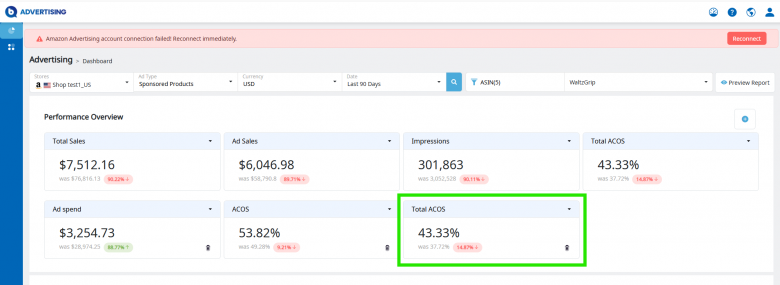
Amazon does not show TACoS directly in Seller Central, so most sellers calculate it themselves using the formula we introduced earlier.
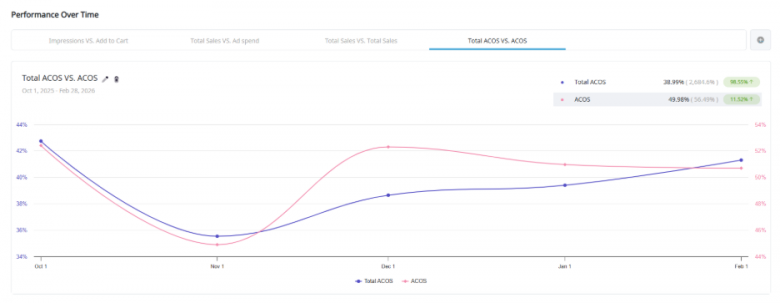
BQool makes this easier by showing both TACoS and ACoS inside its platform, helping users quickly see if their ads are saving money, bringing more sales, and helping their business grow.
Sellers also look at other important numbers like Advertising Cost of Sales (ACoS), ROAS, conversion rate, organic sales, and click-through rate (CTR). These numbers help sellers understand how well their ads are performing.
Conclusion
Total Advertising Cost of Sales (TACoS) is an important metric because it helps Amazon sellers understand how advertising impacts their overall business growth, not just ad sales alone. A healthy TACoS over time can show that ads are helping increase organic sales, improve product visibility, and strengthen long-term profitability. By improving product listings, using smarter keywords, and optimizing campaigns carefully, sellers can gradually lower TACoS while continuing to grow sales.
Managing all of this manually can take a lot of time, which is why many sellers use tools to simplify the process. BQool Ads helps sellers make smarter advertising decisions with AI-powered automation, keyword optimization, and performance tracking tools like TACoS and ACoS monitoring. This allows sellers to spend less time managing ads and more time growing their business.
FAQ
What does TACoS mean for Amazon?
TACoS stands for Total Advertising Cost of Sales. It measures how much you spend on ads compared to your total sales.
What is the formula for Amazon TACoS?
The formula for Total Advertising Cost of Sales (TACoS) is (Ad Spend ÷ Total Revenue) x 100. This formula shows how much of your total sales revenue is being spent on advertising.
What is the difference between TACoS and ACoS?
ACoS only measures ad sales. TACoS measures all sales, including organic sales.
What are good TACoS in Amazon?
A good TACoS depends on your product and goals. New products usually have higher TACoS than older products.
The post What is TACoS on Amazon? The PPC Metric That Shows Real Growth appeared first on BQool Blog.

