
What Is Seller Labs?
The All-in-One Amazon Growth Engine for Sellers Who Want to Scale Smarter
Are You Losing Profits Without Realizing It?
If you’ve been selling on Amazon for more than five minutes, you know this: growth isn’t just about more sales—it’s about smarter systems.
You’re juggling PPC ads, customer emails, review requests, fee spreadsheets, and somehow still trying to understand if you’re actually profitable. It’s exhausting.
That’s where Seller Labs comes in.
Seller Labs is the all-in-one platform built to help Amazon sellers scale smarter, not harder. With tools used by over 40,000 sellers, we give you the visibility, automation, and clarity you need—without guesswork.
What You’ll Learn in This Post
What Is Seller Labs and Why 40,000+ Sellers Trust It?
Seller Labs is a modular platform built for Amazon sellers who are serious about scale. Whether you’re running ads, managing reviews, or figuring out if your business is actually making money—we make the invisible visible.
Each tool in the Genius Suite was built to help you answer a crucial question:
- Are my ads working?
- Are my customers happy?
- Am I truly profitable?
And more importantly: What do I do next?
 Ad Genius – Dominate Amazon PPC Without the Guesswork
You’re not just wasting ad spend—you’re bleeding margin every time you don’t know which keywords are actually working. Ad Genius gives you back control.
 Automation that doesn’t feel like a black box Smart keyword and bid suggestions based on your real-time data Unified reporting across Sponsored Products & Sponsored Brands Built-in guardrails to prevent overspending
 Go from reaction to prediction with ads that scale as you do.
 Explore Ad Genius
 Feedback Genius – Automate Review Requests with Confidence
Amazon’s messaging policies get stricter every year—and yet reviews are more critical than ever. Feedback Genius helps you stay compliant and effective.
Pre-built Amazon-compliant email templates Advanced filters (exclude negative buyers, repeat purchases, etc.) Control over message timing, language, and triggers
 Automate the review request process—safely and strategically.
Explore Feedback Genius
 Profit Genius – Know What You’re Really Making
Many sellers think they’re profitable… until they actually calculate their Amazon fees, ad costs, returns, and storage. Profit Genius reveals what your spreadsheets and Seller Central don’t.
Real-time profit tracking Product-level profitability insights Hidden fee identification Break-even analysis on every SKU
 Find the leaks in your business before they sink your growth.
Discover Profit Genius
 The Genius Bundle – One Platform. Every Insight. Less Cost.
Most sellers juggle 3–5 tools. With the Genius Bundle, you get everything in one place:
- Centralized dashboard
- Streamlined insights
- Lower overall cost
Use only what you need—or unlock the full suite to scale smarter.
Quick Guide for Amazon Sellers: Your Top Questions, Answered
Ad Genius helps you manage, automate, and optimize your Amazon PPC campaigns with ease. You’ll spend smarter, rank faster, and finally know which keywords are working.
Yes. With Feedback Genius, you can send Amazon-compliant review requests, control message timing, and stay fully within Amazon’s terms—without sacrificing engagement.
Profit Genius uncovers your true margins by factoring in Amazon fees, ad spend, refunds, and more. It also helps you spot revenue leaks and prioritize high-margin winners.
Why Successful Amazon Sellers Choose Seller Labs
“I really like the new dashboard. Especially the gross profit after fees and ad expense. The ad genius dashboard is also very good. Thanks!”
What sets us apart?
 Transparent Automation – See the data behind the decisions
 Data-Driven Control – Full visibility and flexibility
 Seller-First Support – Real humans with real Amazon expertise
 Modular Design – Scale your toolkit as your business grows
The Real Problem: Tool Fatigue Is Costing You Growth
Most Amazon sellers use 5+ disconnected tools—and still feel blind.
That’s why Seller Labs exists.
We help you:
- Understand your ads without exporting 20 reports.
- Send review requests that stay fully within Amazon’s messaging policies.
- Track your profit with real clarity.
And we do it in one place, backed by a team that’s been doing this for over a decade.
Ready to Scale Smarter on Amazon?
Join over 40,000 sellers who use Seller Labs to grow faster, profit more, and stop flying blind.
Start your free trial or book a live demo with our Seller Labs experts.
You don’t need more tools. You need better ones. Welcome to Seller Labs.
The post What Is Seller Labs? appeared first on Seller Labs: Amazon Seller Software and Platform.
How an Order Management System (OMS) Works
An order management system can streamline and automate your order processing.
When a customer orders a product, they expect to receive that item quickly and efficiently. As a seller, it’s your job to fulfill that order and ensure it arrives in one piece (literally).
That said, fulfilling and tracking orders can be a massive hassle. How can you streamline this process? Many sellers have started using an order management system (OMS) to create customer orders and process them in one place.
Modern OMS systems utilize automation to streamline fulfillment further, saving sellers a significant amount of time. But how can you rely on an OMS to streamline the supply chain and fulfillment process?
What is an Order Management System?
An OMS software controls an ecommerce order throughout its entire lifecycle. After a customer places an order, the data is transferred to the OMS, where it will follow every step of the fulfillment and shipping process.
Sellers can also use an OMS for other tasks, such as inventory management and post-sales activities.
There are many reasons why sellers will want to invest in an OMS. These systems ensure accuracy in the supply chain, allowing buyers to track the status of their orders.
Related content: Warehouse Management Options
How an OMS Works
Here are a few things you can expect from an ecommerce order management system:
- Placing the order. Your OMS will connect to a form that customers fill out when placing their order. This form is automated and will be processed immediately after payment is made.
- Fulfillment. At the warehouse, employees can see the products in the order, customer information, and shipping details. All the warehouse employees need to do is pick, pack, and ship the order.
- Inventory management. The OMS can also monitor your inventory levels and notify the seller when stock is running low or must be liquidated. Some OMS platforms can forecast sales and trends and adjust accordingly for busy seasons.

Benefits of an Order Management System
An OMS offers advantages at every stage of the supply chain. Here are the most essential benefits to consider.
Manage Orders Better
An order management system typically operates in cloud environments, allowing it to work virtually and connect to various platforms.
Sellers can easily search for orders, check their status, and contact the customer in one place. Since OMS systems are automated, sellers will receive an alert if any issues arise.
An automated order management system also includes analytics and metrics to ensure a stellar fulfillment performance. This is why an OMS can manage orders better than manual processes.
Automation
An order management system for ecommerce includes automation, which means the system handles various tasks independently. Some of these automated capabilities include inventory management, routing, and shipping. This reduces manual labor and enhances accuracy.
Efficiency
Since an order management system can integrate with and manage multiple channels, it’s a more efficient system than manually performing these tasks. Plus, OMS systems can track and update your order status in real-time, eliminating guesswork for both you and your buyers.
Product Management
When you set up your OMS, you can upload all your SKUs into the system. Your OMS will do more than manage your inventory; it can also optimize your product catalog and identify opportunities to bundle items, ultimately maximizing sales.
Seamless Integration
There are numerous OMS options available, and most integrate with the largest ecommerce and fulfillment platforms. If you have a multi-channel strategy, you can utilize your OMS to integrate your existing sales and warehousing platforms.
Sales Forecasting
Many OMS platforms use predictive analytics to forecast sales and trends.
Predictive analytics is a type of machine learning that analyzes past sales data to predict future outcomes, such as busy seasons. As a result, you can optimize stock levels and access automated replenishment, establishing better relations with vendors.
Shipping Tracking
One of the biggest benefits of an OMS is its ability to track shipments. Many platforms set an estimated delivery date and track the fulfillment process to ensure the order arrives by that specific day. If any issues arise, sellers can access a suite of tools to discover the problem and find a solution.
Insights
Since an OMS aggregates data across every step of the supply chain, it can provide insights into your entire selling process.
Most OMS platforms track various sales metrics, such as average order value and order defect rate. OMS systems offer reports, allowing sellers to view a comprehensive picture of their performance.
Order Management System Tips
Sellers will only benefit from an OMS if they optimize it to meet their specific needs. Here are some tips to maximize the use of your order management system.
- Prioritize scalability. Find an OMS that allows you to scale when needed and that will adapt to your evolving needs.
- Train your staff. OMS platforms can be highly technical, so invest in ongoing training for your employees to ensure they understand all the nuances in your system.
- Consider your existing platforms. Evaluate all the channels you currently use for the most powerful omnichannel strategy. This can include your online store, third-party marketplaces, POS, and social media channels. Find an OMS that integrates with these channels to ensure seamless order processing and fulfillment.
- Optimize inventory management. Automated inventory management is one of the most impressive capabilities of an OMS. Optimize this even further with real-time inventory tracking and stock level monitoring.
- Custom reporting. Every business is different, so identify the metrics that are most beneficial to you and leverage your OMS to create custom reports. These metrics can include inventory turnover, sales trends, customer satisfaction, perfect order rate, and fulfillment accuracy.
- Update your platform. Most OMS systems will update automatically; if yours doesn’t, subscribe to update notifications to take advantage of new features and other improvements.
- Customer experience. Utilize your OMS to benefit your customers, such as offering sustainable packaging options, reducing order errors, streamlining returns and exchanges, and providing various shipping options.
- Stay compliant. Your OMS should comply with all data protection laws in regions where you operate. It should also maintain data privacy, including safeguarding your customers’ information.

The Best OMS Platforms
Do you own an eCommerce business and are looking for the best OMS systems? Here are the ones we recommend:
- Extensiv. If 3PL control is what you’re looking for, Extensiv should be your choice. This platform can automate order processing and integrates with several sales channels and 3PL systems.
- Shippo. Shippo is one of the most recognizable names in the shipping industry. It features a robust API that automates many fulfillment processes. Sellers can do several tasks in one place, such as creating labels and managing shipping. Shippo integrates with numerous platforms to centralize fulfillment.
- Shopify. While Shopify is an overall ecommerce platform, it includes multiple tools and apps to enhance the functionality of your online store. That said, Shopify has order management tools to streamline processing and fulfillment. Some of these tools have more features than others, such as custom reporting.
- Salesforce Commerce Cloud. If you have a Salesforce CRM, you can add their Commerce Cloud function to handle order fulfillment. Salesforce Commerce Cloud is packed with features like omnichannel inventory management, pre-built fulfillment flows, and order support.
- Veeqo. When shipping on Veeqo, sellers can pay lower shipping rates and pass those savings onto buyers. Veeqo also includes additional tools, such as order routing and inventory management.
Is an Order Management System Right for You?
An order management system will streamline your entire supply chain. This type of software tracks an order throughout its lifecycle, ensuring there are no issues during fulfillment and shipping.
While an OMS system is a powerful tool, it’s not a seller’s only option. Sellers can also partner with an eCommerce agency that can create a high-level selling strategy.

Author
 Stephanie Jensen has been writing ecommerce content for seven years, and her copy has helped numerous stores rank on Amazon. Follow her on LinkedIn for more insight into freelance writing and creating high-quality content.
The post How an Order Management System (OMS) Works appeared first on AMZ Advisers.
Need Help Reducing ACOS for Supplement Ads on Amazon
I’ve been running ads for my supplement product on Amazon for the last 2 months. My current ACOS is stuck around 45%, and I’m aiming to bring it down to 20%.
I’m running both keyword-targeted and ASIN-targeted campaigns. ACOS across them ranges between 10% to 75%. I’ve already paused all keywords and ASINs with ACOS over 80%.
Most of my sales are coming from keywords and ASINs that have 40-50% ACOS, so pausing those would hurt sales.
Any tips on how to optimize and bring down the ACOS while still maintaining sales? Would appreciate any advice or strategies that worked for you.
submitted by /u/AccomplishedSelf1117
[link] [comments]
Need Help Reducing ACOS for Supplement Ads on Amazon
I’ve been running ads for my supplement product on Amazon for the last 2 months. My current ACOS is stuck around 45%, and I’m aiming to bring it down to 20%.
I’m running both keyword-targeted and ASIN-targeted campaigns. ACOS across them ranges between 10% to 75%. I’ve already paused all keywords and ASINs with ACOS over 80%.
Most of my sales are coming from keywords and ASINs that have 40-50% ACOS, so pausing those would hurt sales.
Any tips on how to optimize and bring down the ACOS while still maintaining sales? Would appreciate any advice or strategies that worked for you.
submitted by /u/AccomplishedSelf1117
[link] [comments]
Supplement store – selling nutritional products
Hello I have a good supplier for nootropics, fitness supplements and otc health products. I’m getting them at a fairly cheap rate.
I am going to start selling on ebay, amazon and create my own website.
I’m just wondering if people think it’s possible to make a living by doing this or would it just be a bit extra cash every now and again? I don’t know how consistent sales would be, I’d probably be making about 6pounds on each product, I’d have to sell an awful lot of products to do well wouldn’t I?
Any tips or advise? The costs of selling, postage and tax etc are all quite costly aren’t they? Does anyone have any ideas for a cheap postage cost?
Thank you.
submitted by /u/Unhappy-Fail6848
[link] [comments]
Supplement store – selling nutritional products
Hello I have a good supplier for nootropics, fitness supplements and otc health products. I’m getting them at a fairly cheap rate.
I am going to start selling on ebay, amazon and create my own website.
I’m just wondering if people think it’s possible to make a living by doing this or would it just be a bit extra cash every now and again? I don’t know how consistent sales would be, I’d probably be making about 6pounds on each product, I’d have to sell an awful lot of products to do well wouldn’t I?
Any tips or advise? The costs of selling, postage and tax etc are all quite costly aren’t they? Does anyone have any ideas for a cheap postage cost?
Thank you.
submitted by /u/Unhappy-Fail6848
[link] [comments]
How to Enroll in Amazon Flex
Amazon Flex offers a straightforward way to earn, just as any other flexible work. In fact, data reveals that after a pandemic slump, the gig economy is now on track to rebound hard, climbing from an estimated $646 billion in 2025 to over $2.1 trillion by 2033.

But before you hop in the driver’s seat, there are a few things to get right. These include what kind of car qualifies, how the Flex app works, and what Amazon actually expects from its drivers.
What is Amazon Flex?
Amazon Flex gives individuals the opportunity to become self-employed delivery drivers.
This program was designed with flexibility in mind. Rather than hiring only full-time staff, Amazon enables people to deliver packages using their own vehicles. Not only that, but it lets users choose shifts that fit their personal schedules.
If you’ve ever received a Prime package and noticed it wasn’t from an Amazon-branded van, there’s a good chance it came from an Amazon Flex driver.
Amazon Flex drivers usually complete deliveries in shifts, known as blocks, that range from 3 to 6 hours. Earnings range from $18 to $25 per hour, with rates varying based on location, schedule, and the nature of the deliveries.

As an independent contractor, you’re not tied down to a boss or fixed schedule. You simply open the app, claim a block, and start delivering. That control over your time is one of the biggest draws for people looking for extra income without the rigidity of a traditional job.
How Does Amazon Flex Work?
Amazon Flex operates through a simple system built around the Flex app, which acts as your command center for everything, including:
- Scheduling delivery blocks
- Navigating routes with built-in GPS
- Scanning and tracking packages
- Viewing Amazon Flex delivery instructions for each stop
- Checking in at delivery stations or pick-up points
- Reporting delivery issues or contacting Amazon Flex support
- Tracking earnings and payment history
- Accessing onboarding videos and training guides
- Receiving real-time updates and block notifications
You can claim blocks in advance or get them last minute, depending on your availability.
During your block, you’ll head to a designated Amazon facility, scan and load your packages, and then hit the road to complete your deliveries. The app provides GPS navigation, delivery instructions from customers, and check-in alerts to help ensure a hassle-free route.
Amazon Flex The app supports every kind of delivery, such as:
- Prime Now
- Whole Foods
- Amazon orders
Amazon Flex Driver Requirements
While Amazon Flex offers independence and flexibility, it also sets baseline standards to ensure safety and reliability. Here are the requirements to quality for Amazon Flex:
- Age and Legal Eligibility. You must be at least 21 years old and legally eligible to work in your country. Amazon requires valid identification and a Social Security number for U.S.-based drivers.
- Valid Driver’s License. Amazon requires a current and unrestricted driver’s license for all applicants. International or provisional licenses typically aren’t accepted.
- Smartphone Compatibility. The app must be installed on a compatible iPhone or Android phone with reliable internet, GPS, and camera access. You’ll need the app for everything, from navigating your route to scanning packages.
- Clean Record and Background Check. After submitting your application, Amazon conducts a background screening, which reviews your criminal history and driving record.
- Bank Account. Since earnings are sent through direct deposit, you’ll need to have a valid checking account registered in your name.
If Amazon Flex doesn’t fit your schedule or vehicle type, you might consider Amazon Relay, which is designed for truckers and delivery fleets. For business owners, some FBA alternatives offer more flexibility in how products are delivered to customers.
Amazon Flex Vehicle Requirements
It’s crucial to check whether your vehicle meets the vehicle requirements for Amazon Flex.
Before signing up, double-check your region’s vehicle requirements inside the Flex app or on flex.amazon.com Having the right vehicle not only helps you get approved; it also ensures a smoother and more efficient delivery experience.
How to Sign Up for Amazon Flex
- Download the Flex App. The app is available on Android and iPhone. Use it to register, set your schedule, and manage your deliveries.
- Check Service Availability. Open the Flex app to verify whether the program is available in your region.
- Link Your Amazon Account. Sign in using your existing Amazon account or create a new one tailored to your Flex profile.
- Submit Your Info. Provide essential details, including your:
- Name
- Address
- Valid driver’s license
- Bank account for direct deposit
- Upload Vehicle Details. Enter information about your car, including the:
- Make
- Model
- Year
- License plate
- Insurance
- Consent to a Background Check. Amazon will verify your criminal and driving record. Approvals are completed within a few business days, but processing times may vary by location.
- Complete Training Modules. Within the Flex app, you’ll watch short tutorial videos on load scanning, app navigation, and delivery protocols.
- Browse and Select Delivery Blocks. Once approved, the app shows available delivery blocks. Pick the timeslot that fits your schedule and reserve your shift.
- Start Delivering. When your block begins, arrive at the pickup site, scan your packages, follow the in-app route, and start delivering!
Related content: Inside Amazon DSP
Is Amazon Flex Worth It?
Deciding if Amazon Flex is right for you depends on your personal goals, priorities, and daily routine. For many, it’s a flexible, no-strings-attached way to earn extra cash. For others, the lack of stability and benefits may be a dealbreaker.
Pros
- Decent hourly pay. Most drivers report earnings between $18 and $25 per hour, depending on the location, time, and delivery type.
- Quick payouts. Drivers receive payments through direct deposit, typically twice each week.
- Simple onboarding. No interviews or resumes. As long as you meet the Amazon Flex requirements, you’re good to go.
- No boss, no micromanagement. As an independent contractor, you’re in charge of your own time and workflow.
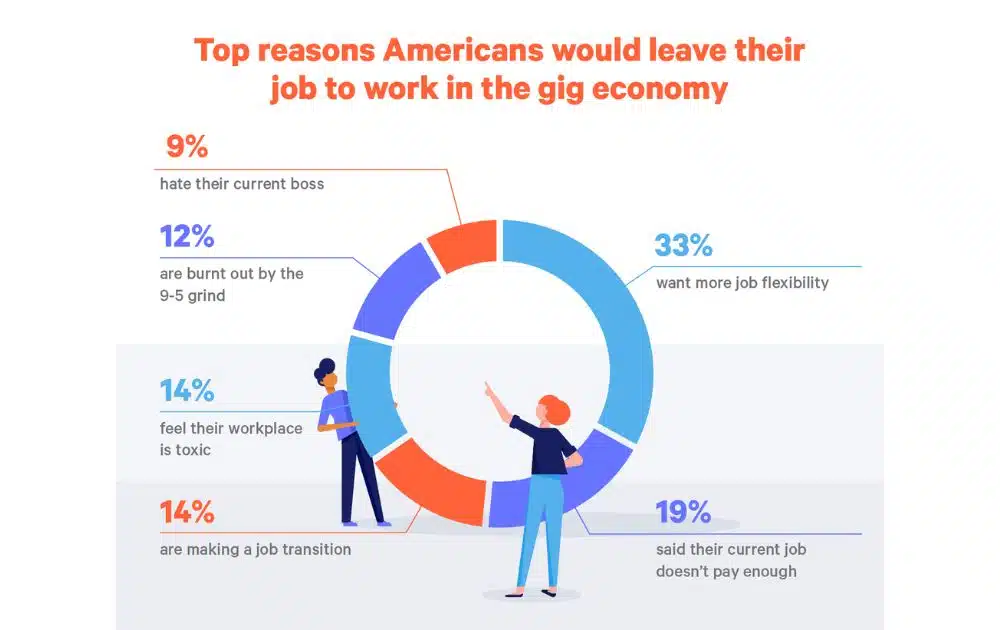
- Flexible schedule. You choose when and how often to work. Ideal for students, part-timers, or people with unpredictable schedules. These last two pros are crucial for many. In fact, data reveals that around one in three Americans choose gigs over a regular job because they want more job flexibility.
Cons
- No benefits. Unlike drivers working for partnered carriers or through Amazon TMS (which manage larger freight operations), Flex drivers get no health insurance, sick leave, or retirement contributions.
- All expenses are on you. Gas, tolls, maintenance, insurance, and phone data plans are out-of-pocket.
- Competitive scheduling. Delivery blocks can disappear fast, especially in busy markets. You might have to frequently refresh the app to secure a delivery block.
- Wear and tear on your vehicle. Frequent driving adds mileage and shortens the lifespan of your car.
- No long-term job security. Amazon can deactivate accounts for low performance, late deliveries, or low customer ratings.
The Bottom Line
Amazon Flex won’t replace a full-time job with benefits, but it can help increase your income without much red tape. Just be aware of the trade-offs and have a plan to track your expenses so your earnings are worth your time.
But if you’re not just driving but also selling on Amazon, there’s more to think about than just deliveries.
If you’re running an Amazon business and want help optimizing your product listings, managing ads, or scaling your operations, AMZ Advisers can give you the expert guidance you need. Schedule a call today to explore ways to grow and expand your business.
Author
 Carla Bauto Deña is a journalist and content writer producing stories for traditional and digital media. She believes in empowering small businesses with the help of innovative solutions, such as ecommerce, digital marketing, and data analytics.
The post How to Enroll in Amazon Flex appeared first on AMZ Advisers.
Listings flagged on Amazon & Walmart for referencing major tech company names – need help getting past automated support
Some of our listings are getting pulled from Amazon and Walmart, and we’re stuck trying to resolve it.
We’re not breaking any policies, but we’re hitting a wall.
The products are basic display items – similar ones are sold everywhere — but because they reference big tech names (like Google, Yelp, and Facebook), we’re being asked to prove we’re allowed to use the logos and aren’t impersonating the brands.
So far, all attempts to connect with a real person at these companies have gone nowhere – just bots and support loops.
If anyone knows how to escalate this or reach someone who can actually help, I’d be super grateful.
submitted by /u/bigeba88
[link] [comments]
Listings flagged on Amazon & Walmart for referencing major tech company names – need help getting past automated support
Some of our listings are getting pulled from Amazon and Walmart, and we’re stuck trying to resolve it.
We’re not breaking any policies, but we’re hitting a wall.
The products are basic display items – similar ones are sold everywhere — but because they reference big tech names (like Google, Yelp, and Facebook), we’re being asked to prove we’re allowed to use the logos and aren’t impersonating the brands.
So far, all attempts to connect with a real person at these companies have gone nowhere – just bots and support loops.
If anyone knows how to escalate this or reach someone who can actually help, I’d be super grateful.
submitted by /u/bigeba88
[link] [comments]
Transferring Amazon Listings/Accounts/Ownership
I had an Amazon account using my LTD company selling supplements which lasted a year before it was suspended after repeating a policy violation.
Following the suspension, my GF took all of my stock and opened her own LTD company and Amazon account and started selling the same supplements – obviously with my oversight.
During which time, I successfully used an appeal service to reactivate my account through mediation.
I have then tried to relist my old supplement listings and create new listings to no success as its gated now – despite countless sales previously. I had also deleted all of my listings during the deactivation period.
We are determining what is the best way to transfer her listings/account/ownership to my name as its essentially my business which she ran during my downtime. Any guidance would be appreciated.
submitted by /u/SugarRayxx
[link] [comments]

