
What Happens When You Ask 3 AIs the Same Question About Your Amazon Ads?
You ask AI to analyze your Amazon ad campaigns. It tells you to pause three keywords and double down on two others. The reasoning looks solid. The data looks specific. So you do it.
Two weeks later, ACoS is worse. The “underperforming” keywords were actually driving conversions on a different campaign. The AI didn’t see the connection — and you had no way to catch it.
That’s not an AI failure. That’s a single-perspective failure. And in 2026, it’s the most expensive mistake Amazon sellers are making with AI — not using it wrong, but trusting one model to see everything.
What You’ll Walk Away With
- Why the “black box” era of AI is over — and what replaced it
- The three layers of AI advancement that changed what’s possible for Amazon sellers in 2026
- How multi-model verification cuts hallucinations by over 30% (MIT research)
- Copy-paste prompts for campaign audits, wasted spend analysis, and bid optimization
- 5 things you can do this week to stop making ad decisions on one AI’s opinion
The Black Box Problem Most Sellers Haven’t Moved Past
Most Amazon sellers tried AI in 2024. They pasted data into ChatGPT, got a confident answer, checked it against reality — and found half the numbers were fabricated. Invented carrier rates. Hallucinated conversion metrics. Beautiful formatting around garbage data.
So they went back to spreadsheets. Back to doing it the slow way. Because at least the slow way doesn’t lie to you.
Here’s the thing: they were right to lose trust. In 2024, the best AI models could find the specific data point they needed inside a large dataset roughly 18-26% of the time. One in five. You’d feed in your campaign reports and the AI was throwing darts in the dark — and when it couldn’t find the real number, it filled in the blank with a guess and served it to you with total confidence.
That era is over. But most sellers haven’t come back to check.
Three Layers Changed Everything in 2026
The AI infrastructure shifted in three ways over the past year. Each one matters for how you use AI for Amazon PPC.
Layer one: AI can finally see your real data. MCP servers — Model Context Protocol — created a direct bridge between your Amazon Seller Central account and AI models like Claude. No exporting CSVs. No pasting into chat windows. The AI reads your live sales data, ad performance, inventory levels, and profitability metrics directly. That alone eliminates the biggest source of hallucination: AI guessing because it couldn’t access the actual numbers.
Layer two: Workflows replaced one-off prompts. If you’re still opening ChatGPT, typing a question, reading the answer, and closing the tab — that’s like owning a race car and pushing it by hand. Agentic AI workflows now chain multiple steps together: pull data, analyze it, cross-reference benchmarks, generate recommendations, flag uncertainties — automatically. Tools like n8n let sellers build these without writing code.
Layer three: Multiple models checking each other’s work. This is the one most sellers haven’t discovered yet — and it’s the most powerful. When you run the same data through Claude, ChatGPT, and Gemini and compare what comes back, something remarkable happens. MIT researchers studied this approach — they called it multi-agent AI debate — and found that hallucinations dropped over 30%. The models literally caught each other’s mistakes. Whatever all three agreed on was almost certainly true. Whatever they disagreed on was exactly where a human needed to look closer.
Why This Matters for Your Amazon Ad Spend
Industry research consistently finds that most Amazon ad accounts carry 20-30% wasted spend — from irrelevant search terms, poorly structured campaigns, and bid decisions based on stale data. For a seller spending $10,000/month on PPC, that’s $24,000-$36,000 per year in preventable losses.
The problem isn’t that sellers don’t care. It’s that every analysis gives you one perspective — and each has blind spots. Claude reasons cautiously and flags uncertainty. ChatGPT gives confident recommendations fast. Gemini pulls from Google’s search and shopping data in ways the others can’t. None of them are wrong. But none of them see the complete picture.
Applied to your campaigns: one model might tell you to pause a keyword that another recognizes is driving organic rank on a different ASIN. One might recommend scaling a campaign that another flags as cannibalizing your best performer. The disagreement between models is where your biggest savings are hiding.
The 15-Minute Multi-AI Ad Audit
This works whether you’re spending $1,000 or $100,000 a month.
Step 1: Pull your real data. Export your last 30 days of campaign performance — spend, sales, ACoS, clicks, conversion rate, and search term reports. Or connect through an MCP server so the AI reads your live numbers directly. The more specific, the better.
Step 2: Same data, same prompt, three models. Feed the identical dataset and identical question to Claude, ChatGPT, and Gemini. The only variable should be the model itself — that’s how you isolate each one’s blind spots.
Step 3: Read the reasoning, not just the answer. Did one focus on ACoS while another looked at TACoS? Did one flag a keyword as waste while another called it an organic rank driver? Those differences are the real signal.
Step 4: Act on consensus. Investigate conflict. All three agree? Green light — the MIT research confirms that’s your highest-confidence outcome. They disagree? That decision needs a human, not another algorithm.
| AI Output | What It Means for Your Ads | Your Next Move |
|---|---|---|
| All 3 say: pause this campaign | High confidence — the data is clear | Pause it today, reallocate budget to winners |
| 2 agree, 1 dissents | Probably right, but a nuance worth catching | Read the dissenting reasoning before pulling the trigger |
| All 3 disagree | Genuinely complex — no algorithm should decide alone | Dig into the data manually, apply human judgment |
| All 3 agree with different reasoning | Triangulated answer — strongest signal possible | Act immediately with full confidence |
That last row is the hidden gem. When three models trained on different data arrive at the same conclusion through different reasoning, you’ve triangulated the answer. That’s more reliable than any single analysis could ever be.
Copy-Paste Prompts for Your Next Amazon Ad Audit
Run each through Claude, ChatGPT, and Gemini with the same campaign data. Compare what comes back.
Wasted spend finder:
“Analyze my Amazon search term report. Find every keyword that received clicks but zero conversions in the last 30 days. Calculate my total wasted spend. Then check — are any of those ‘zero conversion’ keywords actually driving impressions or organic rank for other ASINs? I don’t want to cut a keyword that’s helping my business in ways this report doesn’t show.”
Campaign profitability audit:
“Here is my Amazon PPC data for the last 30 days. Identify every campaign running above my break-even ACoS of [your number]%. For each one, tell me: pause, reduce bids, restructure targeting, or keep running with changes. Flag any campaign where the right call is genuinely ambiguous.”
Bid optimization check:
“Compare my current bids against my actual conversion rates and average order values. Which keywords am I overbidding on? Which am I underbidding where more spend would be profitable? Calculate the exact bid I should pay based on my target ACoS of [your target]%.”
Add this to every prompt:
“Rate your confidence 1-10 for each recommendation. For anything below 7, tell me what additional data would change your answer.”
That last line forces the AI to show you where it’s guessing. In the old black-box era, AI would double down on wrong answers. Now the best models flag uncertainty — but only if you ask.
5 Things You Can Do This Week
1. Run a negative keyword blitz. Pull your search term report. Find every term with clicks and zero sales. Add them as negatives immediately. This alone can reduce ACoS by 15-30% within two to four weeks — and most sellers only do it once a quarter instead of weekly.
2. Get a second AI opinion on your worst campaign. Take your highest-ACoS campaign and run it through two different models. Ask both: “Should I pause this, fix it, or is it doing something valuable the ACoS number doesn’t show?” The second opinion often saves a campaign you were about to kill — or catches one you thought was fine.
3. Switch from ACoS to TACoS as your north star. ACoS only measures ad-driven sales. TACoS measures ad spend against total revenue — including organic sales your ads generate. A 35% ACoS campaign looks terrible until you see your TACoS is 12% because those ads fuel organic rank. One model might miss this. Two won’t.
4. Use the confidence prompt on your next big decision. Before you pause a campaign, change a bid, or restructure your ad groups — ask AI to rate its confidence and explain what data would change the answer. That 10-second addition turns AI from a black box into a transparent analyst you can actually verify.
5. Build a Monday morning ad review. Same 3 prompts, same data, every week. Compare this week’s output to last week’s — patterns emerge that dashboards never show. Tools like n8n can automate this: the AI runs your audit overnight and delivers a comparison report Monday morning.
The Bottom Line
The sellers winning Amazon PPC in 2026 aren’t outspending everyone. They’re out-verifying everyone. They’ve moved past the black box. They’ve connected real data. They’ve built workflows that run while they sleep. And they’ve discovered the simplest insight: one AI can be confidently wrong, but three models arriving at the same answer through different reasoning? That’s as close to certainty as Amazon advertising gets.
The method takes 15 minutes. The prompts are free. The only cost is continuing to make five-figure decisions on one opinion.
FAQ
How much ad spend do most Amazon sellers actually waste?
Amazon Growth Lab and Emplicit estimate 20-30% wasted spend in most accounts — irrelevant keywords, poor structure, and stale data. For a $10K/month account, that’s $2,000-$3,000 per month in preventable losses.
Do I need paid AI subscriptions for this?
No. All three have free tiers that handle basic PPC analysis. Paid tiers give you longer context windows for large datasets, but you can test multi-model verification today at zero cost.
What if all three models give completely different answers?
That’s actually the most valuable outcome. Complete disagreement means no algorithm should make the call alone. You’ve found exactly where human judgment matters — which beats confidently executing a bad strategy because one AI said so.
Can I automate the multi-model comparison?
Yes. Tools like n8n send the same prompt to multiple AI APIs simultaneously, compare responses, and flag disagreements automatically. Some sellers run this as a Monday morning workflow — fresh data through three models overnight, comparison report before coffee.
Want to run these prompts on your actual Amazon data — without exporting a single spreadsheet?
Seller Labs connects your real sales, advertising, and profitability data directly to AI through an MCP server. Ask questions about your actual campaigns and get answers backed by your real numbers — that’s layer one of the framework above, already built and ready.
For a limited time, get 30% off your first month — after your 30-day free trial.
Keep Reading
- AI Can Now See All Your Amazon Data — Here’s What Sellers Ask First
- What Do Target, Best Buy, and Walmart Know About Shipping That Amazon Sellers Don’t?
- How to Optimize Amazon Listings for Rufus AI: 4-Step Method
- Amazon Restricted Products: Complete 2026 Category Guide
- Amazon MCP Server: How Seller Labs + Claude Deliver AI-Powered Insights
The post What Happens When You Ask 3 AIs the Same Question About Your Amazon Ads? appeared first on Seller Labs: Amazon Seller Software and Platform.
What is a Good ACOS on Amazon?
Amazon sellers often focus heavily on ACoS (Advertising Cost of Sales) because it directly measures Amazon advertising ROI at the campaign level. However, ACoS should never be evaluated in isolation. It’s a tactical metric that influences your broader strategy to improve Amazon profitability.
TL; DR
A good ACoS on Amazon depends on your profit margin, growth stage, and business goals, but in most cases, sellers aim for an ACoS between 25% and 40%. To improve Amazon ROI, your ACoS must stay below your break-even margin. If your profit margin is 35%, your ACoS must be lower than 35% to remain profitable. The right target balances growth and efficiency, not just lower ad spend.
Overview
- What Is Amazon ACoS?
- Why ACoS Is Important
- Where to Find ACoS in Seller Central
- ACoS vs. ROAS
- How to Calculate ACoS on Amazon
- What Is Break-Even ACoS?
- What Is Considered a Good ACoS on Amazon?
- Ways to Lower Your ACoS (For Beginner and Advanced sellers)
- BQool AI Advertising Solution to Lower ACOS
- Conclusion
- FAQ
What Is Amazon ACoS?
Amazon ACoS (Advertising Cost of Sales) is the percentage of ad spend relative to revenue generated from ads. Ad Spend is calculated as a percentage of Ad Revenue.
If you spend $20 on ads and generate $100 in ad-attributed sales, your ACoS is 20%.
Why ACoS Is Important
ACoS matters because it shows whether your ads are helping or hurting your profitability. If your ACoS is higher than your profit margin, you may generate sales but lose money, which would strain your cash flow since ads require upfront spending. A sustainable ACoS allows you to scale campaigns confidently, knowing increased ad spend will still be profitable. Ultimately, managing ACoS effectively ensures your advertising delivers strong ROI and supports long-term, sustainable growth on Amazon.
A lower ACoS indicates greater advertising efficiency, while a higher ACoS can reflect either aggressive growth investment or inefficient targeting. For experienced sellers, ACoS becomes a strategic tool, whereby lowering it prioritizes profitability and increasing it can accelerate growth when margins allow. The optimal target for experienced sellers should always align with your break-even threshold.
Where to Find ACoS in Seller Central
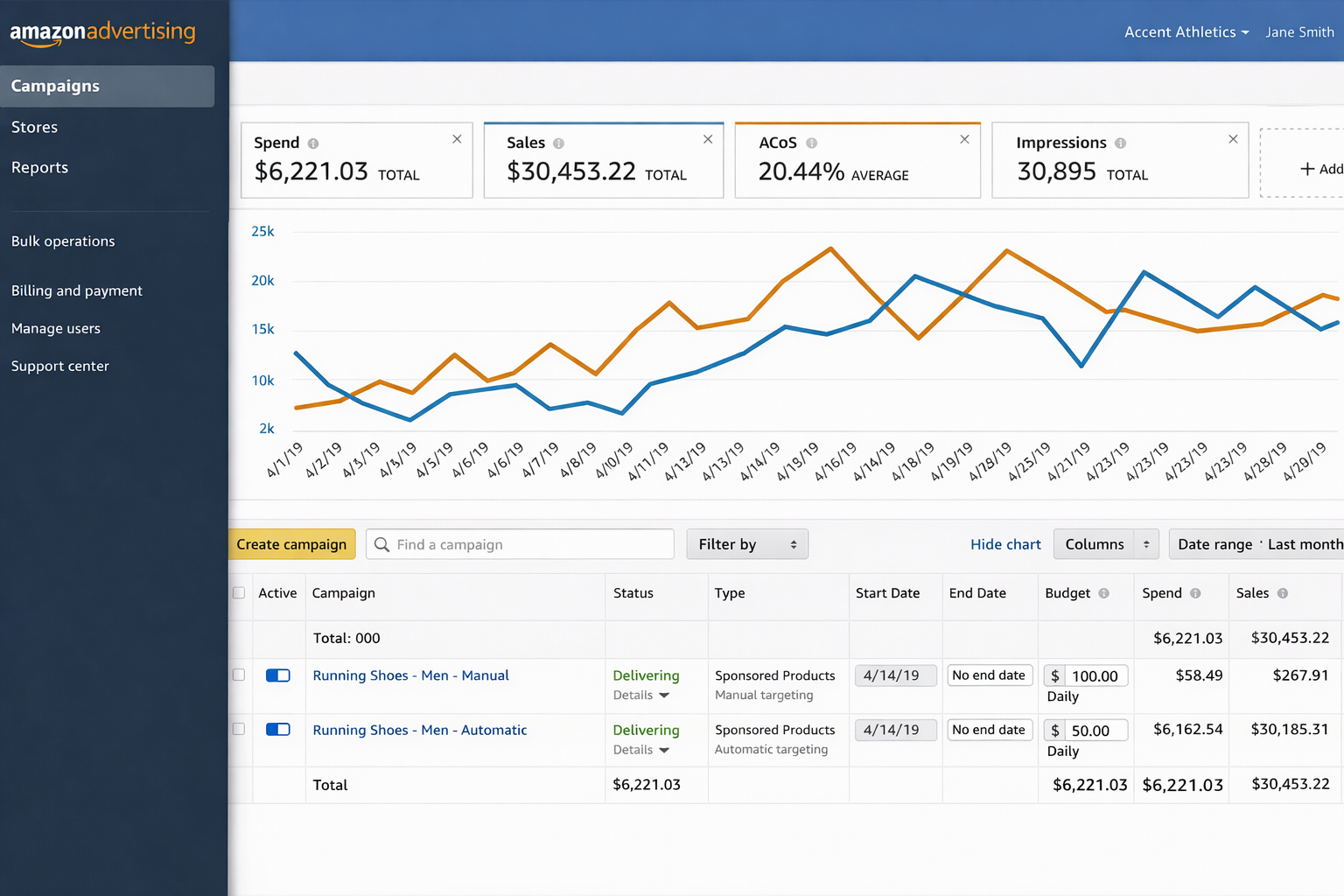
You can find ACoS on your Campaigns Dashboard. Simply click on the arrow next to your one of the metrics shown on your dashboard and there will be a drop down where you can select what KPI you want to display.
You can customize columns to show other metrics including:
- Spend
- Impressions
- Clicks
- CPC
ACoS vs. ROAS
ACoS and ROAS measure the same relationship from different perspectives.
Amazon emphasizes ACoS because it directly relates to margin control. However, some sellers may prefer ROAS because it frames performance in revenue terms.
For a deeper breakdown of ROAS benchmarks and strategy, check out this guide.
How to Calculate ACoS on Amazon
The formula for ACoS is: ACoS = (Ad Spend ÷ Ad Revenue) x 100%.
Take the following example:
- Ad Spend = $500
- Ad Revenue = $2,000
Step 1: Divide spend by revenue
$500 ÷ $2,000 = 0.25
Step 2: Multiply by 100%
0.25 x 100 = 25%
Your ACoS = 25%
What Is Break-Even ACoS?
Break-even ACoS is the maximum ACoS you can afford before losing money. This means it is the same as the product’s profit margin.
If your net margin after all Amazon fees, total cost of goods, and shipping and fulfillment costs equals 30%, then your break-even ACoS is 30%.
If your ACoS exceeds 30%, that means you’d lose money on ad-driven sales.
If your ACoS stays below 30%, you remain profitable.
Understanding this relationship is foundational to improving Amazon PPC ROI.
What Is Considered a Good ACoS on Amazon?
There is no universal “good” ACoS, but industry benchmarks provide context.
Common ACoS Benchmarks
In general, an ACoS under 25% is considered excellent and reflects strong advertising efficiency, while a range between 25% and 40% is typically viewed as average and sustainable for many sellers. An ACoS above 40% is generally considered high and may indicate the need to optimize your ad campaigns, unless you are intentionally prioritizing aggressive growth over short-term profitability.
When a Higher ACoS Makes Sense
ACoS targets vary depending on a seller’s strategic goals; generally, these goals fall into one of two categories: growth or efficiency.
Growth Strategy
- A Higher ACoS is acceptable
- Focus on increasing seller ranking and market share
- Allow for a short-term margin sacrifice
Efficiency Strategy
- Lower ACoS is required
- Focus is more on profitability
- Enhance keyword strategy and narrow it down to key performers
To improve Amazon ROI over time, your ACoS must fit within your profit margin and the long-term value of each customer.
For broader strategies on improving advertising efficiency and overall profitability, check out this blog.
Your Profit Margin is the True Context for ACoS
Two sellers can have the same ACoS and very different profitability outcomes because their individual profit margins determine the real impact.
If both sellers run at a 35% ACoS but Seller A has a 50% margin, they remain profitable, while Seller B with a 30% margin loses money. This is why ACoS should always be evaluated against your own margins and not your competitors.
Ways to Lower Your ACoS (For Beginner and Advanced sellers)
Beginner’s Guide to Reducing ACoS1. Adjust Keyword Bids
Focus on making bid adjustments based on performance data instead of gut feelings.
2. Refine Keyword and Product Targeting
Higher relevance improves conversion rate, which lowers ACoS.
3. Pause or Remove Poor Performers
If a keyword:
Pause it and preserve your funds for better performing keywords.
4. Optimize Product Listings
Your ad performance will only be as good as your listing quality.
Improve:
Higher conversion rate reduces ACoS because more clicks turn into sales.
|
Advanced Guide to Reducing ACoS1. Prioritize Top-Performing ASINs
Allocate more budget toward products with:
Avoid spending your ad budget across underperforming ASINs.
2. Harvest Converting Search Terms
From auto-campaigns:
This improves Amazon PPC ROI through precision targeting.
3. Use Negative Keywords
Apply negative keywords in your ad campaigns to:
Every irrelevant click increases ACoS.
4. Allocate Budgets Around High-Conversion Periods (Dayparting)
Since different times of day can affect ad performance, whether by hour, day, or season, advanced sellers should:
5. Isolate Underperforming Keywords
Instead of deleting underperforming keywords outright, you should try:
While testing other keywords in a separate campaign, you ensure that no potential opportunities are missed.
6. Scale Strong Performers
ASINs with a low ACoS and high conversion rate indicates an opportunity to increase budgets for this ad group to:
7. Organize Campaigns by Root Keyword Themes
Try applying a thematic structure to keywords to:
8. Optimize Ad Placements
Analyze performance of your ads across:
Adjust ad placements based on ROI contribution.
|
BQool AI Advertising Solution to Lower ACOS
Basic and advanced ACoS optimization strategies require consistent oversight. For sellers with larger inventories, managing bids, budgets, and keywords daily becomes time-consuming.
Automation platform, such as AI-driven ad management tools, are commonly used to:
- Adjust bids dynamically
- Detect wasteful spend patterns
- Scale profitable keywords
- Optimize campaigns based on real-time performance
Try out BQool’s AI Advertising solution, designed to help sellers lower ACoS, increase sales and scale more profitably.
Below are some real seller case studies who benefited BQool’s advertising technology:
Conclusion
In conclusion, there is no single “good” ACoS that applies to every seller. It must reflect your margins, business goals, and stage of growth. Benchmarks can provide general guidance, but your break-even point should always anchor decision-making. Sustainable performance comes from balancing efficiency with growth, refining bids and targeting, improving conversion rates, and structuring campaigns intentionally. Advertising is most effective when supported by a strong product, competitive pricing, and a well-optimized listing. Ultimately, ACoS is a strategic variable you manage, but long-term profitability is the real measure of success.
FAQ
What is a good ACoS for Amazon?
A good ACoS on Amazon typically falls between 25% and 40%, depending on your profit margins and business goals. Sellers with higher margins can tolerate higher ACoS, while low-margin products require more control.
What is ACoS and how is it calculated?
ACoS (Advertising Cost of Sales) is the percentage of ad spend relative to ad-attributed revenue. It is calculated using the formula: Ad Spend/Ad Revenue x 100%.
Is a 30% ACoS good?
A 30% ACoS is good if your profit margin exceeds 30%. If your margin is lower than 30%, a 30% ACoS would result in a loss on ad-driven sales.
How does ACoS work?
ACoS works by measuring how much you spend on ads to generate revenue. Lower ACoS means higher advertising efficiency, while higher ACoS indicates more aggressive spending or lower conversion efficiency.
The post What is a Good ACOS on Amazon? appeared first on BQool Blog.
#499 – Steal This 100 Orders A Day TikTok Shop Setup
Audio version above. Video version below
If you’ve been wondering how to hit 100 TikTok Shop orders per day without cannibalizing your Amazon business, this TikTok Thursday episode is built for you. Host Shivali Patel sits down with Alina Vlaic, an Amazon seller, operator, and owner of the AZrank agency, who’s been deep in the trenches, to unpack what it takes to make TikTok Shop work consistently (not just a lucky spike).
Alina walks through the behind-the-scenes journey: what she focused on first, the signals that told her a product could win on TikTok, and the moments where things went sideways. On TikTok Shop, momentum can change fast. This episode gives you the mindset and the practical direction to test smarter, avoid common traps, and keep moving even when the platform throws curveballs.
If you want a repeatable system, not vague motivation, listen through and take notes. Then pick one action to implement today, because the sellers who win on TikTok Shop are not waiting for perfect clarity. They are testing while everyone else is still overthinking.
In episode 499 of the AM/PM Podcast, Shivali and Alina discuss:
- 00:00 – Introduction
- 01:12 – Why Alina’s Known for Ranking and Indexing
- 04:16 – The 10-Point Practical Playbook (Amazon to TikTok Shop)
- 05:13 – The Proof: How They Hit Nearly $1,000/Day and 100 Orders/Day
- 06:27 – Key Setup: Linking TikTok Page & Shop for Shoppable Content
- 08:38 – Don’t Assume It’ll Work: How to Test Your Amazon Catalog Fast
- 11:39 – Content Strategy: Why Your Own Posting Still Matters
- 15:57 – The $2,000 GMV Unlock for More Creator Access
- 18:40 – The Drop: Violations That Crushed Visibility and Limited Orders
- 20:39 – The Fix: Using Tools to Escalate and Clear Violations
- 33:59 – Creative “Reverse Hook” Strategy
- 39:00 – Q&A
Enjoy this episode? Want to be able to ask questions to Leo Sgovio live in a small group with other 7 and 8-figure Amazon sellers? Join the Helium 10 Elite Mastermind and get monthly workshops, training, and networking calls with Leo at h10.me/elite
Make sure to subscribe to the podcast on iTunes, Spotify, or wherever you listen to our podcast!
💰 Get Helium 10 with a special discount to start or scale your e-commerce business here: https://h10.me/h10
Want to absolutely start crushing it on eCommerce and make more money? Follow these steps for helpful resources to get started:
- Get the Ultimate Resource Guide from Bradley Sutton, Carrie Miller, and Shivali Patel for tools and services that he uses every day to dominate on Amazon!
- New to Selling on Amazon? Freedom Ticket offers the best tips, tricks, and strategies for beginners just starting out! Sign up for Freedom Ticket.
- Trying to Find a New Product? Get the most powerful Amazon product research tool in Black Box, available only at Helium 10! Start researching with Black Box.
- Want to Verify Your Product Idea? Use Xray in our Chrome extension to check how lucrative your next product idea is with over a dozen metrics of data! Download the Helium 10 Chrome Extension.
- The Ultimate Software Tool Suite for Amazon Sellers! Get more Helium 10 tools that can help you optimize your listings and increase sales for a low price! Sign up today!
- Does Amazon Owe YOU Money? Find Out for FREE! If you have been selling for over a year on Amazon, you may be owed money for lost or damaged inventory and not even know it. Get a FREE refund report to see how much you’re owed!
- Check out our other Amazon FBA podcasts including the Serious Sellers Podcast, as well as our Spanish version!
- You can also listen to the AM/PM Podcast on YouTube here!

The post #499 – Steal This 100 Orders A Day TikTok Shop Setup appeared first on AM/PM Podcast.
AI Can Now See All Your Amazon Data. Here’s What Sellers Ask First — And What They Find.
You know your ACoS. You can rattle off which campaigns hit 25% and which ones are sitting at 40%.
But here’s a question most sellers can’t answer without spending an afternoon in spreadsheets:
Which of your campaigns are actually profitable once you factor in real product costs, FBA fees, returns, and shipping?
Not ACoS profitable. Actually, money-in-your-pocket profitable.
If you paused on that — you’re not alone. That question is the single most common thing Amazon sellers ask when they finally get AI connected to their real business data. Not inventory questions. Not listing optimization. Not product research.
Advertising. Every time.
The Margin Squeeze Nobody’s Talking About
2026 is hitting Amazon sellers from every direction.
FBA fulfillment fees went up an average of $0.08 per unit in January. That might sound like pocket change until you’re shipping 20,000 units a year and it adds up to $1,600 in extra costs — with zero improvement in service.
But the fulfillment hike is just the headline. Amazon also killed all FBA prep and labeling services in the U.S., started delaying payouts, introduced defect-based fees up to $1.74 per unit for labeling errors, and raised AWD West region storage by 19%.
Meanwhile, ad costs keep climbing. PPC bids in competitive categories have jumped dramatically over the last two years. Sellers in forums are reporting 600% bid increases in some niches. One veteran seller on the Amazon forums put it bluntly: he’d spent over $627,000 on ads lifetime and was questioning whether PPC even makes sense anymore.
And Amazon now takes over 50% of sellers’ revenue through fees — up from 40% five years prior, according to Marketplace Pulse. The margin you had two years ago doesn’t exist anymore.
So where does that leave you? Making faster, smarter decisions about where every dollar goes — especially your ad dollars. And that’s exactly where most sellers are flying blind.
The Daily Grind That Eats Your Time
Be honest about what your Tuesday afternoon actually looks like.
You’re in Campaign Manager. You’re pulling search term reports. You’re adjusting bids on keywords that might be working or might be burning cash — you won’t know for 48-72 hours because Amazon’s reporting is delayed. You’re toggling between tabs trying to figure out if a campaign with a decent ACoS is actually contributing to your bottom line once real costs are factored in.
Listing optimization? You’ll get to it. Product scouting? When there’s time. Profitability analysis at the SKU level? Maybe quarterly, if you’re disciplined.
Advertising is the constant. It’s where the money moves in real time. It’s the part of the business that demands daily attention and punishes you the fastest when you look away.
This isn’t a hot take. It’s the pattern we saw play out in real time when we connected Amazon sellers’ actual Seller Central data to AI.
What Happened When Sellers Could Finally Ask AI About Their Real Numbers
At Seller Labs, we built an MCP server — a secure, read-only bridge that connects your actual Amazon data (sales, advertising, profitability, inventory, keywords, margins) directly to AI models like Claude. No exporting. No spreadsheets. Just ask a question in plain English and get an answer backed by your real numbers.
We expected sellers to explore everything.
They didn’t. They went straight to advertising. Keyword performance. Campaign effectiveness. ACoS. Ad spend. ROAS.
Out of 50+ data tables covering every dimension of an Amazon business, advertising was the overwhelming focus. The question sellers asked most:
“Which campaigns are actually profitable after all costs?”
And the answers surprised people. Campaigns that looked healthy on an ACoS basis were underwater once real product-level COGS, FBA fees, returns, and shipping were factored in. Some sellers’ “best” campaigns turned out to be their most expensive mistakes.
Before AI had access to real data, answering that question meant exporting ad reports, matching them against profitability data in a separate spreadsheet, building pivot tables, and praying the numbers lined up. A full afternoon for one answer.
Now it takes ten seconds and one question.
5 Questions You Should Be Asking AI About Your Ads Right Now
You don’t need our MCP server to start using AI more effectively for your advertising. You can do most of this today with ChatGPT, Claude, or Gemini and a CSV export from your ad reports. The key is asking the right questions.
1. “Which campaigns have the highest ACoS but lowest actual profitability?”
ACoS alone doesn’t tell you if you’re making money. Upload your ad report alongside your COGS data and ask AI to cross-reference them. You’ll find campaigns that look efficient but are actually losing money once all fees are included.
2. “What search terms am I paying for that never convert?”
Export your search term report for the last 60 days. Ask AI to flag every term with more than 20 clicks and zero conversions. These are your negative keyword candidates — and they’re silently draining your budget every day.
3. “How has my TACoS trended over the last 90 days, and what’s driving the change?”
TACoS (Total Advertising Cost of Sale) is the metric that tells you how much of your total revenue depends on advertising. If TACoS is climbing, your organic sales are shrinking relative to your ad-driven sales — which means you’re becoming more dependent on paid traffic, not less.
4. “Which of my products should I stop advertising entirely?”
Not every product should have an active campaign. Ask AI to identify products where the advertising cost exceeds the margin ceiling — meaning no amount of bid optimization will make the campaign profitable. Sometimes the best ad decision is turning one off.
5. “What would happen to my total sales if I cut my bottom 20% of campaigns?”
This is a scenario question that would take hours to model manually. AI can estimate the impact based on your historical data — and the answer is often that the bottom 20% of campaigns contribute almost nothing to total sales while consuming a meaningful chunk of budget.
What the Smartest Sellers Are Building Next
The sellers who started with advertising questions didn’t stop there. They started building systems.
One seller in our community built what he calls a “digital CFO” — AI running daily financial investigations across his entire catalog, digging into shipping costs, margin trends, and product-level performance. His goal: replace the third-party subscription software he’s been paying for monthly with AI conversations connected to his own data.
Another seller built automated agents that check ad performance and business data every morning, then send a summarized briefing to his Slack channel. No dashboards. No manual pulls. Just a daily report waiting before his first cup of coffee. He’s now moving it to the cloud so it runs entirely on its own.
These aren’t features anyone built into a product. They’re experiments sellers designed once they realized what’s possible when AI can actually see their numbers.
The Honest Truth About AI for Amazon Sellers
We could tell you AI is ready to run your Amazon business. But experienced sellers would see through that immediately.
Here’s where things actually stand: AI still makes mistakes. It gets math wrong sometimes. It can drift in longer conversations. One seller in our community told us he was nervous to let his team use it because his employees wouldn’t push back on a wrong answer the way he would.
That’s a valid concern. AI is a tool, not an autopilot.
But it’s improving fast. The latest Claude model retrieves relevant data 76% of the time, up from 18% just months ago. And perhaps most importantly — it now stops and asks for clarification instead of making something up.
The sellers who are furthest ahead didn’t wait for the technology to be perfect. They started building the skill while the competitive advantage was still wide open. By the time everyone else catches up, they’ll have months of experience asking better questions, building better systems, and making faster decisions.
What You Can Do This Week
1. Export your last 60 days of ad data. Campaign reports, search term reports, and if you have it, product-level profitability. Upload it to Claude or ChatGPT and start asking the five questions above.
2. Track TACoS, not just ACoS. If your Total Advertising Cost of Sale is climbing, your business is becoming more ad-dependent — and that’s a fragile position in a year when costs are rising everywhere.
3. Identify your bottom 20%. The campaigns, keywords, and products that consume budget without contributing meaningful revenue. Cut or pause them and redirect that spend to what’s actually working.
4. Ask one question you’ve been avoiding. Every seller has it — the analysis that would take too long, the spreadsheet that never gets built, the number you suspect is bad but haven’t confirmed. That’s your first AI question. Ask it.
5. Build a Monday morning prompt. One saved question that summarizes your ad performance for the week. Run it every Monday. Refine it every week. That’s the beginning of a system — not just a one-time analysis.
FAQ
I don’t use Seller Labs. Can I still use AI for my ad analysis?
Absolutely. Export your campaign and search term reports from Seller Central as CSVs. Upload them to ChatGPT, Claude, or Gemini. Ask specific questions about your data. You won’t have the real-time connection that an MCP server provides, but you’ll still get answers that would take hours to find manually.
What’s the difference between ACoS and TACoS, and why does it matter?
ACoS measures how much you spend on ads relative to ad-attributed sales. TACoS measures how much you spend on ads relative to total sales (including organic). If your ACoS is flat but TACoS is climbing, it means your organic sales are declining — you’re becoming more dependent on paid traffic to maintain revenue.
Won’t AI give me wrong answers about my business?
It can, especially with vague questions. The fix is specificity. “How are my ads doing?” gets you a generic answer. “Show me my top 10 campaigns by spend last 30 days with ACoS above 35% and compare against product-level margins” gets you something actionable. And always ask: “What assumptions did you make?” That one question separates useful analysis from hallucinated noise.
What’s a good prompt to start analyzing my ad data with AI?
Try this. Upload your last 60 days of campaign and search term reports as CSVs to ChatGPT or Claude, then paste this prompt:
“Analyze my Amazon ad campaigns. For each campaign, show me: campaign name, total spend, total sales, ACoS, and total clicks with zero conversions. Sort by spend descending. Then flag any campaign where ACoS is above 35% and highlight search terms with more than 15 clicks and zero orders — those are my negative keyword candidates. Summarize the top 3 actions I should take this week to reduce wasted spend.”
That single prompt replaces hours of spreadsheet work. Save it, refine it each week, and you’ve just built the foundation of an AI-powered ad review system.
The Full Story: When We Gave Sellers AI Access to Their Real Data
Everything above started with a real experiment. We connected Amazon sellers’ actual Seller Central data — sales, ads, profitability, inventory, all of it — to Claude AI through the Seller Labs MCP Server. We gave them access and watched what happened.
They all asked about the same thing. The full story — why advertising dominated every conversation, what sellers discovered when they finally saw their real numbers, and what the smartest sellers are building now — is right here:
The Sellers Who Win in 2026 Won’t Outspend. They’ll Out-Ask.
Amazon sellers have more data than ever and less time to make sense of it. Costs are rising. Margins are thinning. And the sellers who are pulling ahead aren’t the ones working harder — they’re the ones asking better questions, faster.
AI doesn’t replace your judgment. It gives you the answers you need to use it.
Start with advertising. It’s the question every seller asks first — because it’s the one that matters most right now.
Ready to find the money hiding in your shipping data, SKU margins, and ad spend?
Seller Labs gives you SKU-level profitability tracking, AI-powered ad optimization, and the tools to turn your Amazon data into actionable insights.
For a limited time, get 30% off your first month — after your 30-day free trial.
Keep Reading
- Why Target Charges $5.99 for Shipping — And What Amazon Sellers Can Learn From It — A VA mistake revealed a $200K shipping insight. The same behavioral pricing framework Target, Best Buy, and Walmart use — applied to your Amazon business.
- Top 10 Strategies for Amazon Sellers in 2026 — The playbook for navigating rising fees, evolving algorithms, and increasing competition on Amazon this year.
- Amazon MCP Server: How Seller Labs + Claude AI Deliver Insights — How to connect your Amazon data to Claude and ask questions in plain English for instant, data-backed answers.
The post AI Can Now See All Your Amazon Data. Here’s What Sellers Ask First — And What They Find. appeared first on Seller Labs: Amazon Seller Software and Platform.
Letter of Authorization.
I can’t get approved for a few months now, This is my own brand, my own LLC but still can’t get approved? What exactly do I need to send. I have sent letters to my ein to my article of organization?
submitted by /u/Elegant_Permit_8898
[link] [comments]
Slow movers racking up aged inventory surcharges at FBA, how do you decide between removal and external warehousing services?
The aged inventory surcharges on my slower SKUs are getting genuinely ugly and I can’t figure out the right play here. Some of my products turn over every 30 to 45 days which is fine, but I have a handful that move at more like 90 to 120 days and amazon is punishing me for it. The fees start climbing after 180 days and by 270 days they’re painful enough to notice on my P&L. The obvious move is don’t send slow movers to FBA but these products sell consistently through amazon and prime eligibility matters for the buy box on my listings. Remove them and I lose prime and sales tank. So I’m in this weird spot where the products need to be at FBA for visibility but the storage economics make no sense for anything that doesn’t turn over quickly. Sending smaller quantities more frequently sounds like it solves the problem but the replenishment gap creates stockout risk, and running out of stock during a replenishment window means lost ranking that takes weeks to recover. External warehousing services with a drip feed approach keeps coming up when I read about this but I want to hear from people actually doing it before I commit to that workflow. If you have SKUs that sell consistently but not fast, how are you handling the storage fee situation without killing your prime eligibility?
submitted by /u/Dispicable-Envy
[link] [comments]
Slow movers racking up aged inventory surcharges at FBA, how do you decide between removal and external warehousing services?
The aged inventory surcharges on my slower SKUs are getting genuinely ugly and I can’t figure out the right play here. Some of my products turn over every 30 to 45 days which is fine, but I have a handful that move at more like 90 to 120 days and amazon is punishing me for it. The fees start climbing after 180 days and by 270 days they’re painful enough to notice on my P&L. The obvious move is don’t send slow movers to FBA but these products sell consistently through amazon and prime eligibility matters for the buy box on my listings. Remove them and I lose prime and sales tank. So I’m in this weird spot where the products need to be at FBA for visibility but the storage economics make no sense for anything that doesn’t turn over quickly. Sending smaller quantities more frequently sounds like it solves the problem but the replenishment gap creates stockout risk, and running out of stock during a replenishment window means lost ranking that takes weeks to recover. External warehousing services with a drip feed approach keeps coming up when I read about this but I want to hear from people actually doing it before I commit to that workflow. If you have SKUs that sell consistently but not fast, how are you handling the storage fee situation without killing your prime eligibility?
submitted by /u/Dispicable-Envy
[link] [comments]
Letter of Authorization.
I can’t get approved for a few months now, This is my own brand, my own LLC but still can’t get approved? What exactly do I need to send. I have sent letters to my ein to my article of organization?
submitted by /u/Elegant_Permit_8898
[link] [comments]
Is the help center not working for anyone right now?
I’ve got an ongoing support ticket, but whenever I click the help button it just circles around like it loading.
submitted by /u/Capital_Affect_2773
[link] [comments]
Is the help center not working for anyone right now?
I’ve got an ongoing support ticket, but whenever I click the help button it just circles around like it loading.
submitted by /u/Capital_Affect_2773
[link] [comments]

