
How to Qualify for Amazon Exclusives
Amazon Exclusives is a real opportunity for sellers who want to grow their business within the world’s largest eCommerce hub.
Just look at Amazon’s steady climb: retail eCommerce sales jumped from $309.48 billion in 2020 to a projected $540.29 billion by 2025.
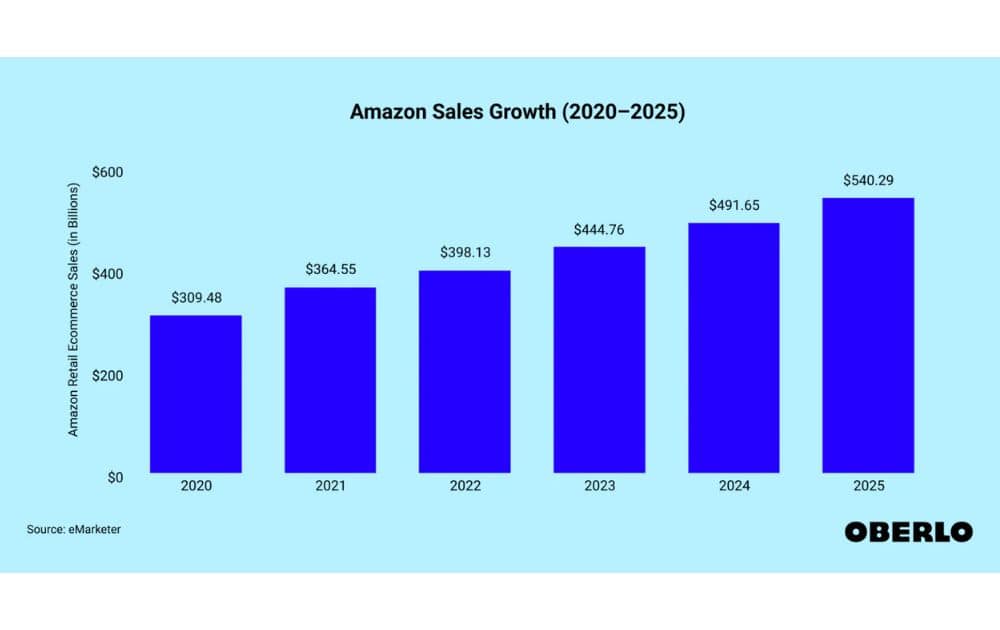
That kind of growth isn’t just numbers on a chart, but a sign that millions of customers are pouring into Amazon every year, searching for products they can’t find anywhere else. This hunger for uniqueness is exactly what fuels Amazon Exclusives.
What is Amazon Exclusives?
Amazon Exclusives is a program designed for brands with differentiated, premium products, offering them a chance to stand out, gain marketing exposure, and protect their brand identity.
Unlike standard product listings, this program gives sellers the chance to showcase unique items that aren’t widely available elsewhere. By participating, brands gain access to:
- Exclusive marketing opportunities
- Better visibility
- Enhanced brand protection tools
The concept works much like the Amazon Prime exclusives, which customers often see during shopping events – special products or deals reserved for Prime members only.
In the same way, Amazon Exclusives highlights products that carry a sense of uniqueness and scarcity, positioning them as offerings customers won’t easily find outside Amazon. For instance, take a look at Funko’s Amazon Exclusives store:
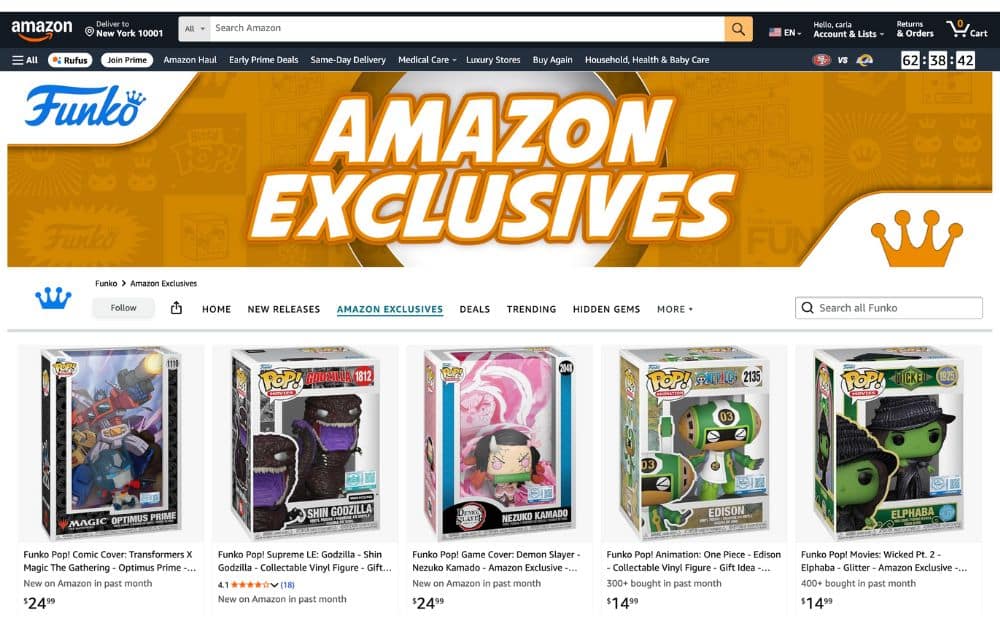
Funko has a dedicated page where it markets its collectible vinyl figures under the Amazon Exclusives banner.
Examples like the Demon Slayer Nezuko Kamado figure show how Amazon Exclusives capitalize on cultural moments. With the anime’s latest season keeping fans hooked worldwide, having a character collectible marked as an Amazon Exclusive makes it even more desirable.
Benefits of Amazon Exclusives
Joining Amazon Exclusives isn’t just about attaching a shiny label to your product—it’s about unlocking resources that help your brand stand out in a crowded marketplace.
Enhanced Visibility and Marketing Support
Products in the program gain access to Amazon’s internal marketing channels, from targeted emails to curated storefronts. This kind of exposure puts your product in front of shoppers who might never have discovered it otherwise.
Stronger Brand Protection
One of the most appealing perks of Amazon Exclusives is the ability to better control your listings. With enhanced listing optimization tools and brand protections, sellers can prevent unauthorized resellers from hijacking their product pages.
Differentiation from Competitors
Exclusivity signals uniqueness. Shoppers browsing through Amazon are more likely to pay attention to products that carry the “exclusive” badge, because it suggests they can’t find the same version elsewhere.
Support for Innovation and Growth
Amazon positions this program as a way to spotlight premium or innovative products. It shares some similarities with Amazon Launchpad, which also champions up-and-coming brands. But while Launchpad is aimed at startups and newer sellers, Amazon Exclusives often appeals to established brands looking to highlight premium lines or special editions.
Better Customer Experience
81% of consumers need to trust a brand before buying. Exclusive products give customers more reason to trust the listing. With Amazon Exclusives, shoppers know the product comes directly from the brand, with optimized descriptions, images, and A+ content.
How to Qualify for Amazon Exclusives
Amazon sets a clear bar for sellers who want to enter the Amazon Exclusives program. Meeting these requirements is key to unlocking its benefits.
Create a Truly Differentiated Product
Amazon isn’t looking for simple tweaks like a new color or packaging change. To qualify, your item must be genuinely unique, offering:
- New features
- Innovative design
- A reformulated recipe
Think in terms of product differentiation that gives shoppers a real reason to buy your version instead of a competitor’s.
Enroll in Amazon Brand Registry
Only brand owners are eligible for Amazon Exclusives. That means registering your trademark and enrolling in the Amazon Brand Registry. Doing so proves that you control your IP and have the rights to protect your brand.
Meet Performance Metrics
Sellers need to maintain strong account health. While Amazon doesn’t publish unique performance requirements for the program, reliability can be proven by maintaining certain benchmarks, such as:
- Order Defect Rate below 1%,
- Cancellation Rate under 2.5%
- Consistent on-time shipments (97% or higher)
These KPIs show Amazon that your business can deliver and keep customers satisfied.
Commit to Exclusivity Requirements
Participation means agreeing to certain exclusivity requirements. In many cases, Amazon expects you to sell those products only through its marketplace (and sometimes your own website). Listing them on other online marketplaces or allowing third-party resellers could jeopardize your eligibility.
Understand the Fees
Being part of the program comes with costs. Amazon charges an additional program fee (often around 5% of sales) on top of standard referral fees. Make sure you’ve calculated how this will affect your margins before applying.
Submit Your Application
Sellers can apply through Seller Central by providing the following:
- Details about the brand
- Product uniqueness
- Business performance
Once submitted, Amazon typically takes a few weeks to review. Be prepared for feedback. That said, if your product doesn’t meet the bar, you may need to adjust and reapply.
Drawbacks of Amazon Exclusives
Just like any other seller program, Amazon Exclusives is not without trade-offs. Here are some of the drawbacks to weigh:
Channel Limitations
The program comes with exclusivity requirements, which may prevent you from selling those products on other marketplaces like Walmart and Target Plus.
While you can often still sell through your own website, limiting other sales channels could reduce overall reach and flexibility.
According to 2023 U.S. eCommerce data, Amazon commands 37.6% of the market, far ahead of Walmart and eBay.
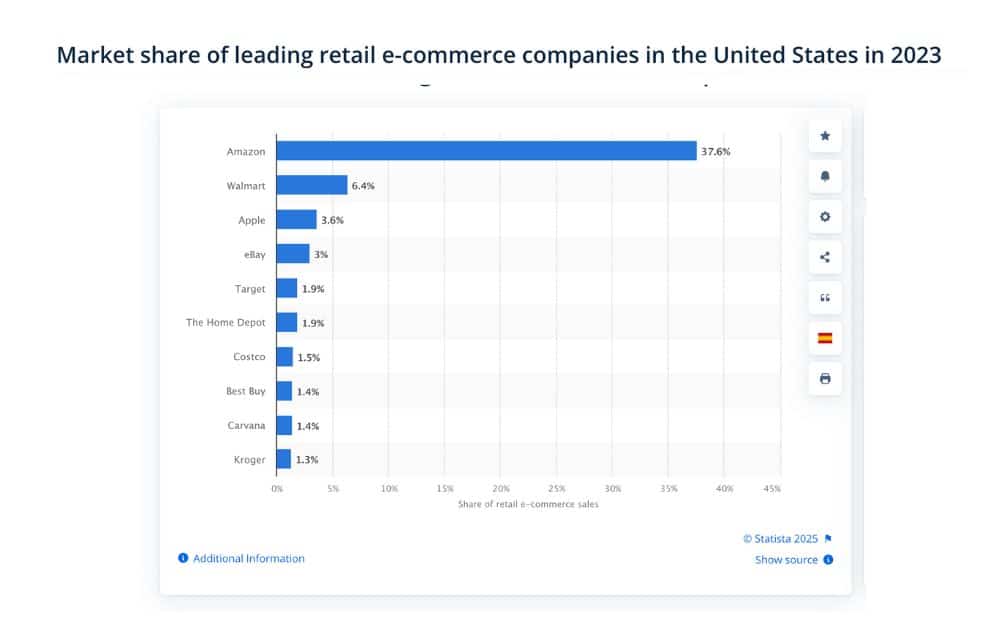
This dominance shows why exclusivity on Amazon can be powerful, but it also highlights the trade-off, which is missing out on other platforms that still hold meaningful chunks of market share.
Higher Fees
Participating in the program adds an extra 5% program fee on top of Amazon’s standard referral fees. For many sellers, this means thinner margins, especially in categories where costs are already high. Running the math is essential to make sure profits don’t get eaten up.
Inventory and Demand Pressures
Exclusives often attract spikes in demand, especially when products align with cultural trends. That excitement can turn into risk if inventory isn’t managed carefully.
According to 2025 data, a staggering 91% of shoppers won’t wait when an item is unavailable, and 43% will switch brands entirely. Worse, 55% of customers won’t return after experiencing two or more stockouts.
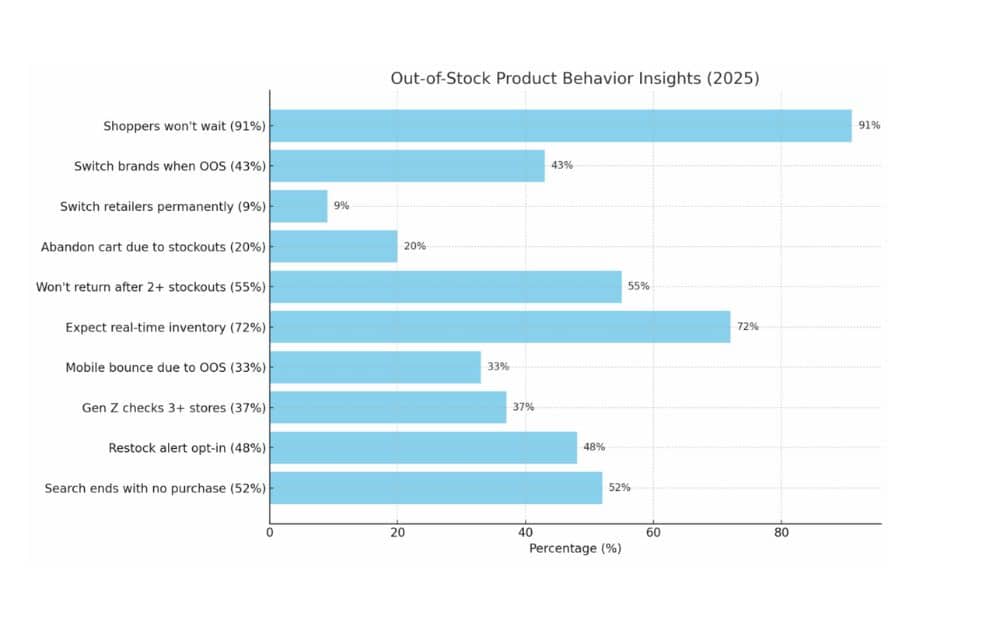
On the flip side, overestimating demand can leave sellers with excess inventory that ties up cash flow. Striking the right balance is critical; otherwise, exclusivity can quickly turn from an advantage into a liability.
The Lowdown
The Amazon Exclusives Program can be a powerful way to stand out in the marketplace. It rewards innovation and differentiation with marketing support, enhanced brand protection, and the credibility that comes with being labeled “exclusive.”
But sellers must also consider the trade-offs: higher fees, stricter eligibility requirements, and the risks of depending too heavily on a single channel.
If you’re unsure whether Amazon Exclusives is the right move, or if you’d like expert guidance on scaling your brand on Amazon, AMZ Advisers can help. Schedule a call today and get assistance as you build strategies that balance visibility, profitability, and long-term growth.
Author
 Carla Bauto Deña is a journalist and content writer producing stories for traditional and digital media. She believes in empowering small businesses with the help of innovative solutions, such as ecommerce, digital marketing, and data analytics.
The post How to Qualify for Amazon Exclusives appeared first on AMZ Advisers.
Aggressive price drops: how do you protect your margins on Amazon?
Hi everyone,
I’m facing a price war on one of my products, and it’s seriously eating into my margin. Here’s what I’ve tried:
- Optimizing my listing
- Using an intelligent repricer to strategically adjust prices
- Boosting sales with Amazon PPC without lowering prices
It has somewhat stabilized the situation, but I’m not there yet.
What are your best tactics to survive this kind of tough competition? Your advice would be really appreciated!
submitted by /u/Misaela22
[link] [comments]
Aggressive price drops: how do you protect your margins on Amazon?
Hi everyone,
I’m facing a price war on one of my products, and it’s seriously eating into my margin. Here’s what I’ve tried:
- Optimizing my listing
- Using an intelligent repricer to strategically adjust prices
- Boosting sales with Amazon PPC without lowering prices
It has somewhat stabilized the situation, but I’m not there yet.
What are your best tactics to survive this kind of tough competition? Your advice would be really appreciated!
submitted by /u/Misaela22
[link] [comments]
Remote Fulfilment with FBA — Offer not showing in UAE
Hi everyone,
I’m looking for advice regarding Remote Fulfilment with FBA.
I recently had several successful international orders through Amazon.ae, so I increased my UK inventory. However, since then, my item no longer appears available in that region.
In my Remote Fulfilment dashboard, I see a message saying that an offer cannot be created for this ASIN due to import/export restrictions.
What confuses me is that other similar items in the same product type seem to still be available.
Seller Support hasn’t been very helpful so far, and I haven’t had a response from my account manager.
Has anyone here experienced the same issue with Remote Fulfilment suddenly blocking a country for one ASIN?
Any suggestions for how to get this looked into would be really appreciated.
Thanks!
submitted by /u/Big_Target666
[link] [comments]
Remote Fulfilment with FBA — Offer not showing in UAE
Hi everyone,
I’m looking for advice regarding Remote Fulfilment with FBA.
I recently had several successful international orders through Amazon.ae, so I increased my UK inventory. However, since then, my item no longer appears available in that region.
In my Remote Fulfilment dashboard, I see a message saying that an offer cannot be created for this ASIN due to import/export restrictions.
What confuses me is that other similar items in the same product type seem to still be available.
Seller Support hasn’t been very helpful so far, and I haven’t had a response from my account manager.
Has anyone here experienced the same issue with Remote Fulfilment suddenly blocking a country for one ASIN?
Any suggestions for how to get this looked into would be really appreciated.
Thanks!
submitted by /u/Big_Target666
[link] [comments]
Anyone have experience with SIPP?
I have been trying to enroll products in Ships in Product Packaging but they keep getting rejected, and Amazon offers little explanation as usual. Anyone have success with this?
submitted by /u/RabidR00ster
[link] [comments]
Anyone have experience with SIPP?
I have been trying to enroll products in Ships in Product Packaging but they keep getting rejected, and Amazon offers little explanation as usual. Anyone have success with this?
submitted by /u/RabidR00ster
[link] [comments]
4 Data Workflows to Stop Hidden Amazon Revenue Leaks and Boost Profit in 2025
 The Pain Every Amazon Seller Knows
You check your Seller Central dashboard. Traffic looks fine. Ads are running. But your payout feels light — again.
You dig into reports, jump between tabs, and still can’t pinpoint what went wrong. Sound familiar?
Most Amazon sellers don’t have a profit problem — they have a data visibility problem. Your reports live in silos. Ad metrics in one tab. FBA fees in another. Returns buried three menus deep. That disconnect hides the real causes of profit erosion — until it’s too late.
The truth? Profit leaks rarely show up overnight. They build slowly, through small blind spots:
- A drop in conversions you didn’t notice
- Returns quietly rising on one SKU
- Packaging size rounding your FBA fees up a tier
- Stranded listings silently blocking revenue
Top sellers fix this differently: they connect their data so every red flag appears before it hurts their margin.
This guide shows you four simple, data-driven workflows that transform your scattered reports into clear actions — the same ones high-performing Amazon brands use to stay profitable through every algorithm shift and fee increase.
Quick Summary
If you’re skimming, here’s the short version — your profit depends on these four checks:
- Conversion Watch – Spot listings where traffic isn’t converting
- Returns Loop – Fix hidden issues triggering unnecessary refunds
- Fee Sentinel – Detect size-tier creep or FBA cost jumps
- Stranded Rescue – Uncover listings losing sales behind the scenes
These workflows take less than 15 minutes a week — and they protect thousands in annual profit.
1. Conversion Watch: Spot Traffic That Isn’t Turning Into Sales
Goal: Catch listing or offer problems before they tank conversions.
Where to find it:
→ Reports → Business Reports → Detail Page Sales & Traffic (last 7 days vs previous 7)
What to check:
- Sessions (traffic)
- Units Ordered
- Unit Session % (conversion rate)
Flag any ASIN where:
- Unit Session % drops ≥ 20% week-over-week
- Sessions rise but Units stay flat (means traffic ≠ sales)
Action Steps:
- Compare price and Buy Box % to competitors
- Review listing content: title clarity, first image relevance, bullet order
- Check if variations or key sizes went inactive
Pro Tip:
In Seller Labs Profit Genius, use your performance data to track SKUs with a 15% or greater conversion drop week-over-week. Combine this with Losing Money Notifications to stay alerted when profit margins decline — a key signal that conversion issues may be emerging.
2. Returns Loop: Connect Returns Data to Listing Fixes
Goal: Reduce return rates by fixing listings that cause confusion or disappointment.
Where to find it:
→ Reports → Fulfillment → Customer Concessions / Returns (reason codes) → Performance → Voice of the Customer (VOC)
What to do:
Cross-reference both. If you spot trends like:
- “Not as described”
- “Too small / Too big”
- “Damaged / Defective”
You’ve found your root cause — not your buyer’s bad luck.
Action Steps:
- Update photos or size charts
- Add packaging disclaimers (“box ships compressed”)
- Include material or compatibility callouts in bullet copy
- Recheck return % in 14–30 days
 Benchmarks: Aim for < 8% return rate on core products, < 12% on apparel. Sellers who apply this workflow regularly see up to 15% fewer returns within two months.
3. Fee Sentinel: Stop “Micro Creep” From Eating Your Margin
Goal: Catch small FBA fee increases or size-tier changes before they silently destroy profit.
Where to find it:
→ Reports → Fulfillment → Fee Preview → Inventory → Manage FBA Shipments → Measurements tab
What to look for:
- FBA fee change ≥ $0.30 per unit
- A shift in dimensional weight or size tier
- Referral fee % increase
Action Steps:
- Re-measure borderline items
- Reduce packaging by even 0.2 inches (it can drop a size tier)
- Move discounting from base price → coupon (protects floor pricing)
- Track total fee impact in the Seller Labs Profit Calculator Template
(Auto-calculates new margins after each fee change — no formulas needed.)
Amazon sellers who re-measure quarterly and track fee shifts save 1–3% in recovered margin each year.
 Download the Profit Calculator Tool (direct download)
4. Stranded & Suppressed ASIN Rescue
Goal: Reclaim hidden revenue trapped in inactive or suppressed listings.
Where to find it:
→ Inventory → Inventory Health → Stranded or Suppressed Listings
What to check:
- Sort by “potential revenue” = Sessions × Price × Conversion %
- Review reason codes: variation, brand, or listing errors
Action Steps:
- Fix top 5 by revenue potential
- Request re-sync or attribute correction
- Update images or backend keywords for suppressed listings
Pro Tip:
In Seller Labs Profit Genius, it’s easy to spot when a SKU’s revenue trends toward zero — a quick way to identify potential listing issues before they impact sales.
Performance Guardrails for Every Amazon Seller
| Metric | Target | Why It Matters |
|---|---|---|
| Target ACoS | Breakeven – 2 pts | Keeps ad spend ROI-positive |
| Min Net Margin | 18–20% | Protects against fee or return erosion |
| Unit Session % | >12% | Ensures strong conversion health |
| Max Return % | 10–12% | Prevents refund leakage |
Treat these as internal guardrails when reviewing metrics in Seller Labs Profit Genius — they help you interpret performance trends and protect against margin erosion.
Why Integration Beats Manual Tracking
Manually pulling five reports every week is a time sink. Automation changes that.
With Seller Labs Profit Genius + Ad Genius, you can:
- View your Amazon sales, ad-adjusted profit, and fee-adjusted margins in one connected dashboard — giving you a clear snapshot of your true earnings at a glance.
- Quickly identify shifts in profitability driven by changes in ad costs, FBA fees, or product performance metrics.
- Refine ad spend decisions for low-margin SKUs by combining Profit Genius insights with Ad Genius performance data.
Key Takeaways
- Profit loss hides in the gaps between reports — integrate them.
- Check conversion health weekly, returns bi-weekly, and fees monthly.
- Track packaging and re-measure to fight size-tier creep.
- Automate margin alerts so you’re never caught off guard.
 Sellers who integrate these workflows typically recover 3–7% of lost profit in 90 days.
Because the sellers who win in 2025 aren’t the biggest — they’re the ones who catch what everyone else misses.
FAQ
No — you can start directly in Seller Central using Business Reports, Fee Preview, and VOC. Software like Seller Labs automates it later.
Weekly for conversions, bi-weekly for returns, monthly for fees and stranded listings.
The fewer SKUs you manage, the easier this is — even one underperforming listing can skew profit. Use the Profit Calculator to check per-SKU margin.
Seller Labs Profit Genius imports fee data and calculates impact in real time, saving hours of manual tracking.
Ready to stop hidden profit leaks before they drain your Amazon business?
Turn your data into actionable profit insights with Seller Labs Profit Genius — and protect your margins across sales, ads, and fees.
For a limited time, get 30% off your first month — after your 30-day free trial.
Related Blogs
- Low Inventory Level Fees: Do You Know How Much Amazon Is Charging You?
Learn how Amazon’s low-inventory fees impact your bottom line and how to avoid unnecessary costs. - Master Amazon Inventory Like a Pro in 2025 with Seller Labs
Discover how to improve inventory flow and profitability using real-time Seller Labs insights. - Amazon 2025 Fee Changes: How They Affect Sellers
Stay ahead of 2025’s FBA and referral fee changes before they erode your margins. - Seller Feedback vs Product Reviews 2025
Learn how to leverage both seller feedback and reviews to strengthen your reputation. - Reduce Amazon Returns in 2025
Explore proven tactics to lower your return rates and boost customer satisfaction.
The post 4 Data Workflows to Stop Hidden Amazon Revenue Leaks and Boost Profit in 2025 appeared first on Seller Labs: Amazon Seller Software and Platform.
Shipping Aerosols with UPS/FedEx?
When I try to ship aerosols FBM, I select the option for hazardous contents which then removes FedEx and UPS from the available options, forcing me to use USPS. I’m familiar with how to ship these items with USPS, but I’m wondering how (if even possible) I’d go about doing it with UPS and FedEx. I know I’ve certainly received aerosols shipped to me through these services.
Anyone know about this and can point me in the right direction?
Thanks
submitted by /u/Retail-Forever
[link] [comments]
Shipping Aerosols with UPS/FedEx?
When I try to ship aerosols FBM, I select the option for hazardous contents which then removes FedEx and UPS from the available options, forcing me to use USPS. I’m familiar with how to ship these items with USPS, but I’m wondering how (if even possible) I’d go about doing it with UPS and FedEx. I know I’ve certainly received aerosols shipped to me through these services.
Anyone know about this and can point me in the right direction?
Thanks
submitted by /u/Retail-Forever
[link] [comments]

