
Here’s How to Pack and Ship Products to Amazon
To pack and ship products to Amazon might seem straightforward at first glance, but it actually requires careful research, thoughtful planning, and precise execution to keep your inventory moving and out of limbo.
It’s not all about sealing up a box and slapping on a label. Amazon has rules and it pays to follow them to the letter, if you want to avoid hitches and missing out on sales.
Let’s break down the basics of the Amazon pack and ship process so that you’ll be 100% sure that your products are where they need to be without delays and guesswork.
FBA vs FBM
Before you pack and ship your first unit, you need to know how your fulfillment model affects everything from box prep to barcode placement.
Amazon FBA
Fulfillment by Amazon (FBA) is the preferred method for many sellers. You ship your inventory to Amazon’s fulfillment centers, where they take care of picking, packing, and delivering each order to shoppers.
FBA is efficient, scalable, and lets you tap into Prime shipping perks without managing logistics in-house.
Fulfilled by Merchant (FBM)
Fulfilled by Merchant (FBM), used by 43% of sellers, puts the packing and shipping process squarely on your shoulders. You manage your own inventory, handle fulfillment from your home, office, or third-party warehouse, and deal directly with returns and customer service.
Data tells us that 92% of Amazon sellers use FBA in some form and 57% rely solely on FBA. On the other hand, 34% use a hybrid of both FBA and FBM.
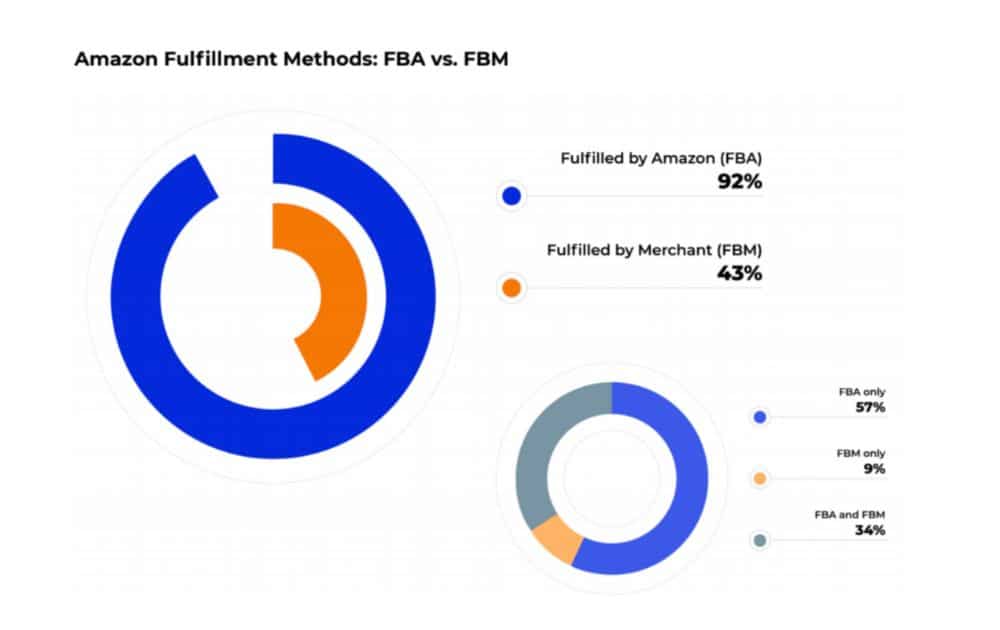
While both models involve pick, pack, and ship tasks, the difference is in who’s doing them:
- FBA streamlines logistics but comes with strict compliance rules and prep work.
- FBM offers greater control over your operations but requires consistent, hands-on involvement.
FBA Essentials
Whether you’re using less than truckload (LTL) or full truckload (FTL) shipping, or possibly still trying to decide between LTL vs FTL, make sure you understand these essentials before you pack and ship anything:
Packaging Requirements and Rules
- Boxes must be strong, clean, and free of branding unrelated to the product.
- Weight limit. Each box must not exceed 50 lbs unless a single unit weighs more.
- Packaging box dimensions limits. Boxes should not measure more than 25 inches on any side unless you’ve received specific approval from Amazon.
- No mixed SKUs. Each box should contain only one SKU unless clearly marked as mixed.
- Amazon may require poly bagging for loose or spillable items, bubble wrap for fragile items, and taping for products with opening lids or flaps.
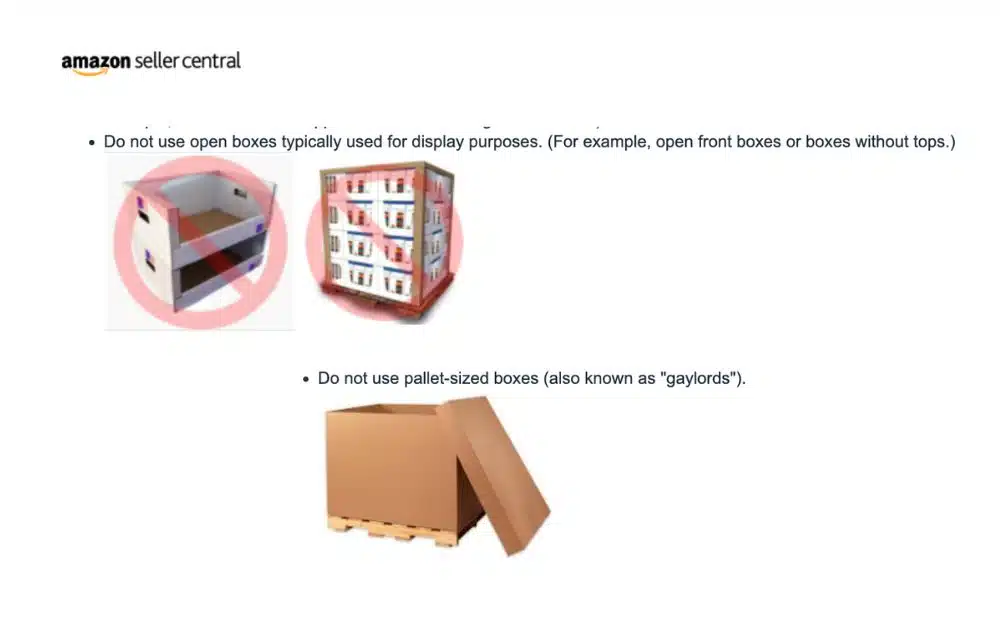
- Amazon prohibits the use of display boxes, such as those with open front sides or those without top covers.
- Amazon prohibits the use of gaylords or shipping boxes that match the exact dimensions of a pallet.
Amazon offers prep and labeling services. However, it’s crucial to note that the platform is stopping this service starting January 1, 2026.
Labeling Requirements
- Every unit needs a scannable FNSKU label. This label tells Amazon what to sell and who it belongs to.
- Labels must be placed flat, without covering barcodes or seams.
- Each box also needs an Amazon shipment label generated during the Send to Amazon workflow.
Penalties for Non-Compliance
Failing to meet FBA’s prep and packaging standards could lead to:
- Inventory being refused or disposed of
- Shipment delays
- Strikes on your account performance metrics
How to Use the “Send to Amazon” Workflow
If you’re using Fulfillment by Amazon, learning how to pack and ship your inventory through Amazon’s Send to Amazon workflow is essential.
This tool replaces the older shipment creation process and simplifies the way sellers build their FBA shipping plan, label products, and book carriers. Here’s a walk-through of how it works:
Choose the Inventory You’re Sending
Access your Shipping Queue in Seller Central. In the “Shipments” dropdown menu, select Send to Amazon to view all your active FBA listings.
Next, choose the products you want to add to your shipment. From the “Shipments” dropdown, click Send to Amazon. This will bring up your list of active FBA SKUs.
At that point, choose the products you intend to include in the shipment. You’ll also select whether you’re sending individual units or using manufacturer-packed cases (case-packed).
If you’re shipping individual units, you’ll go through a sub-step where you confirm how those units will be packed. This is where Amazon pick pack and ship expectations begin.
Confirm Shipping Details
At this stage, you’ll:
- Input the quantity of units you’re sending for each SKU, then organize those items into shipping boxes according to your packing plan.
- Confirm that all units are prepped and labeled in accordance with Amazon’s current standards.
With Amazon no longer providing prep or labeling services for FBA shipments in the U.S. starting January 1, 2026, you are fully responsible for ensuring each unit is correctly prepared before shipping.
If you’re handling labeling yourself (or via a third-party service), make sure to follow all FNSKU label requirements:
- Every product variation (size, color, condition) must have a unique FNSKU.
- The label should be easy to scan and applied to a flat, even surface on the product.
- Any manufacturer barcodes must be removed or covered to prevent scan errors.
Failing to follow these requirements can result in delays, rejected inventory, or an additional FBA pick and pack fee, if Amazon needs to step in for unplanned services (where still applicable).
Print Box Labels
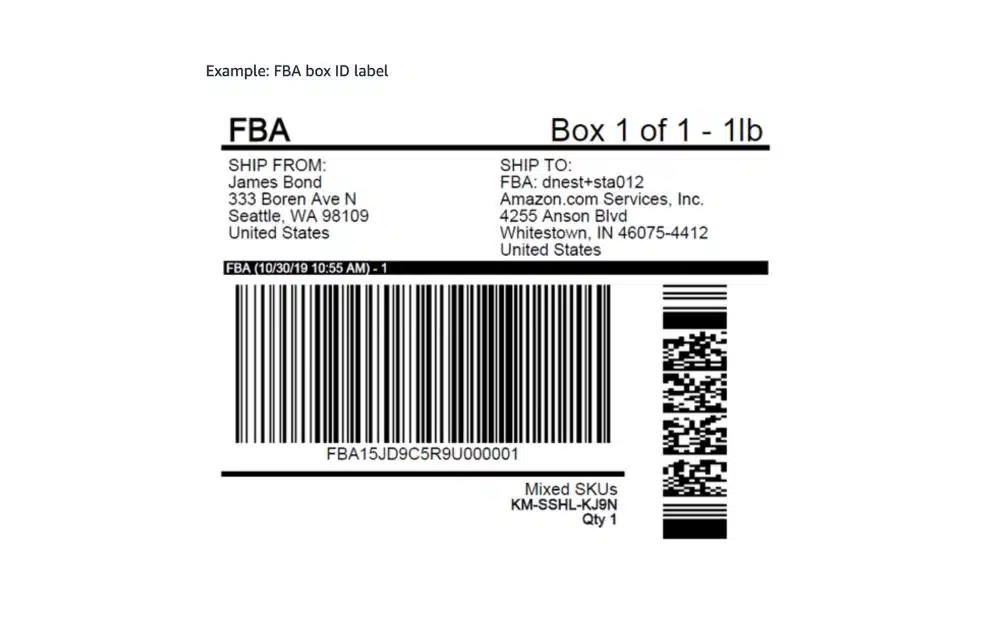
Once your products are prepped, packed, and assigned to boxes, Amazon will generate a box label for each one. The Amazon FBA shipping label includes vital shipment info and tracking codes.
- Labels should be printed on 8.5″ x 11″ paper and placed on flat surfaces of the box, never on seams or edges.
- Ensure the Amazon shipping label is clearly visible and easy to scan when the shipment arrives at the fulfillment center.
Provide Carrier and Pallet Details (for Pallet Shipments Only)
If you’re shipping pallets, you’ll need to:
- Confirm the number of pallets
- Indicate if you’re using an Amazon-partnered carrier or a non-partnered freight service
- Provide pallet dimensions and weight
Choosing an Amazon partnered carrier can make this step more efficient, particularly for LTL shipments.
Print Pallet Labels
For partnered LTL shipments, Amazon will provide four pallet labels per pallet. Print and attach them securely on all sides of the pallet for clear visibility.
Provide Tracking (if Not Using a Partnered Carrier)
If you opted for a non-partnered carrier, you’ll be responsible for entering tracking details manually. This applies to both small parcel and pallet shipments.
How FBM Sellers Pack and Ship to Customers
If you’re using FBM, that means you’re responsible for the entire pick, pack and ship process from start to finish. To do it right:
- Use sturdy packaging that protects your products in transit.
- Include a packing slip if possible, and never add marketing inserts.
- Print shipping labels using Amazon Buy Shipping or a trusted carrier.
- Add tracking promptly to keep your account in good standing.
Many FBM sellers streamline fulfillment by outsourcing to pick pack and ship services or using third-party shipping software.
Common Mistakes and How to Avoid Them
A survey found that fast shipping is among the top crucial factors among U.S. online shoppers:
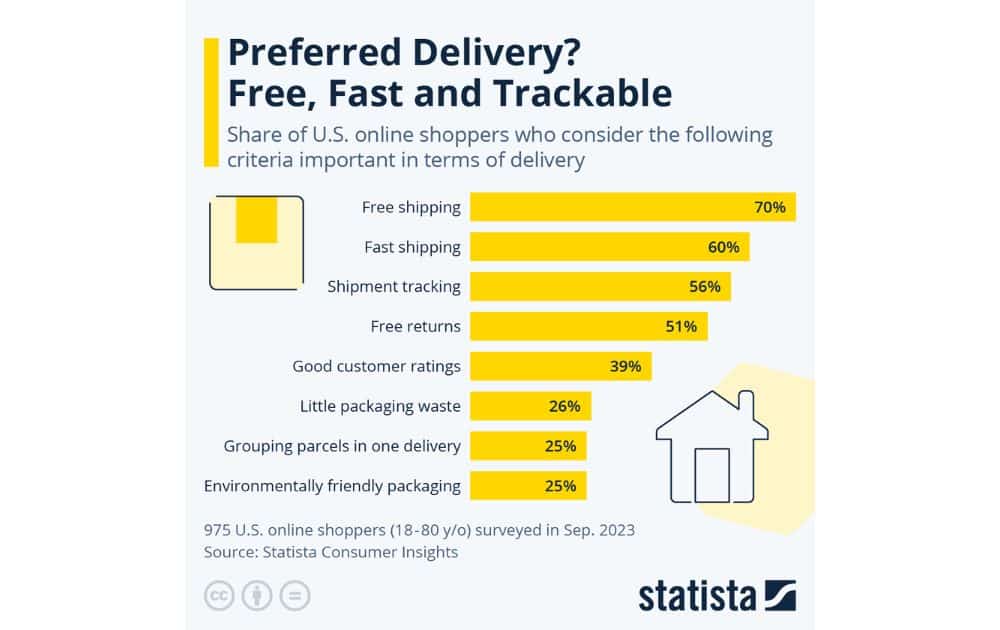
That said, your fulfillment quality directly influences whether customers choose your listing over another. If you mislabel a unit, overfill a box, or delay restocking because of prep errors, you risk:
- Slower delivery times
- Missed Prime eligibility
- Poor tracking data
- Increased returns
Here are some frequent errors sellers make when packing and shipping products to Amazon, along with practical tips to avoid them:
Skipping or Incorrectly Completing the Inbound Shipment Plan
Some sellers rush through or skip critical parts of the inbound shipment plan, such as confirming quantities, prep types, or labeling options. This can lead to incorrect routing, delayed check-ins, or units being mislabeled or rejected.
- How to avoid it. Carefully review each section of your Send to Amazon workflow. Use a checklist to verify correct SKU quantities, appropriate prep instructions, and proper labeling for every item.
Placing Multiple SKUs in One Box Without Properly Labeling It as Mixed
Including different SKUs in the same shipping box without indicating that it contains mixed contents can confuse Amazon’s receiving team, leading to delays, inventory errors, or even shipment rejection.
- How to avoid it. If you’re shipping different SKUs in one box, select “mixed SKU” in your shipment plan and label the box accordingly. Better yet, keep SKUs separated unless absolutely necessary.
Improper or Missing FNSKU Labels
Each unit must have a unique, scannable FNSKU. Applying it incorrectly or skipping it can result in misrouted inventory and check-in delays.
- How to avoid it. Always place FNSKU labels on flat surfaces. Cover or remove manufacturer barcodes.
The Lowdown
To pack and ship your products to Amazon the right way means preventing delays and delivering a stellar customer experience. The key is compliance, consistency, and staying ahead of shifting policies, like the phase-out of Amazon’s prep and labeling services in 2026.
And if all of this sounds like a logistical maze? That’s where AMZ Advisers come in. From compliance to marketing and other crucial facets of your business, out Amazon selling experts can take the stress off your plate.

Author
 Carla Bauto Deña is a journalist and content writer producing stories for traditional and digital media. She believes in empowering small businesses with the help of innovative solutions, such as ecommerce, digital marketing, and data analytics.
The post Here’s How to Pack and Ship Products to Amazon appeared first on AMZ Advisers.

