
What Is an ASIN (And how to find it on a box)?

Overview
When you start selling on Amazon, one of the first of many acronyms you’ll run into is ASIN. If you shop on Amazon, you may have seen it too when scrolling through the product details section of a listing. But what is an ASIN? And more importantly, can you find it printed on a product box?
In this guide, we’ll clear up the confusion. You’ll learn what an ASIN is, how to find one and why understanding ASINs is essential for winning the Buy Box and staying competitive with repricing tools.
What Is an ASIN Number?
An ASIN, or Amazon Standard Identification Number, is a 10-character alphanumeric code that Amazon assigns to every product in its catalog.
It was designed to be understood by Amazon’s internal tracking system, every product you see on Amazon is tied to an ASIN so the platform can organize its massive catalog, prevent duplicates, and link sellers’ offers to the right product detail page.
How ASINs Differ From Other Identifiers
When you sell products on Amazon, you’ll come across different types of product identifiers. They may look similar, but each serves a different purpose:
UPC (Universal Product Code)/EAN (European Article Number)
Barcodes created by GS1 (a global organization that creates and manages product identification standards) printed on packaging, and used for scanning in retail stores worldwide. UPCs are standard in North America, while EANs are used more internationally. Take for instance, the back of this handcream, where can find an EAN-13 barcode.

ISBN (International Standard Book Number)
A unique number for books. Each edition (paperback, hardcover, e-book) gets its own ISBN. On Amazon, the ISBN is also used as the book’s ASIN. Below is an example of a book ISBN.

ASIN
Amazon’s own 10-character code, assigned when a product is first listed. It only exists within Amazon’s ecosystem and is essential for linking your listing to Amazon’s catalog. Below is a screenshot of where you can find an ASIN on Amazon marketplace.

Put simply, UPC/EAN and ISBN are global identifiers, while ASINs exist only inside Amazon.
Is the ASIN Number Printed on the Box?
The short answer is, no.
Unless you’re looking at an Amazon-applied FNSKU label (the scannable code used in Amazon’s fulfillment centers), you won’t see the ASIN printed directly on a retail box.
Instead, product packaging usually shows:
- UPC or EAN (the barcode)
- ISBN (for books)
- Manufacturer model numbers
How to Find the ASIN If You Only Have the Box
If you’ve only got the product packaging, don’t worry. Here’s how to trace the ASIN:
- Locate the UPC/EAN/ISBN on the packaging (near the barcode).

- Search that code on Amazon. It usually brings up the product page.
- Find the ASIN in the product URL (the /dp/ code) or in the Product Details section.

Why ASINs Matter for Sellers: Competing at the Listing Level
Every product on Amazon revolves around its ASIN, and so does your competition. When multiple sellers offer the same item, their offers are all linked to the same ASIN. In practice, this means that every Buy Box battle takes place at the ASIN level.
Repricing tools are built around this concept. They track competing offers for each ASIN and adjust your price automatically, helping sellers remain competitive without the need for constant manual updates.
BQool Feature Spotlight: Competitor Analysis
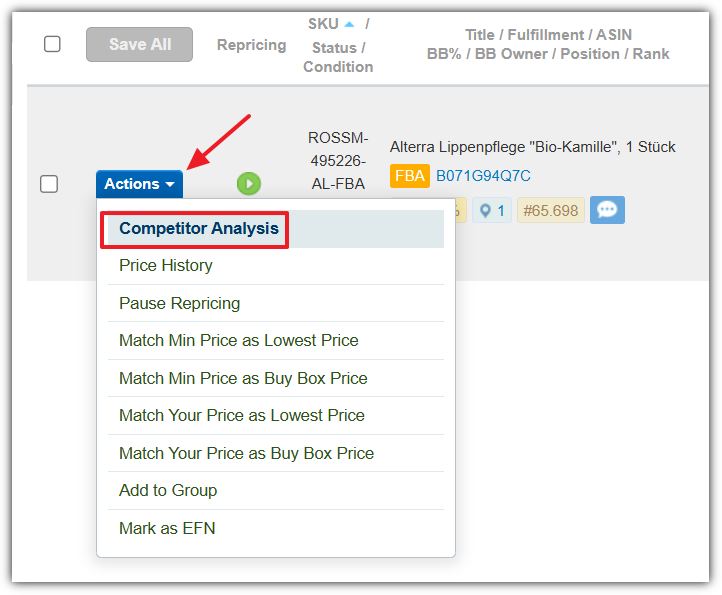
Repricers like BQool use the ASIN for their Competitor Analysis feature. This feature presents the top 20 offers for an ASIN, along with details like whether a seller is FBA or FBM, and whether their inventory is in stock or backordered. Having this level of visibility allows sellers to make more informed pricing decisions, not just quicker ones.
ASIN vs SKU: What’s the Difference?
It’s easy to confuse ASINs with SKUs, but they serve very different purposes:
- ASIN: Assigned by Amazon. Used to organize the catalog. Fixed and unique per product listing.
- SKU (Stock Keeping Unit): Created by the seller. Used for internal inventory tracking. Flexible and customizable.
For example, a seller might have two SKUs (FBA-SHIRT-001 and FBM-SHIRT-001) tied to the same ASIN for a T-shirt if they’re selling through both FBA and FBM.
Where is the ASIN and SKU on BQool Repricing Central?
In BQool’s Repricing Central, you can view both the ASIN and your custom SKU side by side. This makes it easier to manage pricing rules across fulfillment channels.


When You Need to Create a New ASIN
You’ll need to create a new ASIN if your product doesn’t exist in Amazon’s catalog yet.
- Manual creation: Add a new product via Seller Central.
- Bulk upload: Useful for large catalogs, though prone to upload errors.
Be careful, creating duplicate ASINs can cause suppression or listing removal.
Conclusion
ASINs are the backbone of Amazon’s catalog, linking products, defining competition, and determining Buy Box eligibility. While they aren’t printed on boxes, knowing how to find and use them is essential for accurate listings and smart selling.
Once your offers are tied to an ASIN, the real challenge is staying competitive. Repricers like BQool address this by analyzing competition at the ASIN level and adjusting prices automatically, helping sellers win more Buy Boxes while protecting their margins.
FAQs
What does ASIN mean for a product?
How do I get an ASIN for my product?
Is an ASIN the same as an ISBN?
What is the difference between SKU and ASIN?
What happens if you use the wrong ASIN?
The post What Is an ASIN (And how to find it on a box)? appeared first on BQool Blog.
Need help: compliance docs got rejected for children’s products
Hi all,
My listing/product detail page got removed. For compliance I submitted:
- CPC (from certified lab)
- Test report
- Photos of CPSIA tracking label
- Photos of packaging + label on polybag
I uploaded everything on Sept 13, 2025, but on Sept 14, 2025 Amazon rejected the docs with only a very generic email, no reason why.
I’m stuck, don’t know what to fix, add, or change. Tests are legit and documents came from the factory. The product is already in production and I need this listing live.
Has anyone dealt with this? Especially with CPC submissions? Could someone share what a successful CPC or compliance packet looks like (sample, redacted)?
Any advice would be greatly appreciated.
submitted by /u/xjjjww18
[link] [comments]
Need help: compliance docs got rejected for children’s products
Hi all,
My listing/product detail page got removed. For compliance I submitted:
- CPC (from certified lab)
- Test report
- Photos of CPSIA tracking label
- Photos of packaging + label on polybag
I uploaded everything on Sept 13, 2025, but on Sept 14, 2025 Amazon rejected the docs with only a very generic email, no reason why.
I’m stuck, don’t know what to fix, add, or change. Tests are legit and documents came from the factory. The product is already in production and I need this listing live.
Has anyone dealt with this? Especially with CPC submissions? Could someone share what a successful CPC or compliance packet looks like (sample, redacted)?
Any advice would be greatly appreciated.
submitted by /u/xjjjww18
[link] [comments]
There is only 1 listing on Amazon for a pink 3ds how do I undercut them?
My COG is $80 and I want to make an individual selling account is my idea possible and how can I get started?
submitted by /u/Adept-Bat-3350
[link] [comments]
There is only 1 listing on Amazon for a pink 3ds how do I undercut them?
My COG is $80 and I want to make an individual selling account is my idea possible and how can I get started?
submitted by /u/Adept-Bat-3350
[link] [comments]
New seller, I have listed a seasonal product
So I am a seller from india and I have listed a seasonal product that is Diwali lights (string lights) So I have listed them, the listing page shows it is still inactive, I waited for 48 hours then I when to fix the listing so it shows me that I need certificate of safety then I appealed that this product does not require the certificate, it’s been more than 15 + hours, what should I do ? Can anyone help me list the product?
submitted by /u/ConfidentCloud4010
[link] [comments]
New seller, I have listed a seasonal product
So I am a seller from india and I have listed a seasonal product that is Diwali lights (string lights) So I have listed them, the listing page shows it is still inactive, I waited for 48 hours then I when to fix the listing so it shows me that I need certificate of safety then I appealed that this product does not require the certificate, it’s been more than 15 + hours, what should I do ? Can anyone help me list the product?
submitted by /u/ConfidentCloud4010
[link] [comments]
I just want to introduce myself.
Hi, I’m Grace Richard and I just wanted to introduce myself to the community. I’m an Amazon author with books for sale on Amazon.
submitted by /u/GRichard666
[link] [comments]
I just want to introduce myself.
Hi, I’m Grace Richard and I just wanted to introduce myself to the community. I’m an Amazon author with books for sale on Amazon.
submitted by /u/GRichard666
[link] [comments]
Locked out of my Amazon Account
Hi Guys, I had an Amazon Account for some time but have not used it for some years, I tried re activating it about a year ago, but it was too difficult, I wanted to update my email then I had to prove my business address with a utility bill etc…I do not have utility at my Remote business address, and I do not want to use my Home address on Amazon….Plus they seem to pick up on my Mobile # and I seem to hit a brick wall. Can someone give me some advice on what information and evidences Amazon will need to complete my registration again….Also some advice on affiliate marketing and how best to do this, wouldn’t go amiss, Thanking You all in Advance.
submitted by /u/wonderinglands
[link] [comments]

