Patriotic Distributors
  • Home
  • About Us
  • Brand Management
  • 3PL Warehouse
  • Contact Us
Customer Portal
Patriotic Distributors
  • Home
  • About Us
  • Brand Management
  • 3PL Warehouse
  • Contact Us
Become a Wholesaler
January 12, 2021by adminUncategorized11 comments

Amazon Extended Holiday Return Policy 2020: How Sellers Should Prepare

The 2020 Amazon Extended Holiday Returns Policy allows customers to decide whether or not to return a product.

This means that, from October 1st until January 31st 2021, Amazon sellers have to accept returns for any products they sell.

This is applicable to products bought until the 31st of December.

In anticipation of early Christmas shopping, this policy extends the standard 30 days return deadline temporarily. It can vary depending on the product category. FBA and FBM orders need to abide by this new policy. You can check the return deadlines for each category via the Returns Help page.

Make sure to update the Returns, warranties and refunds section of your Detailed Seller Information page to let customers know of the extended Christmas return policy.

Prime Day 2020

Amazon’s annual Prime Day allows Prime members to shop tech, fashion, outdoor gear, beauty and grooming, and household essentials. 

This year, the event took place during the holiday shopping period.

Instead of the standard 30 days return policy, customers have until January 31, 2021 to return most new or unused items. This will depend on the category and reason for the return.

Amazon’s full return policy and information on return shipping fees, policies for different categories, and other common questions and concerns can be found here.

Amazon Prime’s Return Policy

While the standard return window is 30 days, most items bought between October 1 and December can be returned up until January 31, 2021.

Handpicked content for you:

How Is The FBA Sell-Through Rate Calculated? What Sellers Should Know

Amazon Prime Free Returns

Most items delivered within the US qualify for free returns.

To check if an item qualifies, check if there is “Free returns” listed next to the price of the product.

Some exceptions include items weighing 50 pounds or more, fashion products bought from The Drop, and items purchased through third-party sellers. 

Returning Items on Amazon

Go to the “Your Orders” page under your account. Choose “Return or Replace items,” select your method of return, print the label, and package the item for shipping. There is also an option for  the Label-Free, Box Free option where you bring your unwrapped item to a dropoff point with a provided QR code. 

Items Not Eligible for Return

With the exception of damaged or defective items, some items cannot be returned.

Some of these items are groceries, customized or personalized products, gift cards, downloadable software, and subscription services after they’ve been accessed.

To check if an item is non-returnable, you can visit the “Your Orders” page. 

When can I receive my refund?

It can take around 2-3 weeks total to receive your refund. This includes the time it takes to ship, receive, and process the return.

Most of the time, purchases are fully refunded within 7 days of receipt.

Read about estimated return times here.

Concerns On the Extended Holiday Return Policy 

With the return window extended to four months for the holiday season instead of the standard 30 days, some sellers are not happy.

This has become a topic of controversy with some users even creating memes to voice their discontent with the new policy.

However, the Amazon 2020 Extended Christmas Returns Policy won’t necessarily mean that there will be an increase in returns and there is no real expectation that sellers will be flooded with more returns that usual when January arrives.

Extending returns has actually made customers more confident to buy products rather than be more inclined to return them.

This might even be an encouragement for customers to buy more instead of return because of how generous Amazon’s return policies are. What this Christmas policy does is acknowledge and encourage customers to do early Christmas shopping.

Encouraging this early shopping can even help alleviate some of the workload and other pressures associated with Q4 logistics of couriers. Because of the global pandemic and the subsequent rise in online shopping activity, the operating capacity of these couriers has been at maximum for the past six months.

Utilize the Amazon Seller Return Policy

In the case of unfair, extreme losses, sellers can charge restocking fees for damaged returns either by the customer or in shipping.

To review all information on charging a restocking fee, visit here.

It is also worth noting that customers have 90 days to give feedback on an item they have purchased.

This means reviews left on a returned product beyond the 90 day window won’t show up on a merchant’s Amazon seller detail page.

Final Thoughts

Because Amazons returns and refund policies are subject to change during the holidays, the Amazon Extended Holiday Return Policy 2020 is not all that surprising.

There are, however, a few ways sellers can prepare and protect themselves against returns that may be unjust or unfair:

  • Sellers should educate themselves on the Amazon Seller Return Policy so that they know their rights and the risks involved.
  • Assuming they meet the criteria, sellers can charge a restocking fee in order to keep customers accountable.
  • If you’re currently FBM, be sure you handle return requests like a champ
  • Optimize your listings to ensure customers know exactly what they’re getting

The post Amazon Extended Holiday Return Policy 2020: How Sellers Should Prepare appeared first on AMZ Advisers.

Read More
Share
January 12, 2021by adminUncategorized103 comments

How Is The FBA Sell-Through Rate Calculated? What Sellers Should Know

Amazon’s Inventory Performance Index (IPI) is a score that determines how good sellers are managing their inventory. There are several factors affecting your IPI score and one of these is the FBA sell-through rate.

Amazon sellers are at risk of higher fees and storage limitations if they overlook their sell-through rate. To address this kind of issue there are a number of steps to take to increase or maintain your IPI score at an optimal level. This will also help make your Amazon fees lower.

In this post, we’ll learn more about what an IPI score is, how your FBA sell-through rate factors in, and how you can improve it to boost sales.

FBA Sell-Through Rate Defined

The FBA sell-through rate is calculated as units sold over time as compared to initial inventory. It is the number of units sold and shipped over the past 90 days divided by the average number of units stored at the fulfillment centers during that time period. 

To further boost your IPI score, you need to work on improving your FBA sell-through rate through constant monitoring of your stock.

To monitor and view your weekly sell-through rate, click on the ‘View inventory in stock’ link in the ‘SKUs to restock today’ section right next to the IPI progress bar in the dashboard. The report will also show you an estimate of how many more days worth of stock you have. 

Preparing Inventory for the Q4 Holiday Shopping Season

As the holiday shopping season approaches, and also in preparation for the second wave of COVID-19, Amazon fulfillment centers are getting ready to accommodate the demands of consumers.

In an effort to maintain their name in the industry, Amazon has hired more than 175,000 employees and also invested billions of dollars in COVID-related initiatives to continuously meet the increasing demands of the customers and protect their employees as well.

There are capacity restraints in fulfillment centers. Therefore, Amazon will hold from third-party sellers.

And due to the pandemic, Amazon sellers will face a series of setbacks. Given this situation, sellers have to work smarter and think of ways to improve their inventory management skills.

Therefore, you should evaluate your fulfillment capabilities in preparation for holiday shopping in 2020 and throughout the next year. Moving forward, a diversified fulfillment strategy of FBA and FBM is the key factor in reducing the risk in Q4 and in the coming year.

Amazon has also begun displaying Seller business names and addresses. This step clearly shows that the retail giant will continue to put measures in place to minimize the risk from third-party sellers.

This is of great help for customers to learn more about the business of the seller and the products that they are selling. Such measures can include more Seller information in the Buy Box or storefront.

Keep in mind that your suspension guidelines will come into force in response to Negative Customer Experience (“NCX”).

FBA Sell-Through Rate: What is Amazon’s Inventory Performance Index (IPI)?

Good inventory management helps you know exactly how much inventory you need to have on-hand. It helps in reducing costs, expanding profitability, and improving business growth for FBA sellers. A mastery of this will help you get through the challenges and will boost your IPI score. 

According to Amazon, the Inventory Performance Index 2.1k (IPI) measures inventory management over time including how well you balance inventory levels and sales for a good FBA sell-through rate.

To do this, you need to monitor your Inventory Performance Dashboard regularly and keep a close eye on influencing factors to make sure that you are maximizing your allotted storage space, which will also reduce your costs.

Limiting inventory at the ASIN level is a new strategy of Amazon’s. Established in March of this year, it continues as a way to help manage inventory during the fourth quarter and beyond.

All ASINs that are affected will be tagged ‘Limited restock’ and show the maximum inventory limits under the “Days of Supply” column. Sellers need to keep within these limits and plan FBA shipments accordingly to manage their FBA sell-through rate and overall IPI score.

How to Measure IPI

Tracking and monitoring your inventory will help maximize your profitability.

As much as possible, refrain from carrying too much stock. This decreases your profitability due to storage fees and holding costs.

Your FBA sell-through rate is calculated by taking your units sold and shipped over the past 90 days and dividing that number by the average number of units available at fulfillment centers during that time period. This FBA sell-through rate will help you to assess your inventory performance. 

Here are a few tips on how you can improve your FBA sell-through rate:

  • Create and adjust your advertising strategy
  • Create Sales / Markdowns
  • Audit your product detail pages
  • Remove some of your inventory (e.g. slow-moving inventory)

Your stranded inventory percentage is the amount of inventory that is not available for purchase due to a listing problem that resulted in inventory without an active offer. To address this kind of concern, Amazon provides the “Fix listing” option to help lower this percentage. The exact reason why your inventory has been stranded is stated in detail and provides you with the steps on how to resolve the issue.

Another way to measure your IPI  is through FBA in-stock rate. This is the percentage of time your replenishable FBA ASINs have been in stock during the previous 30 days. You may miss an opportunity to increase your IPI when you run out of stock of your best selling or popular items. When an ASIN is out of stock, you should flag that ASIN as non-replenishable in the Restock tool so it doesn’t affect your score.

Boost Your IPI Score

If your IPI score is 350 or under, it’s time for you to plan and execute what is needed. Here’s how to give it a much-needed boost:

1.  Increase your FBA sell-through rate

Your FBA sell-through rate refers to the number of products you sell in relation to how much stock you have on hand.

Work smart on increasing your FBA sell-through rate to make it as high as possible. Amazon wants each seller to have a high FBA sell-through rate because it means more stock is leaving their warehouses faster.

Ideal sell-through rates depend on a number of factors, including your industry and the types of products you sell. Consider the following to help increase your sell-through rate:

  • Bundling products – increasing the number of products sold with each transaction
  • Discounting items – enticing customers with product markdowns
  • Removing inventory – moving stock from FBA warehouses if it’s not needed
  • Reducing reorders for less popular products – making sure what’s in stock is likely to sell

2.  Avoid overstocking

Overstock refers to an excessive supply of a product. It means keeping more items in stock than is needed to meet demand. In most cases, overstocking comes down to poor inventory management practices that lead to excessive stock and poor ratings.

Here’s a formula to calculate the exact cost of overstocking products:

Cost of inventory on hand x excess inventory = annual overstock waste expense

Preventing overstocking is all about meeting (not exceeding) demand. With that in mind, overstocking can be avoided by:

  • Forecasting demand – carefully plan for the future accurately. This will give you an idea of how much stock you’ll need at any given time.
  • Pricing strategically – come up with a strategic plan for the correct pricing of goods. If the price is right the chances of selling more are high. Regular movement of stock from the warehouse will help avoid overstock. 
  • Automating reorders – adopt a trusted inventory management system that will make it easier for you to know when to place orders by automatically calculating your reorder point

3.  Improve your in-stock rate for your best selling or popular items.

While you want to avoid overstocking, it’s also important to keep popular items in stock to avoid missed sales opportunities. It helps in improving your FBA sell-through rate over time.

Optimize your in-stock rate for popular products by:

  • Utilizing key sales reports generated by an inventory management system to let you see the best selling products at different times of the year, and make sure those products are stocked when they need to be.
  • Doing an ABC inventory analysis to categorize products and focus on keeping ‘A’ products in stock at all times. Find out more about how to do an ABC analysis of products here.

4.  Fix stranded inventory

Stranded inventory refers to stock being held at an Amazon fulfillment center that isn’t associated with an active Amazon listing. The reasons why inventory becomes stranded include listings for products that were not created or have errors, resulting in inventory that is accumulating storage fees but can’t be sold.

Amazon penalizes sellers for stranded inventory because it costs the company to hold stock that will potentially never be sold.

It also entails costs on your part to store that inventory at Amazon warehouses, so it’s in your best interest to fix stranded inventory as soon as possible.

To fix your stranded inventory, access the Fix Stranded Inventory page from the Manage Inventory tab to remove or manually edit and relist your items.

Final Thoughts

Sellers must always be mindful of their IPI scores.

They should be extra careful especially mid-month of every quarter (February, May, August, and November).

If you receive a storage limit notice mid-quarter, work your way up and make sure your IPI score is back on track by the end of that respective quarter.

Note that not all third-party sellers will be subject to these restrictions. They only apply to FBA sellers on Amazon.com and there will be exceptions because IPI is still a work in progress.

It’s also important to note that there is some lee-way for seasonal sellers, subject to negotiation, and Amazon is prepared to consider special circumstances. Make sure you reach out to Amazon if you think you qualify.

Keep growing and improving your IPI score. Learn the ropes and master the process to enter a world of endless opportunities.

The post How Is The FBA Sell-Through Rate Calculated? What Sellers Should Know appeared first on AMZ Advisers.

Read More
Share
January 12, 2021by adminUncategorized123 comments

Helium 10 vs Jungle Scout | Product Review, Pricing & Recommendations

When it comes down to building an Amazon business from scratch or growing your existing Amazon business., there are a few suites out there that can help you keep track of your inventory, find niche products to sell, or just manage your everyday transactions. Two of them are Helium 10 and Jungle Scout.

These two powerful suites provide a set of tools with different functions to ultimately drive more sales.

Find out which software fits your business needs in the best way.

What is Helium 10

Helium 10 is an amazing software designed to help Amazon FBA sellers. It is made up of several features that can find high ranking keywords, identify trends, spy on competitors, and even optimize product listings.

Basically, it has everything you need to kickstart an Amazon business, expand it, and make more sales.

Most Popular Helium 10 Features

Helium 10’s Chrome Extension can collect and show you data like net profit, average sales, average rating or average price. In the Chrome extension you’ll find Helium 10 XRay, which includes these functions:

  • Profitability Calculator: Calculate your profit and find out if your selling a product is worth it or not.
  • Inventory Levels: Analyze your competitor’s stock level to calculate your own inventory.
  • Review Downloader: Analyze all negative reviews from your competitors and avoid getting bad reviews yourself.

Helium 10 Magnet

Helium Magnet is the largest Amazon keywords database out there and the most reliable one.

Sellers can easily find high volume keywords that are relevant to their listing. Its broad recommendations will throw keywords you wouldn’t even consider otherwise.

Helium 10 Cerebro

Helium Cerebro works as a reverse ASIN keyword research tool. It gives you access to relevant information, like search volume and the quantity of contending items.

You can find the best keywords to target if you use Helium 10 Magnet and Helium 10 Cerebro combined. That is one of the best ways to drive traffic and sales by putting specific keywords in the product title or targeting keyword search terms for your PPC Ads.

What is Jungle Scout?

Jungle Scout is a set of tools that was created to help you easily find profitable products on Amazon. Jungle Scout is beneficial for sellers who are looking to import products, add private labels, and resell.

The takes important information like the number of reviews or best seller rank, to calculate the right number of estimated sales.

Most popular Jungle Scout Features

The Jungle Scout Opportunity Finder tool can help you discover emerging trends and profitable product niches.

Either if you’re a seller looking for their first product to sell on Amazon or if you’re a seller building a business around unique products, you can use the Opportunity Finder to find the most accurate keywords. You can set search parameters like product category, competition, LQS and opportunity score.

Jungle Scout Chrome Extension

Jungle Find and validate Amazon FBA product opportunities directly from Amazon. The Chrome extension works as a bridge between Amazon and Jungle Scout that is built directly into your browser.

You’ll be able to see opportunity scores, price, reviews, daily sales, sales history, and more, that will help make better decisions for your product ideas.

Jungle Scout Sales Estimator

Jungle Scout’s Amazon Sales Estimator is a free tool that allows you to check average monthly sales of specific Amazon categories. You can also have better product launches and it is a simple way to keep a close look on your competitors.

Jungle Scout Product Tracker

Jungle Scout Product Tracker allows you to analyze and track a product to get accurate sales data.

You can see how certain products perform over a specific time frame so you can detect the most profitable ones. You can also access information such as average price, daily units sold, average daily revenue, etc.

Advantages of Helium 10 over Jungle Scout

  • Sales Dashboard – Keep track of your product performance. Jungle Scout still doesn’t have a similar feature.
  • Competitor Keyword Spy – Find out your competitors’ ranking both via PPC campaigns and organically.
  • Refund Genie –Identify Amazon’s mistakes when a refund takes place. As a seller, the refund genie can assist you in requesting your money back.
  • Alerts – Immediately find out when someone hijacks your item, your product title changes, or images get altered.

Advantages of Jungle Scout over Helium 10

  • Supplier Database – Sellers can find and verify suppliers. Discover who is supplying what, how frequently, and the volumes supplied. The feature allows you to search by product, company, or supplier. You can even see how much your competitors are paying for their items.
  • Giveaway Platform – This feature helps you facilitate giveaways or other launch strategies to guarantee the success of your product.

Jungle Scout Pros and Cons

Pros Cons
Easy to use
Acces to supplier’s database
Affordable  
The tool set is not as complete
as Helium 10
No mobile app  

Helium 10 Pros and Cons

Pros Cons
All-in-one of every tool you need to grow or kickstart a business.
Amazon training
Workshops  
It can be expensive
You need a learning curve to use it to its full potential.  

Pricing

Helium 10 does provide the option of a free plan with the Helium 10 Chrome Extension. You can perform 1000 search queries without paying anything.

If you already have an idea of the exact tools for your business, you can choose to pay only for the tools you really need with Helium 10’s “A La Carte Plan.” This plan can range from $17 to $97, depending on the features.

Otherwise, here are other options:

  • Platinum Plan: $97 per month
  • Diamond Plan: $197 per month
  • Elite Plan: $397 per month

If you decide to pay annualy, you sabe some money:

  • PLATINUM PLAN: $970 per year
  • Diamond Plan: $1970 per year
  • Elite Plan: $4764 per year

Jungle Scout has two versions, the Web App or the Chrome Extension, which have different prices.

Here’s Jungle Scout pricing:

  • Jungle Scout (WebApp only): $49 per month
  • Jungle Scout & Extension: $69 per month
  • Extension: $39 per month

Or, you can get a discount when paying annually:

  • Jungle Scout (WebApp only): $39 per month
  • Jungle Scout & Extension: $49 per month
  • Extension: $19 per month

Helium 10 and Jungle Scout: Which one is better?

Both are amazing software suites with their own pros and cons. Jungle Scout is a great tool with on itself, although Helium 10 is much more comprehensive. Jungle Scout is intuitive and simple, while Helium 10 requires some training.

So it all comes down to your business strategy and how much insights you need to start or grow your business. Helium 10 can help sellers who want to build an Amazon business from scratch and grow it in the long run. The main advantage of Jungle Scout is that it’s much cheaper and might be exactly what you have been looking for.

The post Helium 10 vs Jungle Scout | Product Review, Pricing & Recommendations appeared first on AMZ Advisers.

Read More
Share
January 12, 2021by adminUncategorized1256 comments

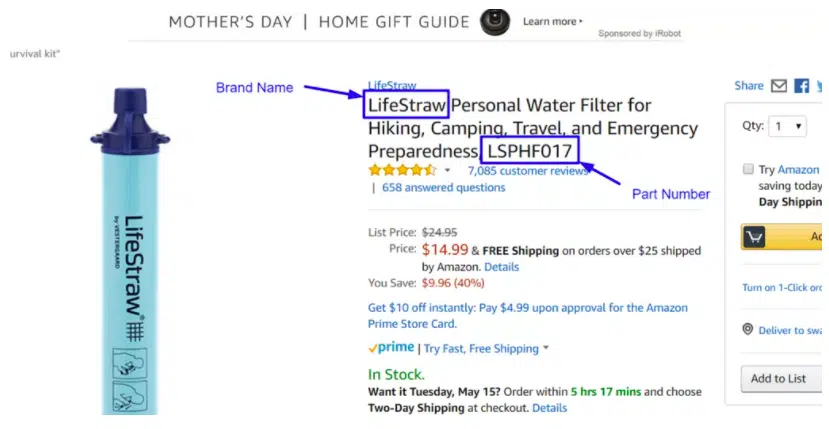
Amazon Manufacturer Part Number: What Is It For?

Amazon uses the manufacturer part number (MPN) as one way to uniquely identify specific products. Aside from MPN, Amazon also uses other unique identifiers such as  UPC, EAN, and GTIN. Let’s have an overview of what this MPN is all about and its significant uses.

What Is a Manufacturer Part Number (MPN)?

A Manufacturer Part Number or MPN is a unique code issued by the manufacturer to identify individual parts or products. It normally comes in a series of numbers and letters. MPN helps distinguish it from its counterfeit parts. This also assures the buyer that the parts or products they are buying are legitimate and 100% genuine.

Amazon provides an optional field for the MPN in the listing inventory as does not apply to all merchandise. It is often used for automotive/Powersports and consumer electronics

Some sellers use other product codes applicable for certain products. For instance, a jacket has an SKU instead of an MPN, and a book has an ISBN. Some also use a UPC as a product identifier. You may get confused hearing these terms simultaneously, so let us tackle the differences for your reference.

SKU (Stock Keeping Unit) – is a series of numbers used in tracking inventory or stocks.

ISBN (International Standard Book Number) – A product code used by publishers, booksellers for stock control purposes.

UPC (Universal Product Code) – this is a common barcode seen on physical products that is used for tracking retail items.

How the Manufacturer Part Number (MPN) can Dramatically Improve Your Amazon Sales

This unique identifier is also used in Amazon’s internal and external searches, so it is highly encouraged to provide an MPN for greater product visibility. Aside from this, having the manufacturer’s part number will help the buyer get the right item and may help increase conversions.

Image: Source Approach

In today’s digital world, shopping has never been so easy, and the internet made this all possible. Connecting to your buyers and suppliers from all over the world is now within reach. If you are looking for a specific part, you can go straight to the manufacturer and purchase from there. While this may sound good, some manufacturers are often hesitant to sell parts directly to the consumer:

  1. The chances of parts return is high when the wrong part is ordered
  2. Difficulty finding the exact or appropriate part that the buyer needs, resulting in poor user experience
  3. Buyers are afraid to order the wrong part thus, reducing potential conversion to sellers

As a seller, you can use this to your advantage to increase Amazon sales.

Conversions

If you’re a seller who can provide a Manufacturer Part Number and include these details in your listing, then you’ll have an edge and you will find yourself with a unique and profitable opportunity. If they are looking for a specific MPN and find it, most likely they will buy the part on the spot. A higher chance of conversion is at stake. Also, these buyers are less likely to return unwanted items and are likely to come back in the future.

SEO and Discoverability

Buyers use search engines when looking for a certain part. To increase your discoverability in the digital space, having MPN is of big help. This field is indexed by both Google and Amazon’s A9 search algorithms. If you have it, there is a big chance you will be picked by both search engines and displayed in the results. This increases your chances of being seen by many more customers, and eventually generating more sales.

Fewer Returns

If you are a seller, you must aim for a lower return rate or better yet, no return at all for better ranking and ratings. When you sell the right and exact part or product to a buyer there is no chance of having it returned. You’ll be surprised by the amount of time and effort saved because of fewer returns.

Product Reviews

You will likely get good reviews from your buyer if you meet their expectations such as providing the exact part that they need, its functionality, and all. As sellers, we must be on top of the game and meet customers’ highly specific demands. Buyers will surely be delighted when they find a seller who can deliver. Then, they are more likely to leave positive product reviews.

Repeat Customers

If you can attain the above-mentioned advantages, there is a higher chance of getting repeat customers. They will not look for somebody else online because they already know where to go and get the exact items they want. You can build trust and they will keep coming back to you. This is one beauty of having an MPN on your listing.

Final Thoughts

To cap it off, a Manufacturer Part Number (MPN) is a unique code used to more easily identify parts. It helps unlock better opportunities for many Amazon sellers to boost their discoverability as well as improve their conversion rates. 

Put yourself in the shoes of the buyer or customer. If you are looking for a specific part with an MPN provided, chances are, you are getting the correct item. Time and effort spent is saved because it eliminates the guesswork that may eventually lead to a poor customer experience.

An MPN can dramatically improve your Amazon sales, so take the chance to go beyond by putting an MPN in the optional field on your listing, and perhaps also in the title or on product photos and see the difference for yourself. 

The post Amazon Manufacturer Part Number: What Is It For? appeared first on AMZ Advisers.

Read More
Share
January 12, 2021by adminUncategorized122 comments

Keepa Product Review, Pricing, and Recommendations

When it comes to sourcing products, you need to have the right set of insights at hand to be able to make the best decisions possible. Especially if you’re sourcing products on Amazon, where you can reach bigger markets, but with a high competition rate. Keepa Chrome Extension is a tool that gives you a product’s price history and sales rank tracker.

It’s one Amazon sellers’ top choices to gather data to make better decision about pricing your own goods. At first, the Keepa graphs may be too overwhelming, but once you get the hang of it, you can use it for different purposes.

It’s available for Mozilla Firefox, Google Chrome, Opera and Internet Explorer.

Keepa Features

Keepa has three main features created to help you collect pricing information on Amazon. It lets you track prices in 10 different local currencies and for over 800 million products. The main thing you should know about Keepa is that all data gathered is exportable, that means you can play around with it and use it however your business needs.

You can get all sorts of insights and details about price variation for the products that you include in your wish list. The data is shown in graphs for easy reading and you can activate tracking alerts.

Keepa is available in the following countries: United States, Canada, Mexico, Brazil, United Kingdom, Germany, France, Italy, Spain, Japan, China, India and Australia have access to the extension. Below, we’ll explain each feature.

1.    Deals

Find products to track! Sellers can use Keepa to browse products by category, deal type (new, used, collectible, refurbished, etc.), price drop time interval, pricing range and discount range.

If you click on a product, Keepa will show its Amazon price history graph and its tracking product options. The tracking options are for you to decide on your desired price, your desired price for new product or used product, etc. Keepa also keeps its own tracking alerts in real time. You can get those alerts on your browser notifications or your email.

2.    Track

In this section, you’ll find the overview of all your tracked products, your wishlists and most recent notifications.

Keepa can monitor a specific product on Amazon and send you an alert when the price drops.

3.    Data

This is probably Keepa’s most useful section. Keepa gathers a ton of data from millions of products. This gives sellers a range of actions that can take place using the data provided:

  • Product finder: You can use Keepa’s database to find a product you may want to add to your watch list
  • Product viewer: You can import your product lists
  • Best seller lists: Easily find the best selling products on Amazon and sort them by category
  • Top seller list: Check out what merchants are succeeding in your field of business.
  • Category tree: Keepa makes data easy to read. You can browse products on Amazon by category
  • Keepa’s API. The API allows you to request live pricing and availability, price history, sales rank, offers count, Buy Box information, review count history. Basically, any insight you want to know about a specific product.

How Can I Use Keepa?

Keepa does have a learning curve for sellers to take the most advantage of the extension. Here’s a little summary of some things Keepa can be useful for and so you can have a better understanding of what the extension can do:

  • Keepa is color coded: Amazon is orange, new marketplace goods are blue, used marketplace goods are black, and the sales rank of a product is green. You’ll get an idea of how a product is doing just by taking a glimpse at the screen.
  • Keepa shows immediate results and gives you the option to display date ranges of a day, week, month, three months or all the data the extension has on file.
  • You can see an intuitive display of a product’s monetary history.
  • You can find out what is a product’s sales rank.
  • You can decide to remove a layer or a set of data when you feel the screen is too crowded, or if you want to focus on a single aspect. You can also broaden your scope by clicking back and the data sets will reappear. The data sets point out of a product is in stock by shading them in black. Out of stock products will appear in white.
  • See the in-stock, out-of-stock history of a product.
  • If you click on all data sets, Keepa just shows you a green line on a graph to indicate the sales rank history over the date range you choose.

Source: Repricer Express

New Features

Since its last update, Keepa now includes these features:

  • Pink Buy Box line replacing the Buy Box diamonds.
  • Find out how many people are in the current Buy Box rotation
  • If Amazon is sharing the Buy Box, Keepa will let you know. It also shows Amazon in/out of stock.
  • if the main category sales rank disappears from Amazon, Keepa has new ways of showing you the sales ranks

How Much Does Keepa Cost?

For bigger sellers, this is probably the cheapest software to use for their Amazon business.

Keepa is defined as a freemium service, which means you can install it for free with access to only some of its features. If you want to get full access to the whole set of tools, then you’ll have to pay a monthly fee of $20. You can pay for an annual subscription and get a discount, too.

Keepa will pay for itself. Even if you only use Amazon once a week, it’s likely that you’ll end up saving more than $20 a month.

Keepa Pros and Cons

PROS CONS
Know all the pricing details of a given product.
Perfectly blends with the browser and the website is easy to use.
The graphs will appear right under the picture of the item.
It’s not a completely free tool.It may be difficult to navigate so much information at first.

Final Thoughts

Keepa is the perfect solution when it comes to finding new business opportunities, scouting new markets and sourcing new products.

It provides different sets of data extracted directly from Amazon. The good is that you’ll get information about basically every pricing detail of a product, the bad is that it’s so much information that it does take a while to learn to use it to your advantage.

It’s completely worth it! Once you incorporate Keepa to your business, you won’t waste more time making important business decisions blindly.

The post Keepa Product Review, Pricing, and Recommendations appeared first on AMZ Advisers.

Read More
Share
January 12, 2021by adminUncategorized280 comments

Ecommerce News Roundup: December Recap

Amazon news roundup

Happy new year! May all your dreams come true, and all your hopes are fulfilled in 2021! BQool will always be here for you to provide any supports in selling on Amazon successfully. Let’s keep up with the latest Amazon news and updates that matter to your business.


Amazon rolls out new industrial AI tools to monitor productivity and worker safety 

Amazon AWS is launching a series of industrial machine learning tools aimed at helping companies use artificial intelligence to monitor factory workers and machines, the company announced in a press release Tuesday. 

The suite of tools, which Business Insider’s Eugene Kim previously reported, use predictive analytics to identify potential equipment failures and product defects, worker safety and compliance violations, and areas where they may be able to improve productivity, among other industrial process improvements. 

The tools include: Amazon Monitron and Amazon Lookout for Equipment, sensors, and software that predict when machines might fail or need maintenance; and AWS Panorama Appliance, AWS Panorama SDK, and Amazon Lookout for Vision, which enables companies to automatically detect a variety of “anomalies” in video footage. Read the full article here. 


VAT changes on sales to UK customers 

Starting January 1, 2021, the way that UK VAT is collected on sales to customers in the UK will change under new legislation being introduced by the UK Government.

Amazon will be responsible for collecting UK VAT on the following sales of goods delivered to customers in the UK where ordered through any Amazon storefront:

  1. Goods delivered from inventory stored outside the UK with a parcel value of up to £135.
  2. Goods delivered from inventory stored in the UK, irrespective of value, where you, the seller, are not established in the UK.

Amazon will calculate and collect UK VAT from the customer at checkout and remit this directly to the UK Tax Authorities, so you will not receive the UK VAT amount in your disbursements and will not be required to remit these amounts to the UK Tax Authorities.

The current VAT exemption for sales of goods under £15, where goods are delivered to UK customers from inventory stored outside of the UK, will also be removed from January 1, 2021. At that point, UK VAT will be calculated and collected by Amazon on these sales irrespective of their value.

Further information regarding this change and the implications for your business, you can refer to UK VAT on eCommerce legislation page.


Marketplace Tax Collection now available in more locations

Marketplace Tax Collection (MTC) has been expanded from 32 states and the District of Columbia to an additional 11 states and Puerto Rico. When items are shipping to any MTC jurisdiction, you may see sales tax calculations made by Amazon, on your orders, at no cost to you. Taxes collected by Amazon are shown with the order details and in various Seller Central reports. Amazon remits (as the taxpayer) all taxes collected as MTC to the appropriate tax authority.

Amazon newest jurisdictions are: Arkansas, Indiana, Kentucky, Louisiana, Mississippi, New Mexico, Ohio, Puerto Rico, Rhode Island, Virginia, West Virginia, Wyoming.

Visit Marketplace Tax Collection FAQ that contains state-specific details and your Amazon reporting options.


Improvement for your Expiration Date ASIN creation

For listing new products that have an expiration date or lose effectiveness over time, the following product attributes are available when you create ASINs in product types that are subject to the Expiration Dated Product Policy and Expiration dates on seller-fulfilled products: Is_Expiration_Dated_Product (IEDP), Product_Expiration_Type (PET), and FC_Shelf_Life (Shelf Life)..Existing ASINs or inventory will not be affected and the change is only in effect for newly-created ASINs.

By filling out the attributes properly, you help create a seamless intake process and proper tracking of products at fulfillment centers, so products that are past their prime can be removed before reaching customers.

You will notice these specific changes for the expiration attributes when you create ASINs:

  1. Label Changes: Update attribute labels to provide consistency across all marketplaces to minimize confusion about what the attribute is asking and allow you to answer the question with confidence.
  2. Requirement Changes: Update the required conditions for IEDP, PET, and Shelf Life. You will be required to answer IEDP with “Yes” or “No.” In cases where IEDP is answered as “Yes,” PET and Shelf Life will also be mandatory to be answered.
  3. Answer Format: Update each answer format by replacing open text cells with drop-down menus and standardized answer formats in order to avoid confusion.
  4. Tool tips: Update “tool tips” to give a clear definition for each attribute and provide additional context for better understanding.
  5. Attribute Location: Amazon is moving the attribute locations in Seller Central to group the expiration attributes together. Previously, expiration attributes were found in different parts of attribute templates and creation paths depending on the Product Type.

Changes to labels, answer formats, and tool tips are updated in all marketplaces for sellers by December 21, 2020. Requirement changes will take effect on January 25, 2021.


New Subscribe & Save performance dashboard now available

FBA Subscribe & Save’s new performance dashboard is now available for sellers to help manage their Subscribe & Save business and ensure a positive customer experience.

On the dashboard, you can get the following Subscribe & Save seller performance metrics for review:

  • The number of units and revenue for shipped subscription orders
  • Projections of units and revenue for orders that are expected to ship
  • The number of active subscriptions
  • Average revenue per customer
  • The percentage of units not delivered because the ASIN was out of stock

You can see these metrics for your overall Subscribe & Save business or at the ASIN level (up to 20 at a time) for weekly, monthly, quarterly, and yearly time frames.

Seller performance reviews are ongoing and include customer feedback, order cancellation rate, and your ability to maintain inventory levels. Poor performance metrics can affect your ability to participate in the program.


Update to FBA shipment closure timelines

In order for Amazon to receive your inventory more efficiently and minimize delays, shipments created beginning today will be automatically updated to Closed status if they become more than 90 days old. Amazon recommends that you ship the full quantity entered in the shipment to the fulfillment center as soon as it is created.

Closed shipments will display a status of CLOSED in your Shipping Queue. You can navigate to your Shipping Queue in Seller Central by going to the Inventory menu and selecting Manage FBA shipments.

If the closed shipments are already in transit, Amazon will still receive them, but you cannot ship additional units for a closed shipment.

For instructions on tracking the status of your shipments, see Track your shipments: Shipping Queue and Shipment Summary.


New Search Terms report feature available for Brand Analytics

The Amazon Search Terms report in Brand Analytics shows you how customers (in aggregate) find your and your competitors’ products in the Amazon stores. This includes the relative search popularity, click share, and conversion share for each of the top three clicked products for a given search term.

With the ability to see the ASINs that have dropped from the top three clicked products, you can better understand which of your products might be losing search relevancy and adjust your product main image, title, and advertising campaigns to generate more traffic.

Amazon Brand Analytics is free to brand owners enrolled in Brand Registry.


Reminder: Action required for listings on Amazon classified as pesticides

As of October 6, 2020, all listings of pesticides and pesticide devices will require the Pesticide Marking attribute to be filled in with evidence of an EPA Registration number and/or EPA Establishment number, or a certification that the product is exempt from EPA regulations. Proactively providing the required EPA information on the product detail page will minimize disruption to your product offerings.

Beginning January 11, 2021, listings of pesticides and pesticide devices without this information may be subject to removal. For detailed instructions for adding the Pesticide Marking attribute to new or existing pesticides listings, along with some answers to frequently asked questions, see the Compliance ID Attribute – Pesticide Marking page.

Additionally, approval from Amazon is required to sell these products. As per Amazon policy, only U.S. residents are eligible to list pesticide products on Amazon.com. If you haven’t received approval, log in to Seller Central to start the application process on the Selling Application page.

You may not be aware you are selling products the EPA considers pesticides or pesticide devices, as it can be hard to identify which products qualify and why. The EPA classifies pesticides or pesticide devices as products that are marketed to disinfect, repel insects, remove allergens, or prevent bacteria, or that make any other antiviral, antimicrobial, antifungal, antibacterial, or other pesticidal claims. If any of your products have been identified as a pesticide or pesticide device, you will receive an email from us with a list of the affected ASINs.

For more information, see Amazon’s Pesticides and Pesticide Devices policy. 


Inventory Performance Index threshold change to 450

Amazon has lowered the Inventory Performance Index (IPI) threshold to 450:

  • If your IPI is 450 or above in week 51 of 2020, starting January 1, 2021, you will not be subject to storage volume limits.
  • If your IPI is below 450 in week 51 of 2020, you will continue to be subject to storage volume limits. We will notify you of your next period limits, which will go into effect on February 1, 2021.

You can visit your Inventory Performance dashboard for ways to increase your IPI by reducing excess inventory, improving your sell-through, or fixing stranded listings.

All products are still subject to restock quantity limits. You can view quantity limits for your products on Restock Inventory.


New Product Types and Attributes Available

In the month of December, Amazon introduced new Product Types and attributes to improve your product detail pages. To view what Products Type and attributes were launched please refer to our help page.

When creating a new listing, you can view these new product types when classifying your product in the Add a product tool in Seller Central. You can also see the product types when you select the appropriate template to download on Add Products via Upload.

These changes will not affect your existing selection but you can provide these additional attributes by editing your products via Manage Inventory or by updating your listings in bulk.


Get the latest eCommerce news and Amazon seller tips at blog.bqool.com. Subscribe for updates!


The post Ecommerce News Roundup: December Recap appeared first on BQool Blog.

Read More
Share
January 12, 2021by adminUncategorized111 comments

How to Start Selling on Amazon Japan

Selling on Amazon Japan

Many Amazon sellers increase sales by expanding their eCommerce business internationally, and Europe’s marketplace usually is their first choice. However, Japan also presents a great opportunity for sellers to gain a large eCommerce market share as Japan ranks fourth in the world for the total size of retail eCommerce, just behind the UK. 

Amazon’s Japan marketplace has less competition because the number of Amazon Japan marketplace sellers in 2019 is 173,483, while there are 1.1 million active sellers on the Amazon marketplace in the United States.


Amazon Japan Marketplace Overview

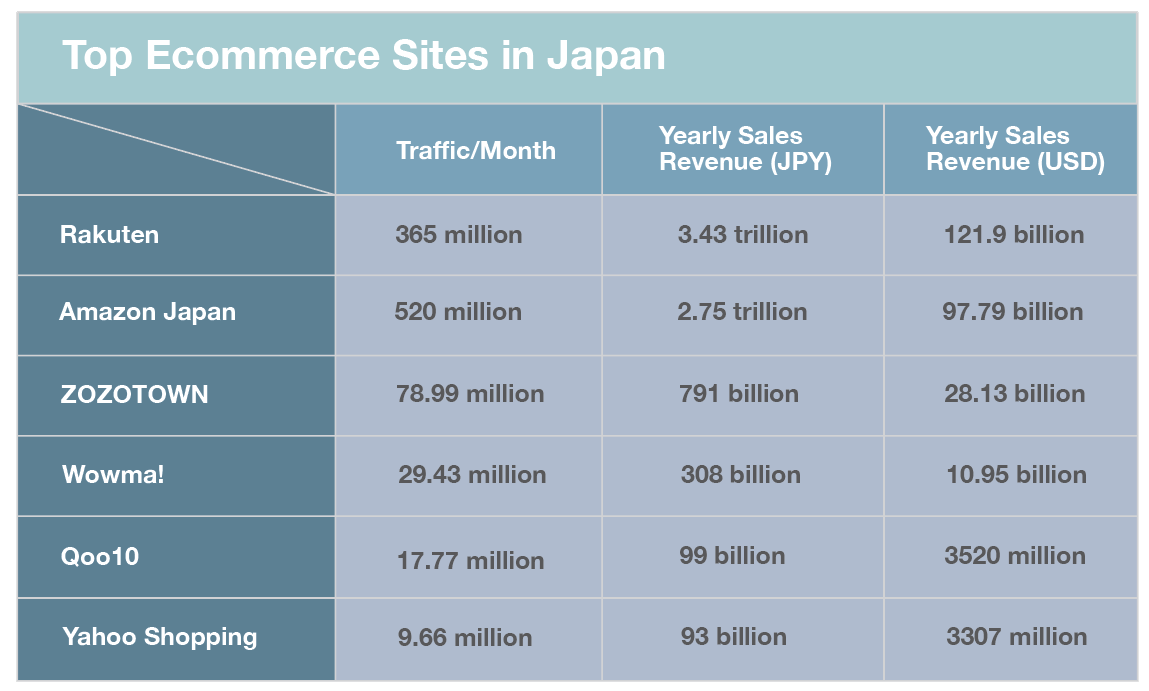
If you want to start selling on Amazon Japan, you must understand the eCommerce ecosystem in Japan first. The most popular eCommerce platforms in Japan are shown in the below table.

Blog_chart_12292020

These data were collected and estimated from various reports. Although the eCommerce giant in Japan is Rakuten, its revenue includes its subsidiaries like Rakuten Travel, Rakuten Payment service, etc. So if we only take online retail into consideration, Amazon Japan may have surpassed Rakuten by sales revenue.


7 Steps to Selling on Amazon Japan

1. Test the waters before expanding into Japan

Before you can begin selling a product in Japan, you have to ensure your products comply with local laws and regulations. You can learn whether you can list your product on Amazon.co.jp here. Then you can identify your product’s demands and profit potential in Japan. A simple way to identify the product demand is to monitor your competitor’s listings. You can easily conduct a detailed comparative analysis between yourself and your competitors using the Amazon product research tool. This can give you some ideas about how to price your products and calculate the estimated ROI.


2. IOR is required for FBA shipments

IOR (Importer Of Record) is the entity responsible for paying import duties and taxes and ensuring your imports comply with local laws and regulations. Sellers who live outside of Japan (non-residents) will need an IOR to sell in Japan as neither Amazon nor its fulfillment centers can serve as the IOR for FBA shipments. If you need an IOR consultation or service, you can find it from external providers with the Amazon Service Provider Network.


3. Register foreign businesses for consumption tax purposes

Amazon Japan charges the consumption tax for selling on Amazon Services and the Fulfillment by Amazon. Companies with taxable sales lower than JPY 10 million during the base period are exempted from the consumption tax obligation. For more information about Japanese Consumption Tax, you can visit Amazon’s help page.


4. Sign up for a Seller Central account in Japan

You can register an Amazon Japan seller account after you have found an IOR and registered consumption tax. If you already have an Amazon seller account, you can easily expand to Japan through Linked Accounts on your Sell Globally page on SellerCentral, and manage your business from one page.


5. Translate your Amazon product listing into Japanese 

Using the local language makes it easier for customers to understand your listings, especially in Japan. With approximately 120 million Japanese people, it’s estimated that less than 30% of Japanese speak English at any level at all, and only 2% speak English fluently. If your ASINs already exist on Amazon.co.jp, which will allow you to launch even faster.

JP template

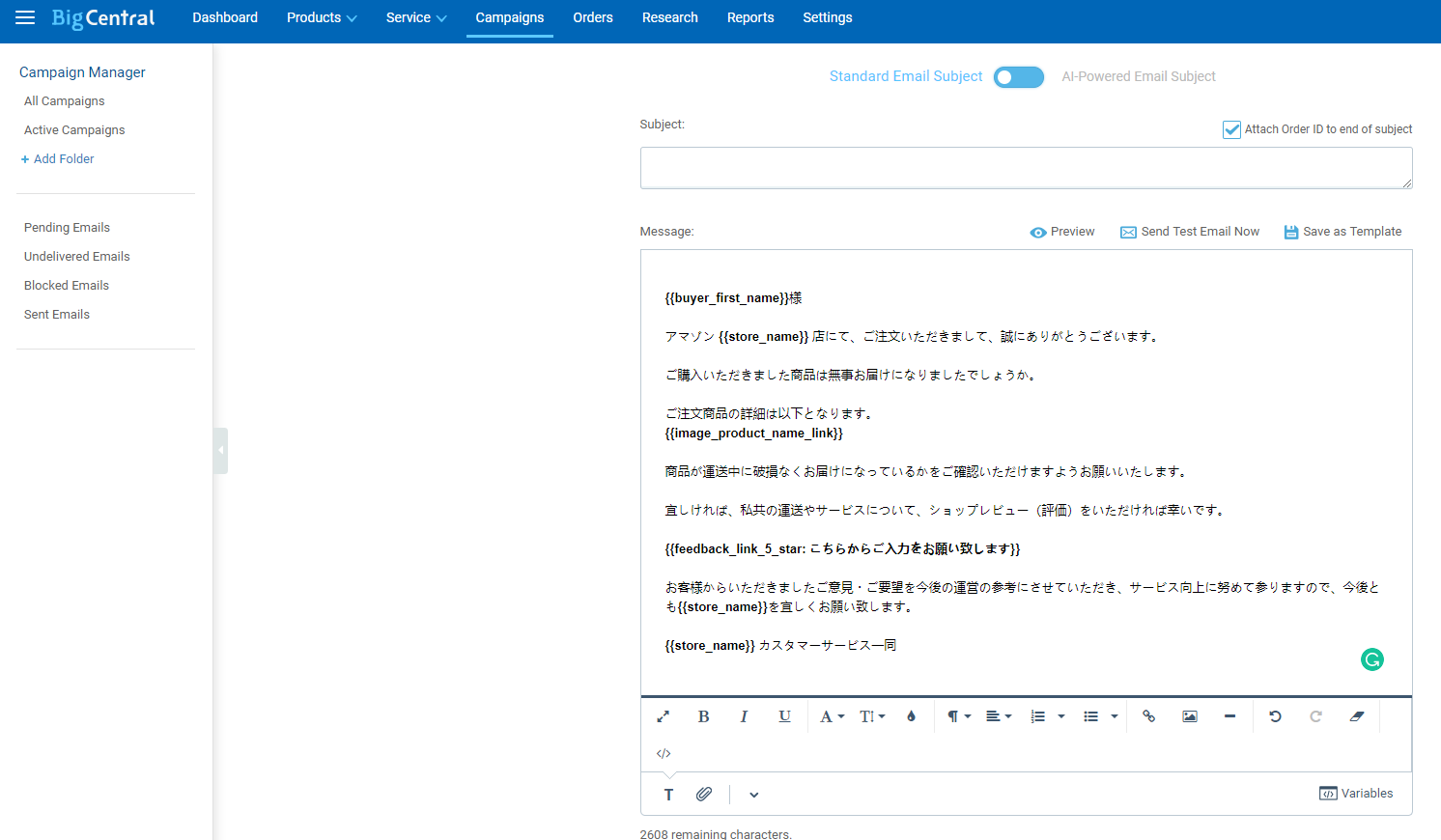
Using FBA is easy to sell on Amazon.co.jp because Amazon takes care of picking, packing, shipping, and customer support for shipping and return questions. For FBM sellers, you can hire a professional Japanese freelancer or use BQool’s BigCentral email automation that includes the pre-made email templates tailored to various customer service scenarios in Japanese. So you can solve your customer service challenges and solicit feedback and reviews in the local country.


6. Choose the most cost-effective shipping option for your items

Most international sellers use FBA. If you have high volume products, and the cost you fulfill your products is significantly more than FBA, you can send your inventory to the Amazon fulfillment centers in Japan by sea freight. For FBM sellers, you can find a reliable logistic provider with a tracking system so that you can keep your customers up to date on their shipments. Don’t know which one works better for you? Read this post FBA VS FBM to find out.


7. Manage and grow your global business 

Whether you choose FBA or FBM, you have to monitor and improve your performance regularly on the Customer Metrics page of your seller account. This allows you to see if you are meeting Amazon selling targets and gives you the opportunity to improve your performance before the issue affects your ability to sell.

When entering a new market, you also need to build brand awareness to increase your brand reputation as consumers confronted with choices are more likely to buy a name brand product than an unfamiliar one. You can promote your brand and products by investing in Amazon ads, such as Sponsored Products.


How to Select a Product to Sell on Amazon JP?

There are one caveat sellers should be aware of when selling on Amazon JP marketplace, that is Japanese customers are very price-conscious and if you are also selling your products in the retail stores, you need to make sure that the products offered on your online store are cheaper than that of the retails. According to the image below, you can tell that the majority of the products offered online have cheaper prices compared to retail offers in Japan.

Price-difference-comparison-Online-vs.-Brick-and-Mortar

Source: Freshtrax


Since BQool BigCentral is one of the leading Amazon product research tools on the market, we will be using the tool to demonstrate how you should find the product of your choice to sell on Amazon JP.


1. The number of competitors on a listing: 3 sellers

The size of Amazon JP marketplace is smaller than the US marketplace. We may tolerate a higher competition on a US listing but this may not apply to Amazon JP. Usually, a listing with less than 3 competitors is acceptable. 


2. Price: 1300 JPY ~ 4000 JPY

Products within this price range are the most popular because most buyers can afford them without hesitation. Books are very popular in Japan and usually, they are priced within this price range too. 


3. The number of reviews on your competitor’s listings: under 150 reviews

As long as your products have unique selling points and can be differentiated from your competitors, the number of reviews on your competitors shouldn’t concern you too much.


4. Weight: less than 2.2 pounds

The lighter the product is, the cheaper the shipping will be.


5. Non-seasonal product

Non-seasonal products will sell consistently well all year round so it’s easier to hold them in stock.

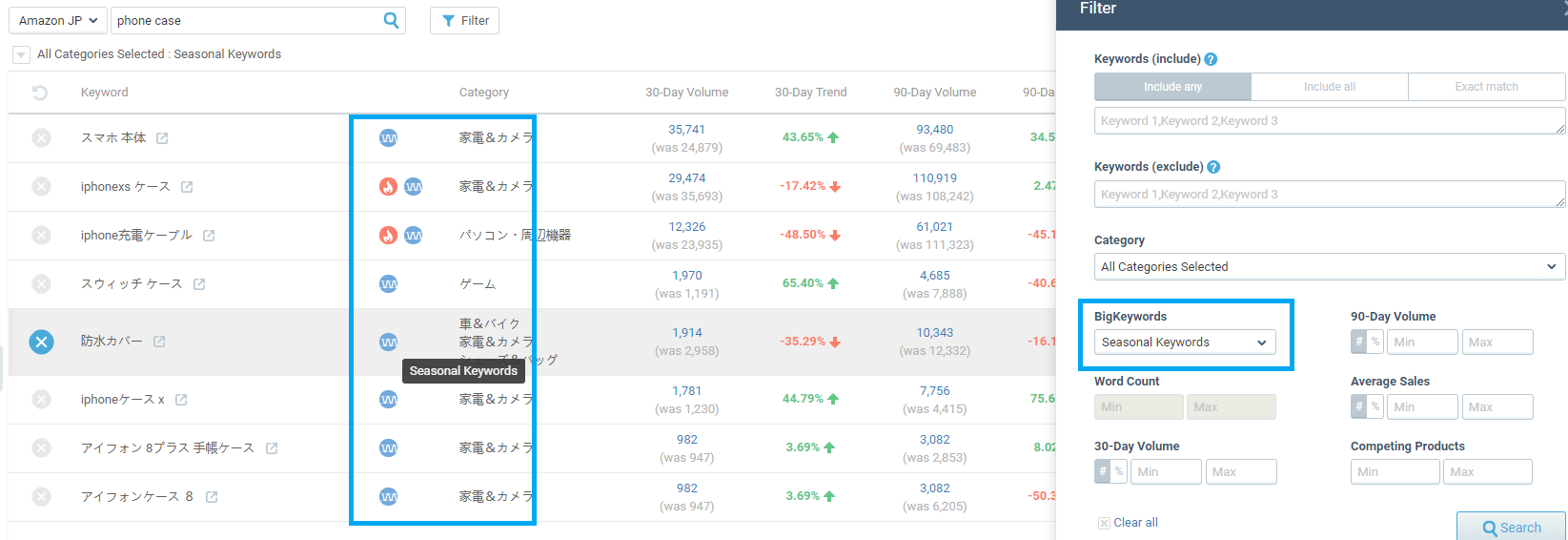
BQool’s BigTracker has a unique feature that allows its users to spot seasonal keywords, hot new keywords, and popular keywords. These keywords will represent the performance of certain products, and you can use this information to determine what products are seasonal products to avoid the pitfall of selecting unsuitable products to sell on Amazon.

BigTracker - Seasonal keywords


Frequently Asked Questions When Selling on Amazon JP

1. Why should I sell on Amazon in Japan?

  • Amazon JP is the third-largest Amazon marketplace right behind Amazon US and DE and is growing rapidly. 71% of Japanese shoppers make purchases online.
  • Expanding to Amazon Japan would allow you to gain access to the market that is the world’s third-largest economy with a 120-million population which is twice the size of the population in the UK.
  • When selling on Amazon, you can utilize A+ Content and other Amazon-exclusive marketing assets to promote and penetrate a new market like Amazon JP.
  • Don’t put all your eggs in one basket: selling on Amazon JP also provides you the means to spread your risks so you aren’t dependent on just one market. If your Amazon account on a primary marketplace has been suspended or experienced a sales slide, you would still have an Amazon JP store to provide you with a reliable revenue stream.
  • Opening a store on Amazon Japan is relatively simple: you can open an Amazon JP store on your existing Amazon selling account and start offering your products as long as your listings are displayed in Japanese. Amazon JP can provide Japanese translation and customer service as well.


2. What are the category restrictions on Amazon JP?

If you wish to sell products belonging to the following categories on Amazon JP, you would require Amazon’s approval first.

  • Food and kitchen appliances
  • Toys
  • Comics
  • Media


3. Do I need to register a business in Japan or own a Japanese bank account?

You are not required to register a business in Japan to start selling in the country, neither you would need a Japanese bank account to collect your earnings. Funds will be deposited into your existing bank account by Amazon. 


4. How can I ship to Japan?

If you wish to opt-in for Amazon FBA in Japan, you will need to ship your inventory to the JP FBA warehouse. Otherwise, you can choose merchant fulfillment to send your parcels to your Japanese buyers internationally.


5. How should I prepare my product label?

Amazon JP is the same as any other Amazon marketplace when it comes to product labeling. You are required to provide either EAN/UPC/GTIN label or Amazon FNSKU for your products. The majority of the sellers would request their manufacturers to label their parcels and product packages before being shipped out.


 6. Is JP Seller Central displayed in English?

Yes, you can switch the display language to English on Seller Central


7. How are tax collected in Japan

Sales tax will be collected by the Japanese government if you are a cross-border e-commerce seller. You are also responsible for the import tax when your items arrive in Japan. The total payable tax should be around 13%.


Get started selling on Amazon Japan today!

Don’t let the language barrier stop you from selling on Amazon Japan. While you can find any supports and solution you need on Amazon, BQool’s suite of Amazon seller tools can also help you manage your multichannel business and grow with you as you expand to other marketplaces.

If you have any other questions regarding selling on Amazon Japan, let us know in the comments below!

BigCentral_blog_CTA_banner


The post How to Start Selling on Amazon Japan appeared first on BQool Blog.

Read More
Share
January 12, 2021by adminUncategorized118 comments

How to Target Your Audience When Selling on Amazon

Target Amazon audience

For many businesses, turning to Amazon to market their products is their first and only marketing decision, and it’s easy to see why. Choosing to sell on Amazon and use it as a marketing platform can be a valuable decision when it comes to taking your product online. After all, Amazon has a profound global reach. Your products could be found and loved by people you’d have never even imagined. But, with Amazon’s vast troves of products and millions of customers visiting the site daily, how can you ensure the right people seeing your items?

One of the best ways to garner attention and increase sales for your products is by targeting a specific audience. Your audience may be the same that these other products are targeting. But your audience may be somewhat different because your products have certain unique qualities. The ultimate key to success is to draw their attention to them and build interest and loyalty. How you do it in front of Amazon’s vast audience? 


Break up your audience

The first step in targeting potential customers is determining exactly what factors and demographics would lead someone to your product. Would an outdoor enthusiast be interested in your product? Or are you more likely to draw in a couple who just bought their first home? Knowing your audience is critical to capitalizing on the potential market out there.

You might divide your audience into smaller, more manageable groups that you can develop hyper-specific marketing strategies for them. This process is called segmentation, and it allows you to tailor your message to different marketing demographics and draw them all into a similar set of products. Personalized online marketing is more important than ever — millennial and younger generations have come to expect a personalized experience when they deal with a business

On Amazon, a segmentation strategy is likely to help you wrangle the millions of potential customers a bit better and focus on those that are most likely to convert. Amazon even offers tools such as a hashed audience campaign strategy that can target new and existing audiences. This strategy does so by utilizing data from similar marketing demographics and purchasing trends. It’s important to use this information wisely to acquire new audiences.


Take certain actions for custom audience

Reaching a broad, global audience can open up a lot of doors. But it can also mean that you now have to spend more time considering what your audience perceives when they look at your products. For instance, the sizing of a small shirt can be very different in Asia than in the States. If you find that your target audiences are from a wide variety of backgrounds, consider adding product “translations” that can help ensure they are ordering the right thing for them.

Another thing to consider is the average age of your targeted marketing demographic. Younger generations are more likely to open to new technology and personalized marketing, while older generations may be more apt to prefer simpler, more straightforward marketing approaches. Either way, communication with your audience (and your employees) is essential to get through to them.

Finally, stay informed and responsive to customer inquiries. Providing high-quality customer service is another thing that will help your business stands out on Amazon. Answering questions professionally, having a reputable return policy, and developing product quality and variety based on customer interest will help to grow your business.


Diversify your marketing channels

Although Amazon offers a wide variety of services to help sellers grow their business, you can always reach more audience and increase exposure for your products from outside of Amazon. For instance, your company website can be an additional powerful marketing tool for your business. To entice your customers further, you can think of your website as a way to introduce yourself to new customers and include more information beyond your Amazon store to keep current customers engaged.

Another marketing tool you can use to complement selling products on Amazon is social media marketing. Create appealing content to pique your audience’s interest, so you can get them engaged in your content and encourage them to share it within their social networks. You can also consider running ads on Facebook or Google to drive external traffic to your Amazon listings.


Wrapping up

Reaching more audience and creating a target audience strategy for your Amazon business is a journey and takes lots of time and effort. Once you’re ready to start, BQool’s Amazon Seller solutions can support your business along your journey to becoming an Amazon Top Seller.


Author Bio

Jori Hamilton is an experienced writer from the Northwestern U.S. She covers a wide range of subjects but takes a particular interest in covering topics related to business, marketing, and technology that benefits both of those endeavors. To learn more about Jori, you can follow her on Twitter.


The post How to Target Your Audience When Selling on Amazon appeared first on BQool Blog.

Read More
Share
January 12, 2021by adminUncategorized129 comments

Amazon PPC Guides – Keyword Targeting Methods

blog-20201211 (1)

Would you rather listen to this blog instead of reading it? Just click play below. (Audio Recording by Samuel Krushnisky)

Amazon PPC (pay-per-click) can be a huge win for most sellers. The simple advertising model ensures that customers searching for products like yours will find what you are selling. In many cases, they’ll see it on the first page of their search results.

And while you might want to get to that first page organically, the truth is, building up to that takes time. Your listings will usually need to be live and selling for a while first unless you are in some ultra-specific niche. Amazon PPC can give you a leg up, as long as you use it wisely.


What is Amazon Advertising?

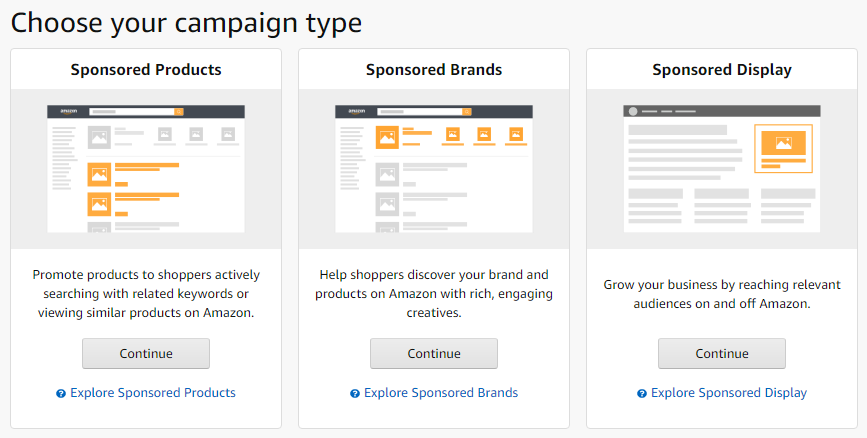
There are 3 different Amazon ads campaigns available: Sponsored Products, Sponsored Brands, and Product Display Ads (PDAs)

3.Choose a format

  • Sponsored Products – a format of keyword-targeted ads for advertisers to promote individual products appearing on the search results page and product details pages.
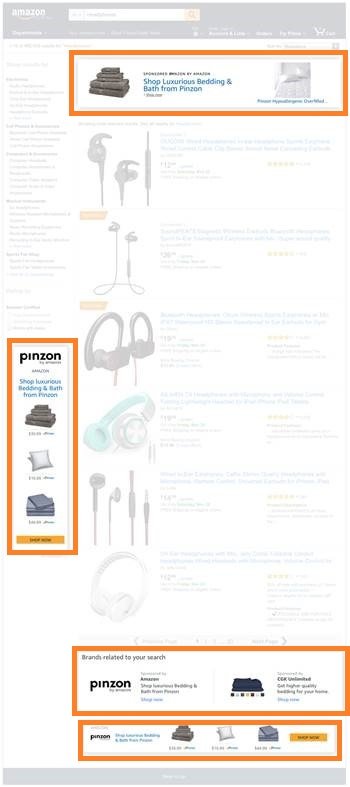
  • Sponsored Brands – a format of ads showcases your brand featuring your brand logo, a custom headline, and a selection of 3 products appearing in shopping results pages that attract shoppers to your Stores page or a custom landing page on Amazon.DiscoverProductUpdate_screenshot._CB502442956_
    Sponsored Brands is offering four ad placements: above search results, on the left side and bottom of the search results page on desktop, as well as within search results on the Amazon app. 
  • Sponsored Display – a format of ads targeting to deliver relevant ads to shoppers with certain interests and who are actively browsing a similar product detail page is available for vendors only. It typically appears below the “Add to Cart” button on Amazon product detail pages and appears alongside customer reviews, shopping results pages, or on the far right side of product detail pages.


Who can run Amazon Ads?

Amazon vendors can use Sponsored Products, Sponsored Brands, and Sponsored Display Ads in their Amazon Advertising Console. 

Amazon sellers are required to have a professional selling plan to use Sponsored Products and Display ads, and only sellers with Brand Registry are eligible to use Sponsored Brands.


How much does Amazon PPC cost?

Amazon PPC is an auction, which means how much you are willing to pay for a click on your ad (Cost Per Click, a.k.a. CPC). The bidder who is willing to pay the highest CPC will win the highest ad position but will only pay a penny more than the next highest bid.

For example, if you bid $2 and the next highest bid was $1.00, then your CPC would be just $1.01 even though the highest bid was $2. So if your ad is clicked, the cost of the click will be $1.01. 


What is the Average Cost Per Click (CPC)?

On Amazon.com, the average CPC is $0.71 according to recent research. In addition, your average CPC can vary widely depending on the Amazon product category or subcategory your product belongs to, and the level of competition of your niche for the keywords will also impact the average pay per click cost.


Optimize your Amazon listing before you get started with Amazon PPC

Before you even enter the campaign manager, you need to optimize your product listing for Amazon SEO. If a product listing is lacking details or is inaccurate, then no amount of advertising can save it. Here’s what to focus on:

  • Images should clearly show the product and be high-resolution. Multiple images are preferred.
  • Your bullet points and product description should be free of typos and spelling errors. They should persuasively explain what the product is, what its features are, and how it will benefit the customer.
  • Your price should be competitive.
  • Your listing should include the Amazon PPC keywords you are targeting, with the most important one(s) in the product title. Secondary keywords should go in Amazon’s keyword field.


How do different keyword match types for Amazon PPC ads work?

Amazon PPC ads using keyword targeting to match a shopper’s search query will trigger your Sponsored Products or Sponsored Brand ads to appear.

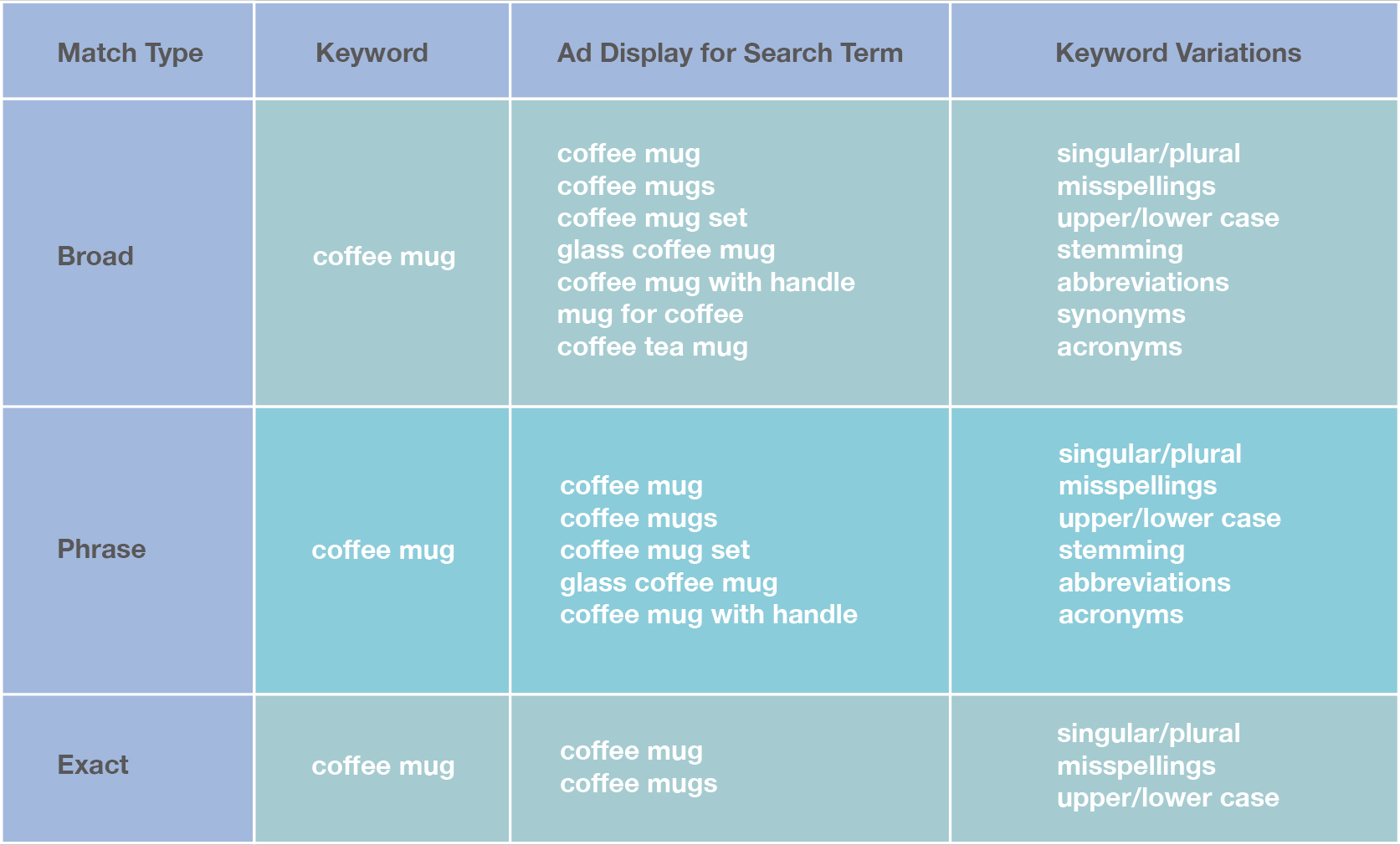
When it comes to an advertising budget, you want every penny counts. You need to understand how each keyword match type works before you create a list of keywords for your products:

  • Broad match type: search terms that include all components of your keyword in any order. 
  • Phrase match type: search terms that include all components of your keyword must be together in the same order.
  • Exact match type: search terms that match all the components of your keyword in the same order exactly. 

chart_20201215_v2


Complement Amazon PPC keyword strategy with Amazon Keyword Research Tool

Amazon sellers should perform keyword research, analysis, and keyword optimization to ensure the keywords are relevant to your products and will lead to a click and then convert into a transaction.

Discovering search terms related to your products that shoppers use on Amazon is not an easy job, because the keyword you want to rank for and the search term your target audience use can be two different things. Selecting Amazon PPC keywords isn’t a guessing game, so you need the right keyword research tool. 

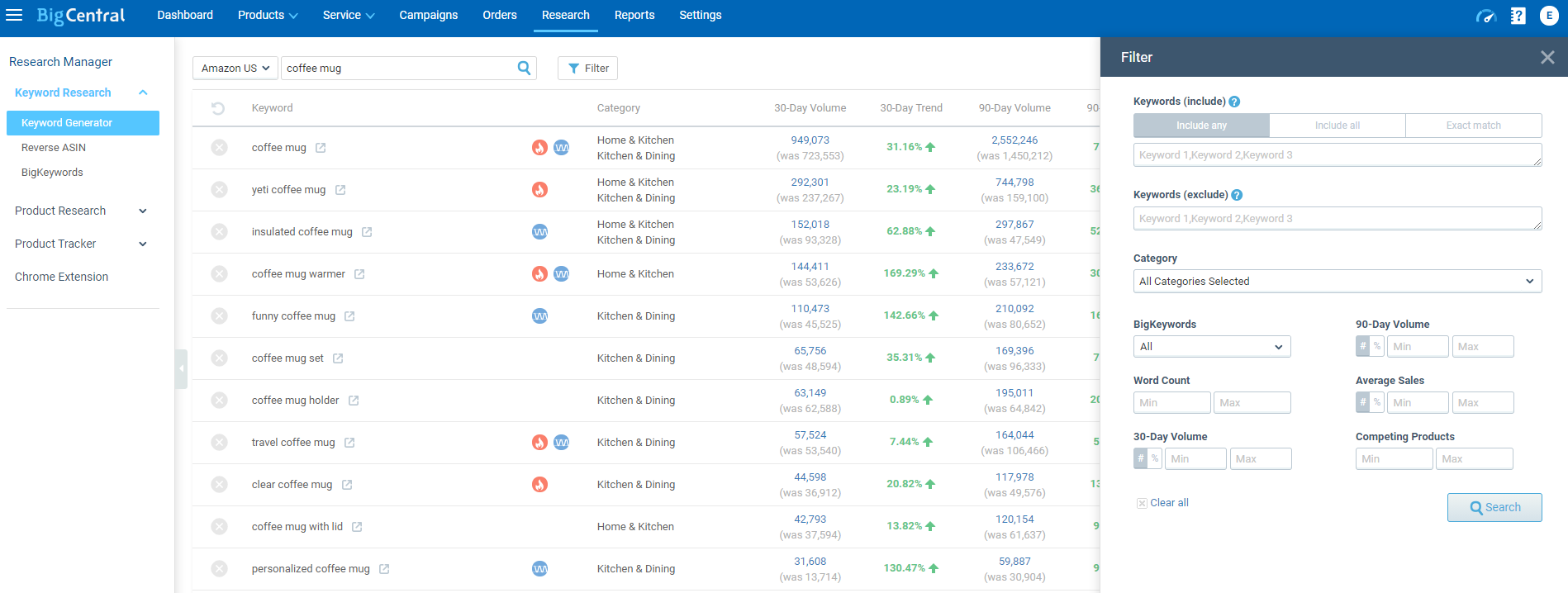
Keyword Generator

BigCentral Keyword Research tool can help you to generate a lot of keyword ideas fast. It also shows search volumes and trends data, and you can export the results for free in one click. And it also has one notable feature – filters, which you can include or exclude certain words. 

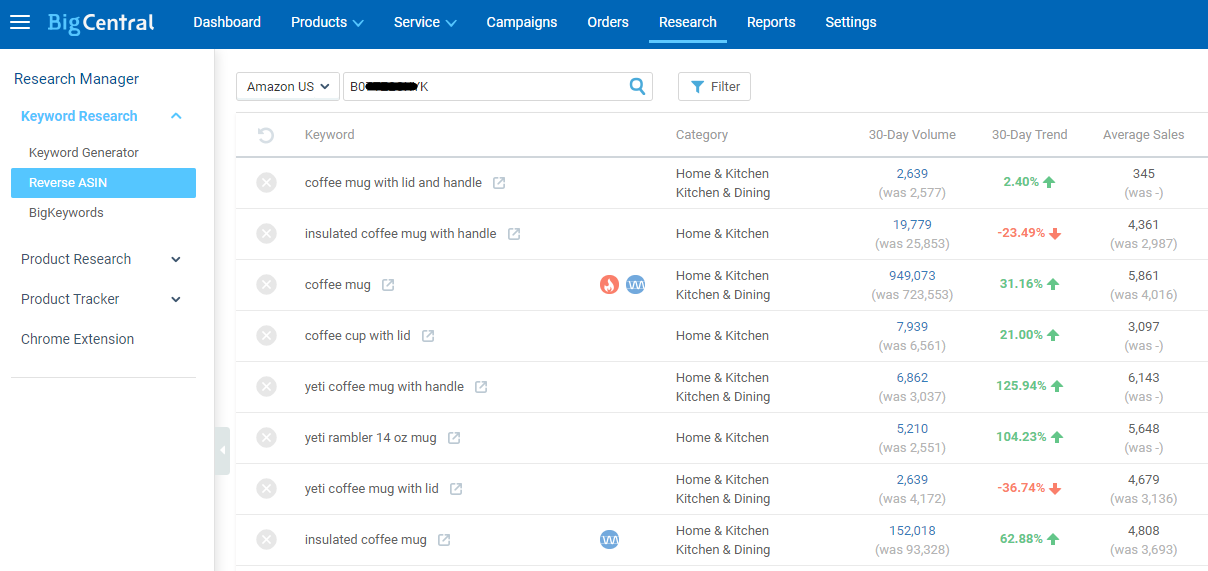
Reverse ASIN

BigCentral Keyword Research tool also allows you to research the keywords your competitors are using. Just use the Reverse ASIN tool to target those ASINs that are in direct competition with your products, and you can get a more comprehensive perspective of the competitor’s keyword and advertising strategy.


Steps to set up an Amazon PPC advertising campaign

Part 1: Create your Amazon PPC campaign

Once you’ve optimized your listing, you can start creating your campaign in the “Campaign Manager” section of Seller Central. Here are the steps:

  1. Go to Advertising > Campaign Manager.
  2. Choose a name for your campaign.
  3. Choose your daily budget. There is a balance here. If you are just starting off, picking a higher budget can be a good idea, and then you can adjust it as needed. However, keep in mind how things accumulate. $50 may not seem like much at first, but it adds up fast on a day to day basis.
  4. Choose your start date and end date. We suggest including an end date; again, your budget can add up fast. You can always extend the campaign if needed.
  5. Decide between manual targeting and automatic targeting:
  • In manual targeting, you choose your own keywords
  • In automatic targeting, Amazon chooses them for you
  • We recommend that you can use both targeting types at the same time to experiment with which one works better. While manual targeting gives you more control and accurate results, automatic targeting can help you to find all the search terms that Amazon defines relevant to your product in the beginning. Then you can manually further refine the search terms that Amazon matched your ads for a better result.


Part 2: Build your ad

  1. After you have your Amazon PPC campaign set up, it’s time to start building ads. Here are the simple steps you’ll need to take:
  2. Choose an ad group name. This name should be more specific than your campaign name, as you can have multiple ad groups.
  3. Pick a product to advertise.
  4. Choose your keywords. Even if you chose manual targeting, you can still look at suggested keywords from Amazon, and they are a good place to start. You can also rely on our Amazon Keyword Research tool. Don’t forget that you can make adjustments later.
  5. Choose your bids. You can make an individual bid for each keyword. If you think one keyword will be more likely to generate clicks, then feel free to up its bid.
  6. Choose your match type. Your match type options are “broad, phrase, or exact” Keep in mind that broad matches will usually result in more money spent, but may also capture more customers.
  7. Once you’ve finished entering keywords, choosing their bids, and picking their match types, you can Save and Finish.

Your campaign is now good to go! Keep in mind that it can take up to an hour for your ads to start appearing.


Part 3: Experiment, Experiment, Experiment

Now that you understand the basics of setting up your campaign, it’s time to experiment. Let your campaign run for one month, and then start making adjustments based on your findings. Which keywords are yielding good results? Which are too expensive? Which are ineffective?

It’s important to consider your Average Cost of Sale (ACoS) as you make future decisions. Sometimes, an expensive Amazon PPC keyword is completely worth it if you are still turning an overall profit when you make the sale. Review the data vigilantly, and you’ll be likely to find success with PPC.

BigCentral_blog_CTA_banner


This blog post was originally published in June 2017 and was updated in December 2020 due to product updates or Amazon policy changes.


The post Amazon PPC Guides – Keyword Targeting Methods appeared first on BQool Blog.

Read More
Share
January 12, 2021by adminUncategorized285 comments

What is Amazon’s Choice Badge?

Amazon’s Choice is a label given to a product when Amazon believes it is the best match for a specific keyword. In search results, the badge is visible in the top left corner of a product’s image, or just below the title on product detail pages.

Amazon's Choice on AmazonBasics Product with Amazon Logo

Amazon’s Choice products first appeared on the platform in 2015, with the arrival of the Echo Dot. As Echo became more popular, more and more customers spoke their requests to Alexa, Echo’s voice assistant. Unlike shopping on a desktop, it’s difficult to browse and filter results via voice search. (Although Alexa’s AI is smart, she’s not that smart.)

Amazon needed a way to simplify shopping for voice, so they introduced Amazon’s Choice as a way to quickly match keyword searches with the most relevant products. Today, the badge can be found on both mobile and desktop, in addition to voice.

Amazon’s Choice Vs. Best Seller Badge

Contrary to popular belief, Amazon’s Choice is not the same thing as the Best Seller Badge. Although both badges indicate high-quality products, Amazon’s Choice is given to the best match for a particular keyword. The Best Seller badge, on the other hand, is given to products that have sold the most units per hour in their category.

In other words, Amazon’s Choice is determined by SEO, and the Best Seller badge is determined by sales velocity. You can see the difference between Amazon’s Choice and the Best Seller Badge by looking at the search results for “decorative stapler.” 

Amazons Choice logo on the decorative stapler and Best Seller logo on the best selling stapler

The first product, an attractive stapler in white and gold, is an excellent match for the query “decorative stapler.” Its counterpart, a heavy-duty black one, is half the price and handles twice the capacity. The heavy-duty one is less “decorative”, but it’s certainly a better stapler. 

Therefore, the better-selling product gets a Best Seller badge because it sells better in the stapler category. The more relevant stapler, however, receives Amazon’s Choice for the keyword. 

Notice that a product can have a Best Seller badge AND be Amazon’s Choice for a keyword. That same bestselling stapler, for example, is Amazon’s Choice for another query, “stabler”.

(Typically, Amazon doesn’t recognize misspellings as keywords, but this particular example seems to be so commonly misspelled that Amazon can’t tell the difference.) 

What Does Amazon’s Choice Mean?

What does Amazon’s Choice badge mean for your bottom line? Well, this little badge carries a lot of meaning for Amazon sellers, including huge boosts in conversion rates. In fact, a Profitero study found that products with an Amazon’s Choice Badge received twice twice the traffic than comparable products without one.

It’s clear – Amazon’s Choice products sell more units. Is there some Amazon’s choice badge hack that is sure to get you that coveted seal of approval from Amazon? Bad news for the sellers that scroll Reddit looking for a shortcut to Amazon’s choice and sales – the best way to get the badge is to be an all-around amazing seller, plain and simple. 

When you are a great Amazon seller with a well-optimized listing, you will have no problem being Amazon’s most relevant product for a search term. As with most things on Amazon, the devil is in the details. In order to optimize your listing for Amazon’s Choice, you need to know more about the process. 

How does Amazon choose the most relevant products for search terms? Well, Jeff Bezos sits in one of his many homes and sorts through millions of customer queries to pick his favorite. He buys and surveys each Amazon product, pays special attention to small owned businesses… 

Made you look. 

Actually, the eCommerce behemoth developed an algorithm to do the picking automatically. Their equation is based on a series of inputs. The most important factor? The number of clicks and conversion rates on a given search term’s results page. 

How To Get Amazon’s Choice

In addition to clicks and conversions, there are some supplemental improvements you can make to increase your chances of being selected. Start with our top three tips to crack the code and get your next Amazon’s Choice badge.

1. Be a Great FBA Seller

Amazon doesn’t want to promote products that are hard to buy! To make a profit, Amazon needs to connect shoppers with products that are available to ship, ready at the click of a button, and Prime eligible. 

If you’re not an FBA seller already, apply to be one. Once you offer fast, free shipping, it will be far easier to convert shoppers and move products. Side note: make sure that you have enough inventory so that you always win the Buy Box. 

All these tips are general best practices for successful Amazon selling, but implement them now, and you’ll be one step closer to Amazon’s Choice. 

2. Tailor Your Listing to Highly Relevant Keywords  

A lot of new sellers don’t understand Amazon SEO and get distracted by high search volume keywords. Remember to always think about search intent when selecting a target keyword.

For example, Paladone sells a novelty Game Boy mug. Game Boys were big in the 90s, so they’re probably not going to convince someone shopping for “gifts for boys 5 years old” to purchase it.

Even though the keyword “gifts for gamers” has a lower search volume, it more relevant to this product. They’ve got a better chance of conversion on the results page for this keyword.

Basically, a keyword is only as valuable as your product’s potential to convert on that search term’s results page. Select a long-tail keyword to target with your listing, and you’re more likely to rank, sell products, and get the badge. 

Don’t stop at one keyword though! Expand on your keyword by finding phrases that semantically related. A keyword tool will show you related search terms, so that you can then sprinkle spelling variants and alternate phrasings throughout your listing like chocolate chips in cookies.

3. Maximize Sales Velocity and Reviews

The better your product listing, the easier it will be to get Amazon’s Choice. However, you can optimize until the cows come home, without ever getting the magic badge. Why? You likely don’t have enough sales or reviews.

If you’re selling on Amazon, you already know that a high sales velocity and multiple reviews are good for business. But sales and reviews are also a huge benefit to the overall SEO of your listing.

Start by improving your star rating. A highly rated, well-priced product will make it easier for all the SEO you’ve done to pay off. Sure, you may be in control of things like setting competitive pricing, but you can’t exactly leave yourself good reviews. With a tool like Seller Labs Pro, you can solicit reviews AND stay Amazon compliant.

Pro Tip: As your customer rating improves and you start to make more sales, you’ll want to ensure your return rate stays low. Check your return rate periodically in your Seller Central Account. 

Conclusion

 The nifty part about all this fun work? It pays off twice. The three tips above will not only help you get Amazon Choice, but it will also help you get a Best Seller badge for your category! If you’re looking for specifics on how to get the Best Seller badge, read our full article.


How to Get an Amazon Best Seller Badge for Your Product [UPDATED 2020]

Learn how to get the much-coveted Amazon Best Seller badge for your product by selling the greatest number of products within your category.


Oct 20, 2020
Ashley Kochans

The post What is Amazon’s Choice Badge? appeared first on Seller Labs: Amazon Seller Software, Tools, Services & Platform.

Read More
Share
  • 249
  • 250
  • 251
  • 252
  • 253
  • 254
Patriotic Distributors

Innovative Ecommerce Solutions for Your Brand

Facebook Instagram Linkedin

Services

  • Brand Distribution
  • Brand Management
  • 3PL Warehousing & Fulfillment
  • Become a Wholesale

Contact Information

  • +1 203-482-3643
  • business@patrioticdistributors.com
  • 4 Sandcut Rd Unit 2 Brookfield, CT 06804
  • About Us
  • Contact Us
  • Privacy Policy
  • Terms of Service

Copyright © 2024 Patriotic Distributors. All Rights Reserved.

Design and Develop By Haider Ali