
Amazon Fee Increases 2026: How to Protect Profit Before It’s Too Late
 Quick Summary: What’s Changing and Why It Matters
| Amazon’s Statement | The Real Impact for Sellers |
|---|---|
| “Average increase of $0.08 per unit.” | Comes straight from your profit, not your sale price. |
| “Less than 0.5% of item price.” | If your net margin is 10%, that’s a 5% hit to your take-home profit. |
| “Slight adjustments to support operations.” | Micro-fees stack up yearly, quietly shrinking your payout. |
Bottom line: $0.08 may not sound like much — but compounded across SKUs, it’s a profitability drain you can’t afford to ignore.
 If you missed our breakdown of Peak Season Fees 2025 or our Q4 inventory strategy, read those next to stack your profitability playbook.
Why This Fee Increase Isn’t as “Small” as It Sounds
Amazon has confirmed new FBA fee increases for 2026 — an average of +$0.08 per unit. At first glance, that might not sound like much, but compounded across hundreds or thousands of SKUs, this “small” adjustment can quietly erode your profit margin.
In this guide, we’ll break down what the 2026 fee changes really mean for your bottom line, show you how to calculate your SKU-level impact, and outline the exact strategies top Amazon sellers are using right now to stay profitable.
Step 1: Understand Exactly What Amazon Announced
From Amazon Selling Partner News:
“In 2026, we will slightly increase Fulfillment by Amazon fees by an average of $0.08 per unit, estimated at less than 0.5% of average item price.”
| Fee Type | Impact in 2026 | Notes |
|---|---|---|
| FBA Fulfillment Fees | Slight increase (+$0.08 avg.) | Applies from Jan 15, 2026 |
| Referral Fees | Minor category adjustments | Some categories excluded |
| Storage Fees | Awaiting Q4 updates | Likely similar to 2025 |
| MFN / FBM Fees | No change | Fulfilled by merchant unaffected |
Official Source: Amazon Selling Partner News → 2026 Fee Update
Step 2: Calculate Your SKU Impact Using Our Free Tool
Want to see exactly how the new fees will affect your margins — without touching a calculator?
Download our ready-to-use sheet here
Before you panic — measure your actual exposure. Every SKU reacts differently to fee changes depending on size, weight, and referral rates.
Use the Seller Labs Profit Calculator:
- Download your Amazon Fee Preview report
→ Seller Central → Reports → Payments → Fee Preview → Download CSV - Paste into Sheet
- Paste_Price tab → SKU + current price
- Paste_FeePreview tab → SKU + current FBA fee + referral %
- Go to Calculator Tab
- SKUs, Prices, Fees auto-populate
- Enter 0.08 (or whatever applies to your category) under “2026 Fee Add-On”
- Review your results:
 Green = Safe
 Yellow = Shrinking margin
 Red = Will lose money at current pricing or packaging
 Watch the RED and YELLOW rows — those are the SKUs you should reprice, resize, or trim before Amazon’s new fees go live.
Step 3: Five Proven Tactics Top Sellers Use to Stay Ahead of Fee Changes
| Strategy | Why Sellers Use It | What to Do |
|---|---|---|
| Trim SKUs below 20% profit buffer | Low-margin SKUs become liabilities when fees stack | Remove or pause these SKUs now |
| Reduce packaging dimensions by 0.2” | Can drop a fee tier and offset the entire increase | Perform a packaging compression audit |
| Push a 2–3% price lift on bestsellers | Conversion-safe on top SKUs; absorbs micro shifts better | Apply pricing change and monitor in Seller Central |
| Reorder negotiation with suppliers | 10–15% volume commitment can absorb cost hikes | Ask: “What’s my price if I lock a 15% increase before Q1?” |
| Set automated margin alerts | Prevent silent profit erosion | Use Seller Labs Profit Genius to get notified before payout dips |
Sellers who adjusted packaging and pricing proactively in 2024–2025 saw an average 4–6% higher net ROI post-fee adjustment.
Step 4: Set Profit Alerts So You Never Miss Margin Erosion
Profit erosion doesn’t happen overnight — it happens silently. That’s where automation steps in.
With Seller Labs Profit Genius, you can:
- Set margin alerts
- Identify when fees, ads, or returns reduce profitability
- Use Ad Genius insights to adjust ad spend proactively when profit margins narrow.
No more guessing. You’ll know exactly when profit starts slipping — before your deposit reflects it.
Step 5: Quiet Profit Leaks to Fix Before 2026
| Hidden Leak | Fix Before It Compounds |
|---|---|
| Rising ad CPC on low-margin SKUs | Use Seller Labs Ad Genius or the Budget Pacing Sheet to monitor spend and make timely adjustments. |
| Aged inventory stacking long-term fees | Clear out old SKUs before rate changes |
| High return rate items | Add returns % to your Profit Calculator for true margin visibility |
| Untracked fulfillment errors | File FBA reimbursement claims monthly |
Key Takeaways for Amazon Sellers
1. $0.08 matters — because it compounds.
What looks like a penny problem can become a multi-thousand-dollar issue by Q3.
2. Model it, don’t guess it.
Use your Fee Preview + the Profit Calculator to pinpoint where you’ll lose money before Amazon does.
3. Adapt faster than competitors.
The sellers who adjust first — not biggest — keep ranking and profit share.
4. Automate your margin defense.
Seller Labs tools monitor profit and ad pacing, so you can scale without firefighting spreadsheets.
Other Amazon News This Week
1. Submit Your Black Friday & Cyber Monday Deals by October 28
Amazon’s biggest shopping events are coming fast. You have until October 28 to submit Lightning Deals, Coupons, or Prime Exclusive Discounts.
Join the discussion thread on Seller Forums
2. 2025 Peak Fee Reminder
Peak fulfillment fees are live through January 14, 2026. Plan inventory smart — overstock means frozen cash and higher storage fees.
Read our full guide: Amazon FBA Peak Fees 2025 — What Sellers Need to Know
3. Listing Management Updates
Amazon’s Manage All Inventory page now allows bulk optimization and faster suppression fixes. Use this to clean up underperforming ASINs before new 2026 fees hit.
Final Call: Protect Profit Before 2026 Hits
Amazon’s FBA fee hikes are small by design — but deadly by neglect. Don’t wait for your next payout to find out which SKUs are bleeding profit.
Your 3-Step Action Plan:
- Download the Profit Calculator
- Run your Fee Preview report and identify red-flag SKUs
- Set up Seller Labs margin alerts to stay ahead
Be the seller who acts before January — not after.
Ready to Protect Your Profit Before 2026?
Turn Amazon’s fee data into growth opportunities with Seller Labs Profit Genius. Track your margins in real time, catch profit leaks automatically, and stay ahead of every Amazon change.
For a limited time, get 30% off your first month — after your 30-day free trial.
Related Blogs
- Amazon 2025 Fee Changes: How They Affect Sellers
Discover what changed in 2025 and how to prepare your pricing for future fee adjustments. - Master Amazon Inventory Like a Pro in 2025
Learn how inventory management impacts profitability as Amazon’s fees rise. - Low Inventory Level Fees: Do You Know How Much Amazon Is Charging You?
Avoid unexpected low-inventory penalties and keep your account profitable. - Reduce Amazon Returns in 2025
Cut down on costly returns and protect your bottom line with better listing and packaging strategies. - Amazon Buyer-Seller Messaging Suspension: How to Address & Prevent It
Stay compliant with Amazon messaging policies and maintain customer trust.
The post Amazon Fee Increases 2026: How to Protect Profit Before It’s Too Late appeared first on Seller Labs: Amazon Seller Software and Platform.
How Vendor Managers Can Help Your Brand
Partnering with an Amazon vendor manager can make or break your IP brand at the world’s biggest ecommerce platform.
Most brands aren’t “all-in” and the numbers show it. 38.3% of vendors say Amazon is less than 10% of their total sales; 36.6% put it at 10 to 25%; 17.5% at 25 to 50%; only 4.4% land in the 50–75% range; and a slim 3.3% rely on Amazon for more than 75% of revenue.
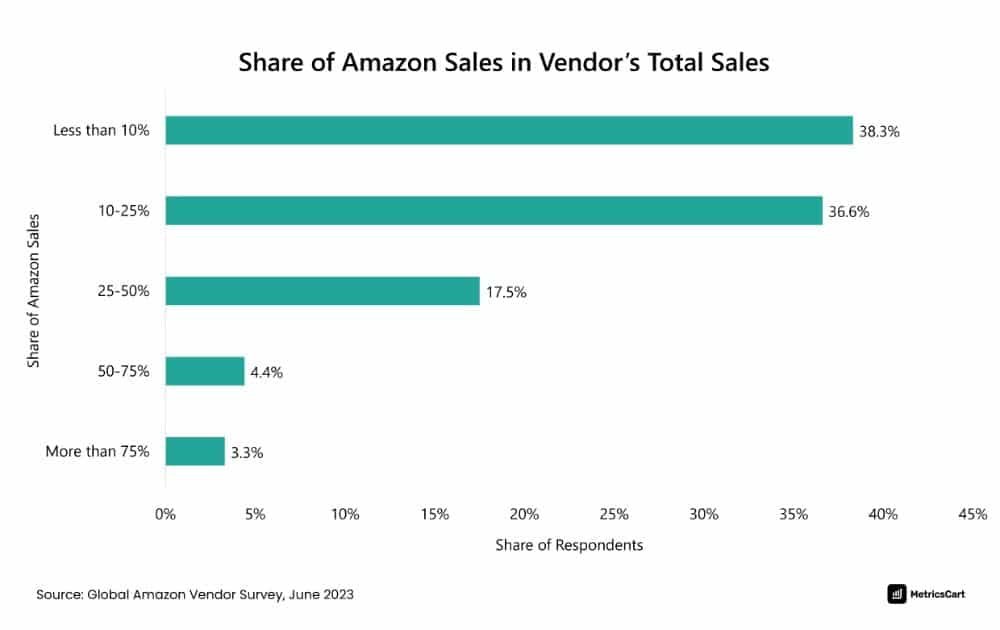
For the majority, Amazon is a powerful channel, but not the whole pie. That said, every purchase order (PO), promo slot, and content tweak has to count.
That’s where a great Amazon vendor manager earns their keep. They sit at the crossroads of POs, pricing windows, promotional calendars, and compliance, ensuring that your IP brand appears retail-ready.
Vendor vs Seller
Still confused about the difference between an Amazon Vendor vs Seller? Let’s get definitions out of the way.
- Vendors (1P) sell wholesale to Amazon, who in turn becomes the seller of record to shoppers.
- Sellers (3P) own retail price, inventory, and fulfillment choices.
Vendor managers live on the 1P side and focus on scaling your wholesale business inside Amazon Retail.
Unlike 3P, vendors don’t have to deal with listing products on Vendor Central. Amazon issues POs and vendors ship inventory and supply content, specs, and brand assets so Amazon can publish and optimize the product detail pages.
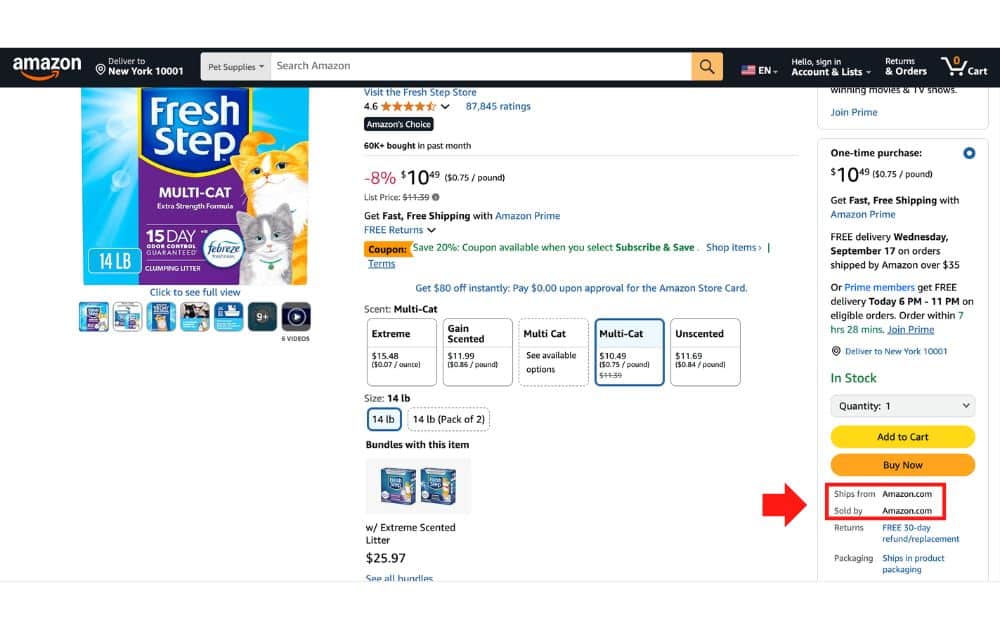
How do you know if the Amazon product listing is sold via 1P or 3P? Just look at the “Ships from” and “Sold by” information. If both say Amazon, then they are 1P products.
What Is a Vendor Manager?
A vendor manager is the retail-side owner of your relationship with Amazon. Think of this role as a hybrid buyer–strategist. They do tasks such as:
- Plan on demand
- Place purchase orders
- Negotiate terms
- Guide pricing and promotions
- Push for retail readiness (images, copy)
- Monitor compliance
Amazon vendor managers work across operations, advertising, and catalog teams to keep your assortment healthy. They also monitor category key performance indicators, including:
- Sell-through rate
- Margin
- On-Time & In-Full (OTIF)
- Returns
How Vendor Managers Operate
Day to day for a vendor manager is about translating category goals like revenue, margin, and availability into actions you execute using Amazon Vendor Central.
How the Rhythm Works
- Quarterly planning and weekly execution. You and your vendor manager align on targets, assortment, and pricing guardrails. The manager sequences buys and promo slots, then monitors exceptions (e.g., stockouts, returns) as the weeks roll.
- Inputs that matter. Clean forecasts, confirmed lead times, stable case packs, and retail-ready content (titles, bullets, images) drive deeper buys and better shelf placement.
- PO lifecycle. Amazon issues POs, you confirm quantities and dates, ship with compliant labels and an accurate advanced shipping notice (ASN). The vendor manager reviews OTIF and chargeback trends to remove friction.
Core Touchpoints Inside Vendor Central
Here are the core touchpoints inside Vendor Central that you need to keep in mind:
- Catalog and Content. This touchpoint involves creating or refreshing Amazon ASINs, fixing titles, bullets, and images, and keeping specs accurate. Here, your vendor manager pushes for “retail readiness” before promos; escalates catalog fixes; prioritizes which SKUs to onboard first.
- Purchase Orders and the Shipping Loop. Amazon issues POs, you confirm, you ship on time with the right labels, and Amazon receives the items before the product goes live. In this touchpoint, your vendor manager sequences buys, monitors fill rate and dates, flags constraints, and adjusts cadence.
- Compliance. Making sure you have the correct routing guides, carton and pallet labeling, and packaging rules helps you avoid deductions. To assist you in this touchpoint, the vendor manager points out repeat defects and coordinates operations support to remove friction.
- Promotions and Deals. This touchpoint involves lining up inventory cover, price support, and retail media for events like Prime Day. During these events, Amazon vendor management secures deal slots, aligns timelines, and advises on funding levels.
- Scorecards, Reviews, and Business Rhythm. Your vendor manager reviews various KPIs, including ratings and reviews, and sets action items. Why does it matter? Data reveals that 82% of 1P items had 100+ reviews (vs. 65% for 3P) and 92% were rated 4–5 stars (vs. 78%), with far fewer showing no rating (2% vs. 15%).
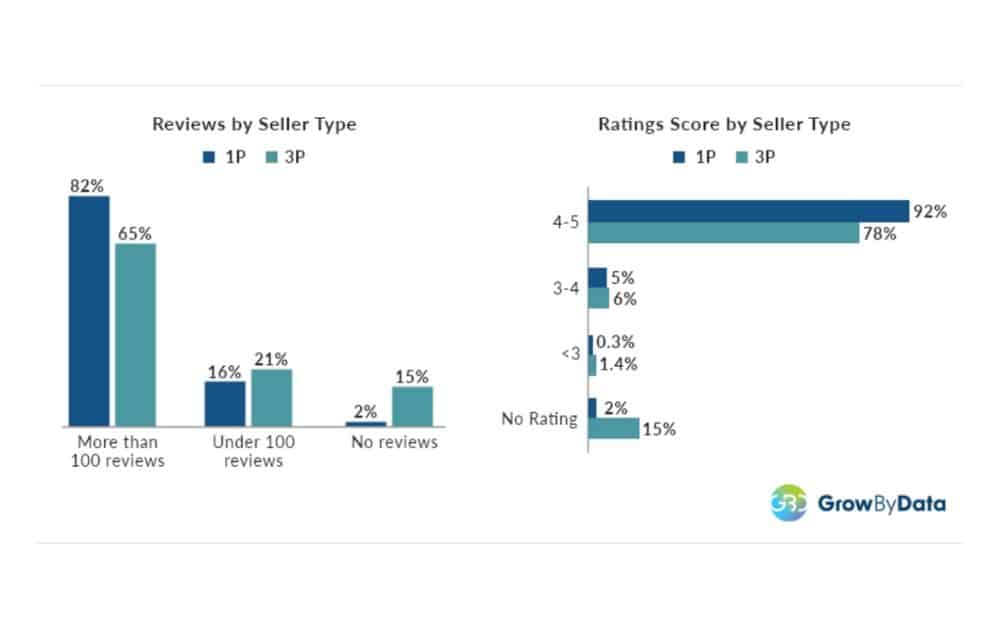
These numbers indicate that strong retail readiness and availability, driven by the cadence established by Amazon vendor managers, can help pages accumulate the social proof that converts.
How to Get the Most from Your Vendor Manager
Set a clear cadence and agenda
Your vendor manager works best when there’s a steady rhythm. This means monthly business reviews plus quick weekly check-ins for exceptions.
Agree on the KPIs that matter (availability, sell-through, profit margins, chargebacks) and stick to a simple agenda every time. Share pre-reads 24 hours ahead so the meeting is about decisions, not discovery. Close with owners, deadlines, and a running action log.
- Best practice. Send a one-page Weekly Business Review pack (WBR pack) or pre-reads that include a forecast snapshot, PO status, risks, or promo plans before each call. Doing so makes the meeting decision-ready.
Bring crisp forecasts and real constraints
Amazon buys what it believes you can supply, so fuzzy forecasts turn into choppy POs. Give your vendor manager a rolling 90/180-day forecast, real lead times, and capacity limits so they can phase buys and avoid stockouts.
- Best practice. Maintain a living forecast tab with date-stamped changes and the “why” behind each revision. Expect questions; good VMs pressure-test assumptions, not your credibility.
Align inventory, price support, and ads for every promo
Promotions only work when all three levers land together:
- Inventory cover
- Price support
- Retail media
And the stakes keep rising. In fact, data tells us that Amazon’s US net digital ad revenues climbed from $10.3B in 201 to $39.45B in 2023, while its share of US digital ad spend grew from 7.8% to 14.6%.
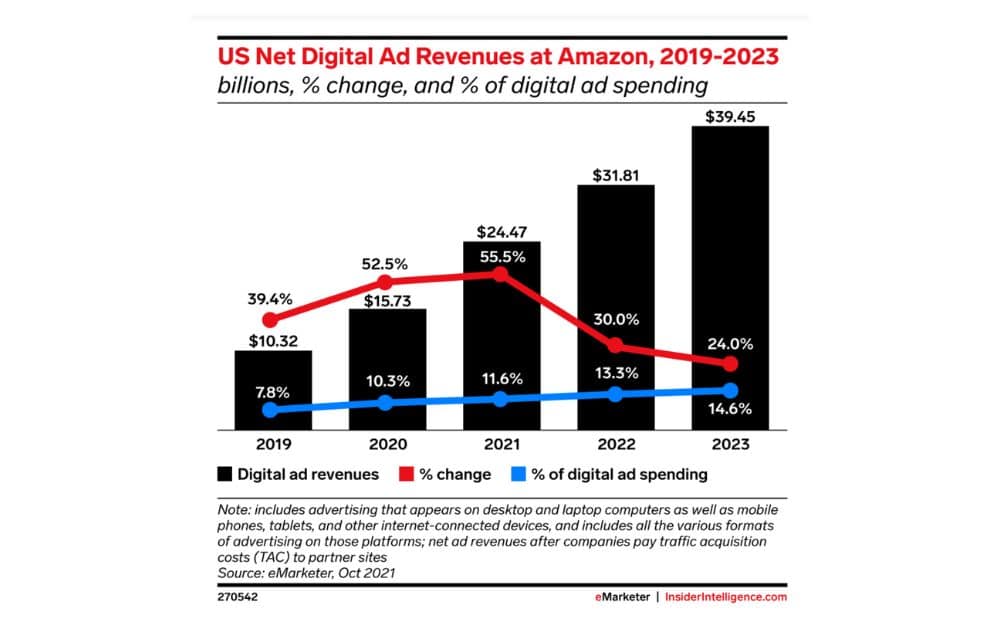
Bigger budgets chasing the same deal windows mean wasted spend if ads outpace supply or pricing. Share your promo calendar early so your vendor manager can secure deal slots and phase POs.
- Best practice. Build a one-row “promo brief” per ASIN (dates, target price, inventory cover, ad budget, hero keywords).
Know when to loop in an Amazon senior vendor manager
Most problems resolve at the vendor manager level when you present facts, attempted fixes, and a clear ask. For bigger bets, however, the vendor manager may involve an Amazon senior vendor manager to widen the lane. These situations may include:
- Major launches
- Cross-country distribution
- Large Co-op negotiations
Keep escalations short, structured, and solution-oriented so leadership says “yes” faster. Then route outcomes back into the weekly plan.
- Best practice. Use a three-slide escalation: (1) issue + impact, (2) attempts to fix, (3) proposed options with pros/cons.
Treat retail readiness like a launch checklist
Conversion lives and dies on the product page, and your vendor manager will push for clean titles, strong images, A+ content, and accurate attributes. Sometimes, returns are reduced and ratings increase with a few tweaks in small details, like:
- Size charts
- Compatibility notes
- Lifestyle shots
Prioritize your top ASINs, fix obvious gaps, and refresh visuals ahead of peak moments. It also pays to make content changes measurable by tracking before conversion and after conversion.
- Best practice. Run a quarterly “Top 20 ASINs” content audit and ship all fixes two weeks before major events.
Negotiate with data, not vibes
When engaging in discussions, ensure you’re prepared with landed-cost math, freight assumptions, and realistic promotional ROI, rather than relying on your gut feel.
Your vendor manager must hit category margin targets; you protect unit economics by knowing your floor price and the trade-offs you can make. If packaging changes or your MOQs lower cost, negotiate for something tangible in return, such as:
- Deeper or more stable buys
- Better merchandising
- Deal placement
Document every give/get so both sides remember why the decision was made.
- Best practice. Partner with an expert like AMZ Advisers to build a comprehensive negotiation package. This includes current versus proposed margin by ASIN, funding scenarios (base/best/worst), expected volume, and operational constraints. With expert ecommerce advice in every step, you can get the best position at the negotiating table.
The Bottom Line
Your Amazon vendor manager connects the dots: forecasting, POs, retail readiness, compliance, promos, and analytics. That process helps ensure that every buy and every deal slot actually moves the needle.
Get the rhythm right, and Amazon Vendor Central starts acting like a growth engine for your IP brand.
Author
 Carla Bauto Deña is a journalist and content writer producing stories for traditional and digital media. She believes in empowering small businesses with the help of innovative solutions, such as ecommerce, digital marketing, and data analytics.
The post How Vendor Managers Can Help Your Brand appeared first on AMZ Advisers.
Competitive External Price Issue
Hello,
I work for a manufacturer in the pet industry. We sell 3P on Amazon, and 1P with Chewy. Every time I do a price discount on Amazon, Chewy will match it. So for instance, I had 10% off our retail price from 10/22-10/27 on Amazon, and once Chewy saw that discount, they also put the products 10% off on their platform.
Now today, much of my catalog is suppressed because the “external” price is showing as 10% cheaper than my price on Amazon. But it’s not correct. Chewy has flipped back to the regular retail price (the exact same as Amazon).
I’m not sure how to handle this in the future. The sales bump from the price discount hardly feels worth it when my ASINs immediately get suppressed once the sale ends. I can submit cases to have the external price re-checked, but it takes up to 3 days. It’s just not worth it to do a sale and then get crushed with suppressions at this point..
submitted by /u/RowOk2483
[link] [comments]
Competitive External Price Issue
Hello,
I work for a manufacturer in the pet industry. We sell 3P on Amazon, and 1P with Chewy. Every time I do a price discount on Amazon, Chewy will match it. So for instance, I had 10% off our retail price from 10/22-10/27 on Amazon, and once Chewy saw that discount, they also put the products 10% off on their platform.
Now today, much of my catalog is suppressed because the “external” price is showing as 10% cheaper than my price on Amazon. But it’s not correct. Chewy has flipped back to the regular retail price (the exact same as Amazon).
I’m not sure how to handle this in the future. The sales bump from the price discount hardly feels worth it when my ASINs immediately get suppressed once the sale ends. I can submit cases to have the external price re-checked, but it takes up to 3 days. It’s just not worth it to do a sale and then get crushed with suppressions at this point..
submitted by /u/RowOk2483
[link] [comments]
How many of working on Amazon wholesale in 2025?
Looking to gain learning and experiences, I have just recently stepped into the Amazon wholesale USA Market.
How do you take brand approvals? Do you go directly with brands or via distributors??
How to run a profitable wholesale account profitably in the long-run?
Now, What’s the right roadmap and process to follow in 2025 to run a profitable wholesale store on Amazon.
Looking forward to hearing multiple experiences.
submitted by /u/RunWaste9225
[link] [comments]
Amazon Advantage Application Timeline
Anone go through the Amazon Advantage Application recently who can share the timeline for approval? FAQ says to expect up to 2 weeks. It has now been longer than that but I’ve seen anecdotes that it has taken months in some instances.
submitted by /u/TonyD00
[link] [comments]
Amazon Advantage Application Timeline
Anone go through the Amazon Advantage Application recently who can share the timeline for approval? FAQ says to expect up to 2 weeks. It has now been longer than that but I’ve seen anecdotes that it has taken months in some instances.
submitted by /u/TonyD00
[link] [comments]
How many of working on Amazon wholesale in 2025?
Looking to gain learning and experiences, I have just recently stepped into the Amazon wholesale USA Market.
How do you take brand approvals? Do you go directly with brands or via distributors??
How to run a profitable wholesale account profitably in the long-run?
Now, What’s the right roadmap and process to follow in 2025 to run a profitable wholesale store on Amazon.
Looking forward to hearing multiple experiences.
submitted by /u/RunWaste9225
[link] [comments]
How to Start an Amazon Business: Jasim’s Story

When most people think of starting an Amazon business, they imagine needing tens of thousands of dollars, deep industry knowledge, or insider connections. But for Jasim, an 8-figure Amazon seller, the journey began with something far simpler: a box of free textbooks from a college library.
Within days of listing those books, sales trickled in. That small experiment grew into a multimillion-dollar operation spanning multiple categories, warehouses across the U.S., and a dedicated team in the States and abroad. In this guide, we’ll walk through Jasim’s story, the strategies behind his growth, and the lessons he shares with new sellers.
Overview
Starting Small: From Free Books to a Business
Back in 2017, while studying accounting in Minnesota, Jasim and a friend stumbled on free textbooks at a college library. Skeptical at first, he changed his mind when the first sales came through.
Curiosity turned into research, thrift stores, Goodwill, YouTube tutorials, and soon he was sourcing books strategically. The textbook hustle evolved into structured online arbitrage and later branched into electronics, apparel, and more.
Turning Patterns Into Profits
One early breakthrough: seasonal textbook price swings. Prices dip mid-semester and spike before a new term. Jasim bought low, held, then sold into demand, creating a repeatable profit loop.
He even wrote a book on textbook arbitrage. While he later diversified, the principle holds: watch market cycles, books, shoes, even sprinkler systems.
Scaling Up: Warehouses, Teams, and Systems
Six years later, the one-book experiment became an operation with multiple U.S. warehouses and a 40–50 person team across the U.S. and Jordan.
Amazon is risky, competitive, and unpredictable. What worked for Jasim:
- Building relationships: thrift stores and suppliers for consistent sourcing.
- Outsourcing strategically: delegating to family and trusted team members.
- Investing in software tools: e.g., BQool Repricer to compete in fast-moving categories.
Margins evolved too. Early textbook flips hit 400–500% ROI. At scale, the target shifted to 20–25% ROI, trading higher volume and cash flow for lower margins.
Smart Sourcing Strategies
Sourcing sits at the heart of Jasim’s success. Core approaches:
- Build Relationships: Partner with thrift stores or donors directly to cut out middlemen and raise margins.
- Think Seasonally: Buy when demand is low (e.g., sprinklers in winter), sell in peak season.
- Leverage Amazon Itself: Source discounted products from Amazon or major retailers and resell profitably.
His team also runs a private leads list, sharing profitable OA deals with members via Telegram.
The Role of Repricing Software
As the catalog expanded into shoes and electronics, manual repricing couldn’t keep up. Enter BQool, which updates prices every few minutes to stay competitive for the Buy Box.
Recent features like conditional repricing are clutch: rules based on inventory age and sell-through, price aggressively on older stock and hold margins on fresh units. Result: higher Buy Box win rate, more sales, and hours saved each week.
Lessons Learned: Jasim’s Top 3 Tips
- Seek Help & Keep Learning: Use free resources, communities, and paid courses if it fits your budget.
- Be Patient: Cash cycles and sell-through vary; setbacks happen.
- Specialize First: Master one category or model before expanding.
Challenges of Running a Global Team
With operations in the U.S. and Jordan, there are pros and cons:
- Challenges: Time zones and slower comms can delay work.
- Advantages: Cultural alignment, strong talent, and meaningful opportunities for the team.
Importantly, the overseas team isn’t just “virtual assistants.” They’re skilled professionals critical to execution.
Beyond Amazon: Diversifying Into New Ventures
Amazon remains the core, but Jasim’s family has branched into car rentals and real estate, adding stability and new growth paths.
Still, Amazon has been life-changing and remains his main business passion.
Conclusion
Jasim’s journey shows how big things grow from humble starts. From free textbooks to an 8-figure Amazon brand with a global team, the playbook is clear:
- Don’t overthink the start, test low-risk products.
- Build systems, relationships, and patience as you grow.
- Use tools like BQool to stay competitive in a fast-moving marketplace.
The post How to Start an Amazon Business: Jasim’s Story appeared first on BQool Blog.
Amazon lowered my price by 37%
Just saw an order for 4 units of Xmas cookies but AM lowered the price by 37%. I did not set a business price or offer quantity discounts. When I click on “see other sellers” 1/2 of them are also lowered form 10-37% and mine shows the correct price. When I click to ship the order it sold at the lower price.
Is this a promotion? Nothing on my end to indicate that. These are Merchant filled and obviously I don’t want to be selling at this ridiculous price.
10 plus years here and never seen this, open a case I guess. The forums gave no results.
submitted by /u/Nick98368
[link] [comments]

