
Don’t have money to pay balance
TLDR: Will Amazon wait until next settlement date to attempt a charge to pay a negative balance AFTER it failed today? If not, will I lose access to account leaving me unable to ship open orders?
Ran into some tough times and the timing around an ad invoice has made it so that we had an $800 shortfall on settlement date. We were expecting a $300 shortfall and our debit card had the balance to pay it. Because Amazon tried to charge $800 it was denied. Apparently, they then try a $0 charge which my bank denied due to fraud protection. When that happened, Amazon restricted my account. I got that corrected and have access to my account again.
Now, the account shows -$800 total balance. When I go to Payments, it shows that $800 will be charged to my account on next settlement date, 11/5. While that would be great, I’m pretty sure I remember this happening awhile back and they did actually attempt that charge again a few days later, not waiting until that settlement date.
I’ve turned off my ads and gone into vacation mode because I worry about getting locked out of my account with any open orders. Ideally, I’d rather continue to sell as that would help pay balance down.
Any ideas on the best course of action? Will they attempt to charge that $800 before the settlement date? What happens if they try the charge again in a couple of days and it gets denied? One of my biggest concerns is how do I fill open orders if I can’t access my account?
I don’t have any other card available. And I know, I need to be more responsible. I thought we had it covered and then our advertising spend jumped past it’s payment threshold an hour before settlement.
Thanks.
submitted by /u/tommydearest
[link] [comments]
How to Set Your Amazon Online Store Apart
For successful sellers, an Amazon online store is a branded space where trust, design, and storytelling all come together. In a marketplace crowded with countless items, credibility carries as much weight as presentation.
In fact, Amazon Transparecy has already confirmed the authenticity of over 2.5 billion product units, proving how crucial credibility is to winning customer confidence.
When shoppers know your brand is genuine and your store is thoughtfully built, they’re far more likely to stop scrolling, explore your catalog, and complete a purchase.
What is an Amazon Storefront?
An Amazon storefront is a branded hub where sellers can showcase their products in a structured and visually engaging way. Similar to a personalized shop window that highlights your brand’s identity, it acts as a curated space with:
- Banners
- Categories
- Rich visuals
Instead of sending shoppers through scattered listings, you can use an Amazon Store to bring everything together in one immersive, shoppable destination. This makes it easier to showcase your brand story, highlight best-sellers, and guide customers to explore your full range.
For instance, here’s the storefront of Anker, well-known for its consumer electronics products:
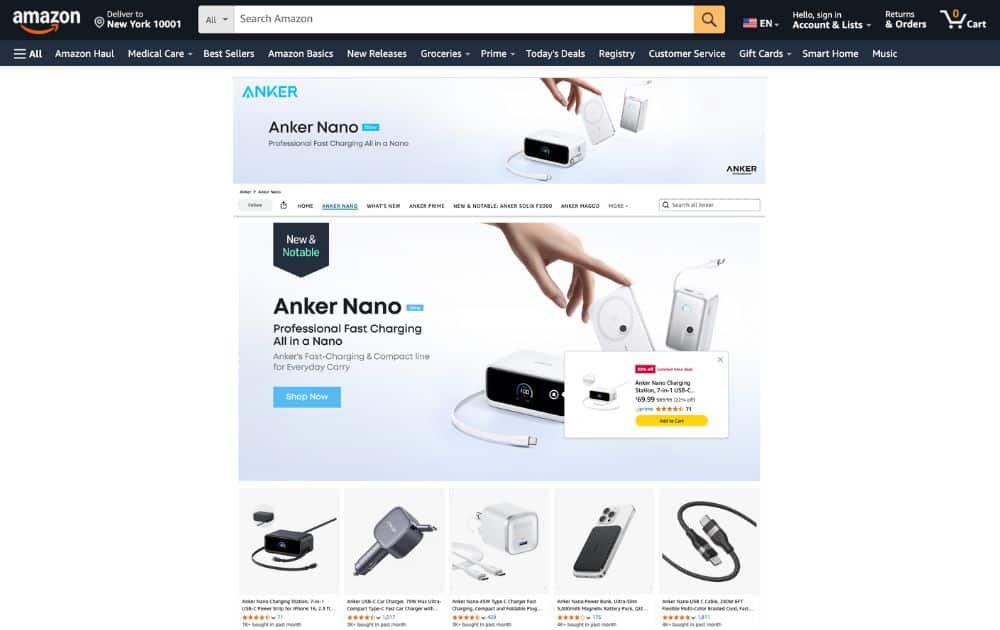
The storefront highlights a featured product, a category menu, and a search bar. You’ll also see a shoppable image, where each tagged product can be clicked directly to view details or purchase.
Further down the page, you’ll see product comparison charts, lifestyle banner images with copy, and product tiles.

When you build an Amazon online store, you’re not just making your products accessible, but you’re crafting an environment where credibility and design help close the sale. That’s why sellers who prioritize Amazon store creation and optimization often see stronger engagement, higher conversion rates, and repeat business.
By investing the effort to create an Amazon Store, you’re giving customers a polished, reliable experience that builds that trust.
Advantages of a Branded Amazon Online Store
With the right Amazon storefront setup, you can transform a simple product page into a mini website. The advantages of establishing a branded Amazon online store include:
Building Consumer Trust
Trust stands out as a key driver of competitiveness. According to recent research, 78% of consumers say brand trust is very important when making purchase decisions. The majority—90%—say they are more willing to spend with a company they view as reliable.
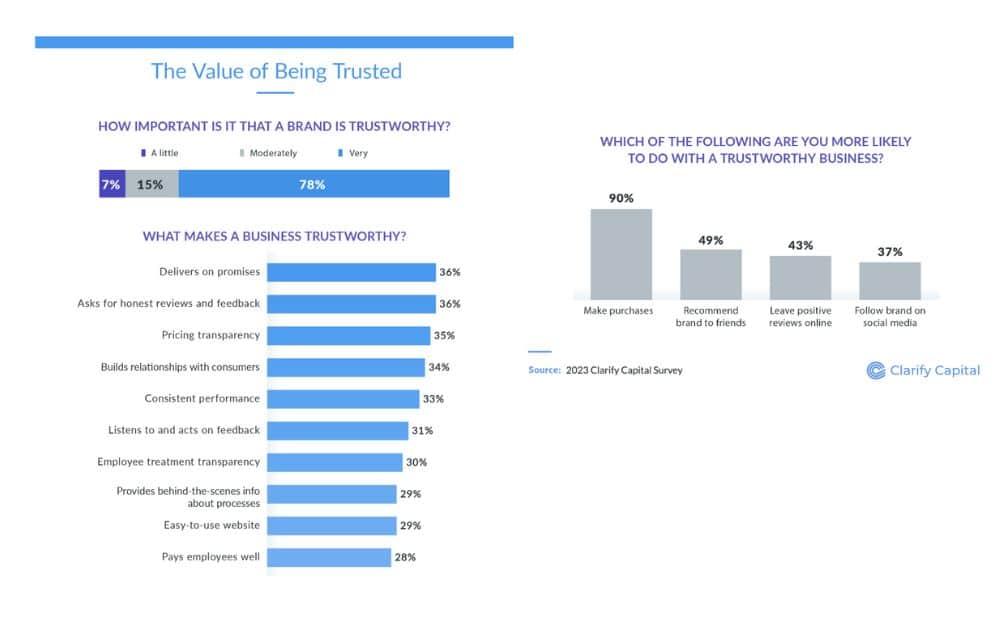
By combining professional branding, streamlined navigation, and straightforward product descriptions, your storefront conveys reliability from the start.
Enhanced Shopping Experience
When you make an Amazon storefront, you can guide shoppers through a curated experience. Instead of bouncing between scattered product listings, visitors can browse collections, view lifestyle imagery, and compare product specs in one place. This seamless navigation improves user experience and keeps customers engaged longer.
Stronger Conversion Rates
Amazon store optimization strategies like adding shoppable images, mobile-friendly layouts, and seasonal updates, directly improve sales performance.
Stores that are regularly refreshed have been shown to see higher engagement and repeat visits, proving that an updated brand space makes a measurable difference.
Marketing Integration
A branded storefront doubles as a marketing asset. You can link Sponsored Brands Ads directly to your Amazon online store, promote your storefront URL on social media or email campaigns, and track traffic with Amazon’s Store Insights. Each tactic increases visibility and drives high-intent shoppers to your pages.
Take a look at Samsung’s Amazon store, which is a strong example of how a brand can turn its storefront into a marketing asset:

The storefront combines lifestyle photos, polished banners, and organized product tiles to showcase the brand’s newest launches. Each product tile is clickable, creating a seamless path from browsing to buying.
Amazon Storefront Requirements
To set up an Amazon online store, you’ll need to meet a few key storefront requirements. These steps make sure your brand is qualified to design, customize, and publish a professional-looking storefront.
Brand Registry Enrollment
The main Amazon storefront requirement is to enroll in Amazon Brand Registry. You’ll need a registered trademark to move forward. Once enrolled, you gain access to Store Builder, which is the tool that lets you create and edit your storefront.
Professional Seller Account
You need a professional seller account in good standing to be able to create an Amazon storefront. This shows Amazon that your business is established and trustworthy.
Product Catalog Readiness
You’ll need a catalog of products that can be grouped into categories. To make your storefront more appealing, you’ll need to have:
- Strong images
- Accurate titles
- Product details
Creative Assets
Strong creative elements elevate a basic storefront into a polished, immersive shopping environment. To create a customized store, you should prepare:
- High-quality visuals
- Lifestyle photography
- Banners
When these Amazon storefront requirements are in place, you can move from simple listings to a polished storefront that strengthens your credibility and builds trust with customers.
Creating an Amazon Storefront
Once you’ve met the requirements, the next step is creating an Amazon storefront that feels professional and true to your brand.
Amazon’s Store Builder gives you an intuitive drag-and-drop interface, which means you don’t need design skills to put together a polished layout. What matters is how you organize your products and visuals to guide shoppers naturally from discovery to purchase.
Choose a Template
Amazon provides several pre-built templates for different product ranges. Regardless of how many products you offer, the right template should make your catalog easy to navigate and understand.
Add Branding Elements
Upload your logo, banner images, and lifestyle photography. This is where you shape the look and feel of your storefront so it reflects your brand identity.
Structure Your Pages
Break your storefront into logical categories or collections. These could be collections like “Best Sellers,” “New Arrivals,” or “Bundles.” Clear navigation makes it easier for customers to explore and reduces the risk of them bouncing out.
Integrate Product Tiles and Shoppable Images
Make your storefront interactive by adding product tiles and shoppable images. These features let customers see your items in context and click directly to product detail pages.
Preview and Optimize for Mobile
Data tells us that mobile ecommerce (sometimes called m-commerce) is projected to account for 59% of retail ecommerce sales in 2025. That said, it’s crucial to always preview your storefront on a phone or tablet.
Ensure your banners are readable, navigation is simple, and calls to action appear above the fold.
Strategies to Differentiate Your Store
Tell a Brand Story Through Visuals
Shoppers are more likely to connect with a brand that feels personal. Use banners, lifestyle photography, and short videos to communicate not just what your products do, but how they fit into your customers’ lives.
- Best Practice. Always ensure visuals are consistent in tone and style across your storefront to build brand recognition.
Create Organized Product Collections
A cluttered storefront drives customers away. Group your products into collections like “Best Sellers,” “New Arrivals,” or “Travel Essentials” so shoppers can navigate easily.
- Best Practice. Limit each page to a clear theme—too many categories on one page can overwhelm shoppers.
Use Shoppable Images and Comparison Charts
Make browsing interactive with images and tables that highlight features and allow customers to click directly to purchase. This reduces friction and makes decision-making faster.
- Best Practice. Keep comparisons simple, focusing on 3–5 key features like size, power, or compatibility.
Optimize for Mobile-First Shoppers
With mobile making up the bulk of Amazon traffic, your storefront should be optimized for smaller screens. Use simple fonts, clean banners, and CTAs that show up right away.
- Best Practice. Test every page on multiple devices before publishing to ensure a seamless experience.
Keep Your Storefront Updated
Customers notice when your storefront feels fresh. Regular updates with seasonal collections, product launches, or holiday promotions keep visitors engaged and signal that your brand is active.
- Best Practice. Update your storefront at least once every quarter to maintain relevance and encourage repeat visits.
The Lowdown
An Amazon online store gives your brand a permanent presence in the busiest shopping marketplace. With the right Amazon storefront setup, you can move beyond scattered product listings and create a polished, immersive experience that drives repeat purchases.
If you need more guidance on building a solid ecommerce business, partner with experienced experts like AMZ Advisers to create a storefront strategy tailored to your business goals.
Standing out on Amazon comes from intention, strategy, and continuous improvement. Let’s start building today, and turn your storefront into one of your brand’s most powerful marketing assets.
Author
 Carla Bauto Deña is a journalist and content writer producing stories for traditional and digital media. She believes in empowering small businesses with the help of innovative solutions, such as ecommerce, digital marketing, and data analytics.
The post How to Set Your Amazon Online Store Apart appeared first on AMZ Advisers.
Business reports still not available on seller central.
Good morning!
Are you still having a lag on the data update in the Seller Central Business Reports?
submitted by /u/ThePhoenix74
[link] [comments]
Business reports still not available on seller central.
Good morning!
Are you still having a lag on the data update in the Seller Central Business Reports?
submitted by /u/ThePhoenix74
[link] [comments]
What to do here? Edit listing or create new one?
One of our products – a 400ml shampoo – is changing size as we are offering it in a smaller package instead.
What do we do on the Amazon side of things?
Is it possible to edit the listing and update the GTIN on gs1 uk (this is what Amazon support recommended) –
Or do we have to create a new GTIN, delete this listing, and create a new one?
We are also registered in Brand Registry, so don’t know if that would need to change too?
Thanks
submitted by /u/IllustriousLibrary8
[link] [comments]
What to do here? Edit listing or create new one?
One of our products – a 400ml shampoo – is changing size as we are offering it in a smaller package instead.
What do we do on the Amazon side of things?
Is it possible to edit the listing and update the GTIN on gs1 uk (this is what Amazon support recommended) –
Or do we have to create a new GTIN, delete this listing, and create a new one?
We are also registered in Brand Registry, so don’t know if that would need to change too?
Thanks
submitted by /u/IllustriousLibrary8
[link] [comments]
Order auto-cancelled by Amazon after direct truck delivery – $41,998.80 balance unpaid despite confirmed receipt
Hey everyone, I’m hoping someone here has dealt with something similar or can point me in the right direction.
We recently fulfilled a large order that shipped via direct truck delivery – no parcel carrier, no standard tracking number. Unfortunately, Amazon auto-cancelled the order because a tracking number wasn’t uploaded, even though the shipment was delivered, received and signed for (we have the Bill of Lading and all documentation).
The kicker is, it all shipped to a new Amazon AWS warehouse for use.
Here’s the situation in short:
-The shipment was delayed while confirming the correct delivery address and phone number. -Once verified, our warehouse shipped the units directly via truck. -Since it was a direct freight shipment, no tracking number was generated or uploaded. -Amazon’s system automatically cancelled the order for “missing tracking.” -The delivery was completed and confirmed by the receiver (we have a signed BOL). -The order cancellation left an unpaid balance of $41,998.80 for goods already delivered. We’ve reached out to contacts at Amazon and SellerCentral support to try to escalate, but so far, there’s no clear path for payment resolution since the order is marked “cancelled.”
Has anyone here experienced a similar situation where Amazon auto-cancelled a freight order post-delivery?
-How did you get Amazon to recognize the shipment and release payment? -Is there a specific internal team or escalation route (Payments / Vendor Operations / Freight) that can handle this? We’re a small business, and this kind of issue – almost $42K in delivered goods – is a huge hit for us.
Any insight, escalation contact or next-step advice would be hugely appreciated.
submitted by /u/dmjarv2
[link] [comments]
Order auto-cancelled by Amazon after direct truck delivery – $41,998.80 balance unpaid despite confirmed receipt
Hey everyone, I’m hoping someone here has dealt with something similar or can point me in the right direction.
We recently fulfilled a large order that shipped via direct truck delivery – no parcel carrier, no standard tracking number. Unfortunately, Amazon auto-cancelled the order because a tracking number wasn’t uploaded, even though the shipment was delivered, received and signed for (we have the Bill of Lading and all documentation).
The kicker is, it all shipped to a new Amazon AWS warehouse for use.
Here’s the situation in short:
-The shipment was delayed while confirming the correct delivery address and phone number. -Once verified, our warehouse shipped the units directly via truck. -Since it was a direct freight shipment, no tracking number was generated or uploaded. -Amazon’s system automatically cancelled the order for “missing tracking.” -The delivery was completed and confirmed by the receiver (we have a signed BOL). -The order cancellation left an unpaid balance of $41,998.80 for goods already delivered. We’ve reached out to contacts at Amazon and SellerCentral support to try to escalate, but so far, there’s no clear path for payment resolution since the order is marked “cancelled.”
Has anyone here experienced a similar situation where Amazon auto-cancelled a freight order post-delivery?
-How did you get Amazon to recognize the shipment and release payment? -Is there a specific internal team or escalation route (Payments / Vendor Operations / Freight) that can handle this? We’re a small business, and this kind of issue – almost $42K in delivered goods – is a huge hit for us.
Any insight, escalation contact or next-step advice would be hugely appreciated.
submitted by /u/dmjarv2
[link] [comments]
Amazon’s Hidden Trust Score: 7 Ways to Protect Your Account Before It’s Too Late
 The Hidden Game Behind Amazon Account Health
You might have perfect metrics on your Seller Central dashboard — yet still find yourself facing suppressed listings, delayed approvals, or a sudden drop in Buy Box wins.
That’s because Amazon doesn’t just measure what you see. Behind every seller account is a hidden Amazon trust score, an internal metric that evaluates how reliable, consistent, and compliant you appear compared to other sellers.
Amazon’s algorithms use that invisible data to decide everything from how often you’re shown in search results to how quickly support responds when you file a case. And the scary part? You’ll never see the number — only the consequences.
Let’s break down what Amazon’s hidden trust metrics really are, how they affect your business, and seven ways to protect your account before it’s too late.
What Is Amazon’s Hidden Trust Score?
Amazon’s “trust score” is an internal ranking that assesses seller reliability and long-term risk.
Think of it like a credit score — your visible metrics (order defect rate, late shipment rate, cancellation rate) are just the public-facing summary. But Amazon’s system tracks dozens of deeper behavioral and sentiment-based factors behind the scenes.
These unseen data points include:
- Variability in sales and returns patterns
- Buyer sentiment in messages and feedback
- Listing edit frequency and pricing behavior
- Dispute resolution consistency
- AI-based analysis of your buyer-seller interactions
When your hidden trust score drops, Amazon may throttle your visibility, restrict shipping options, or escalate your account for review — even if your visible metrics look fine.
How Hidden Trust Metrics Impact Sellers
Here’s what low trust scores actually look like in practice:
 Suppressed listings with no clear policy violation
 Declining ad impressions even when bids stay constant
 Sudden Buy Box losses despite strong pricing
 Delayed FBA shipment approvals or restock limits
 Slower support responses from Amazon Account Health
Most sellers assume these are random bugs or algorithm quirks — but in reality, they often signal hidden trust degradation.
The good news? You can’t see the trust score, but you can influence it — if you know where to look.
7 Ways to Protect (and Boost) Your Amazon Trust Score
1. Monitor Buyer Sentiment — Not Just Feedback Counts
Amazon’s AI now scans buyer-seller message tone and review language to assess sentiment. Negative or frustrated wording, even in polite messages, can quietly hurt your trust profile.
Action Step:
Use tools like Feedback Genius to send Amazon-compliant review and feedback requests after each purchase, and to monitor new reviews and seller feedback in one place. Tracking customer sentiment trends helps you identify tone or service issues early — before they impact your trust score.
Pro Tip:
Avoid defensive language in message templates (“We can’t do that because…”). Use neutral phrasing (“Here’s what we can do instead…”).
2. Keep Your Performance History Consistent
Amazon’s trust algorithm values stability. Even short-term dips — like sudden cancellation spikes during Q4 — can lower your trust index for months.
Action Step:
Track your cancellation and late shipment rates weekly in Seller Central, and use SKU Economics to monitor fulfillment costs and timing trends. Identify SKUs that consistently underperform on delivery or defect metrics and phase them out.
3. Avoid Over-Editing Listings and Prices
Frequent listing edits, especially on high-volume ASINs, are red flags for manipulation. Amazon interprets too many title, image, or pricing changes as potential listing abuse.
Action Step:
Keep your product data organized and consistent across SKUs. Sudden catalog or pricing inconsistencies can raise red flags with Amazon’s automated trust systems — so review listings regularly for accuracy.
4. Track and Analyze Return Reasons
A high return rate doesn’t always hurt — but unclear or repetitive buyer reasons do. “Not as described,” “damaged,” or “missing parts” can signal quality or fulfillment issues that lower trust.
Action Step:
Regularly review the Return Dissatisfaction Rate (RDR) and pair it with SKU-level profitability insights in SKU Economics. Identify repeat offenders and update descriptions, packaging, or images accordingly.
5. Protect Against Sudden Behavior Changes
Amazon’s systems flag unusual account activity — such as a rapid jump in sales, sudden FBA storage use, or multiple bank account updates. These are the same signals Amazon associates with hacked or fraudulent accounts.
Action Step:
Keep your account access secure (2FA, consistent IP logins) and avoid unnecessary profile changes. Schedule catalog and inventory updates at predictable intervals to show system stability.
6. Audit Your Buyer-Seller Message Rate
Did you know a declining message rate can also hurt your trust metrics? Amazon assumes fewer buyer interactions mean less engagement or weaker service.
Action Step:
Focus on sending Amazon-compliant review and feedback requests after each purchase to maintain healthy engagement signals. Tools like Feedback Genius help automate these approved messages and track your incoming reviews and feedback in one place — giving you clear visibility into buyer sentiment trends.
7. Build a “Trust Shield” Routine
Create a weekly “trust audit” checklist to catch silent problems before they hurt your visibility:
 Review Voice of the Customer (VOC) dashboard Check recent refunds and reason codes Track performance trends via Seller Labs Profit Genius Rotate messaging templates quarterly Reconfirm pricing and catalog consistency
You can’t control Amazon’s algorithm, but you can feed it consistent, high-quality data — the same way Amazon’s own AI trains to trust predictable sellers.
How Amazon’s AI Makes Trust Scores More Dynamic in 2025–2026
Amazon’s Account Health and Voice of the Customer programs are now powered by machine learning models that constantly update seller reliability scores.
That means:
- A seller’s “trustworthiness” is recalculated daily, not quarterly.
- External signals like refund sentiment and chat tone carry more weight.
- Amazon support tools like “Account Health Assurance” use these predictive scores to pre-approve or deny reinstatement requests.
In short: if you wait until you see a warning, it’s already too late. Sellers who automate trust tracking and sentiment analysis early will be the ones Amazon’s AI rewards with priority visibility.
From Invisible Risk to Competitive Advantage
Amazon’s trust metrics may be invisible, but their effects are not.
The sellers who survive policy shifts, AI audits, and random suspensions aren’t necessarily the biggest — they’re the most predictable, data-driven, and trustworthy in Amazon’s system.
By monitoring sentiment, consistency, and behavioral signals with the right tools, you can turn Amazon’s invisible scoring model into your invisible advantage.
 Start building your trust shield today with Seller Labs Genius Bundle — automate your messages, track your SKUs, and surface performance risks before Amazon does.
Ready to protect your Amazon account — and build long-term trust with every sale?
Turn Amazon’s hidden trust metrics into an advantage using Seller Labs tools that monitor performance, automate feedback, and strengthen your account health.
For a limited time, get 30% off your first month — after your 30-day free trial.
Related Blogs
- Amazon Buyer-Seller Messaging Suspension: How to Address & Prevent It
Learn what triggers messaging suspensions and how to safeguard your account health. - Amazon Voice of the Customer Transition 2025: What Sellers Need to Know
Discover how VOC insights connect directly to Amazon’s hidden trust systems and what metrics to monitor. - Amazon Account Suspended? Here’s How to Fix It in 2025
Step-by-step guide for recovering from account suspensions and avoiding performance flags in the future. - Reduce Amazon Returns in 2025
Identify root causes of high return rates and protect your trust score by improving buyer satisfaction. - Amazon Feedback vs. Product Reviews 2025: Why Both Matter
Explore how buyer feedback impacts account health and long-term trust performance metrics. - Amazon Brand Registry 2025
Build brand reputation, boost customer trust, and gain more control over your listings.
The post Amazon’s Hidden Trust Score: 7 Ways to Protect Your Account Before It’s Too Late appeared first on Seller Labs: Amazon Seller Software and Platform.
Amazon US Seller Central Issues
Is anyone having problems today trying to update listings and what not? I am having all kinds of issues on my US seller account
submitted by /u/SparePirate5924
[link] [comments]

