
#500 – Big Amazon Review Change? & AM/PM 500th Episode | Weekly Buzz 2/27/26
Audio version above. Video version below
We’re back with another episode of the Weekly Buzz with Helium 10’s VP of Education and Strategy, Bradley Sutton. Every week, we cover the latest breaking news in the Amazon, TikTok Shop, Walmart, and E-commerce space, talk about Helium 10’s newest features, and provide a training tip for the week for serious sellers of any level.
In this episode, we’re switching things up with a fresh new look, and it’s the perfect time because this is Episode 500 of the AM/PM Podcast! Join us for a quick trip down memory lane as we celebrate nearly 10 years of the AM/PM Podcast and keep Manny Coats’ classic “How cool is that? Pretty cool, I think.” spirit alive.
Amazon reviews might be acting weird again, and it could be more than just the usual “dog page” error some shoppers have seen for months. In this week’s first story, Bradley shares a new test showing up on certain customer accounts where you can only view 10 reviews and then have to “apply” to see more, with Amazon promising an email response within five business days. If this expands, it could push more shoppers toward Rufus-style review summaries rather than reading reviews directly, and it could significantly impact how sellers and tools analyze review data. Especially after Amazon’s crackdown that removed Helium 10’s Review Insights. The good news: the Helium 10 team is working on a new, fully “Amazon-compliant” version that still provides high-quality review insights, and Bradley asks viewers to share in the comments if they’re seeing the same review limits and whether they think it could roll out more widely.
Amazon Seller Central: Account health tips for multiple selling accounts
https://sellercentral.amazon.com/seller-news/articles/QVRWUERLSUtYMERFUiNHVVFVQ1RDRThCSlJXUUhK
Helium 10 New Feature Alert! Check out the new upgraded Cerebro with new Sponsored Rank filters, so you can instantly spot keywords where multiple competitors are bidding top of search. It’s a fast way to see which terms rivals are fighting for most, and what should be on your ad radar next.
Amazon Seller Central: Upload Images now provides faster uploads and more flexibilityhttps://sellercentral.amazon.com/seller-news/articles/QVRWUERLSUtYMERFUiNHTE5HMzJYWTlMRExVUUha
Seamlessly reach relevant audiences with enhanced targeting capabilities from Amazon Ads
https://advertising.amazon.com/en-us/resources/whats-new/amazon-ads-introduced-enhanced-targeting-capabilities/
Next week brings a free AI monthly workshop with expert Andrew Bell showcasing Helium 10’s revamped Listing Builder, now an all-in-one “8-in-1” workflow that combines keyword research with AI optimization, including Rufus question targeting. Register here: http://h10.me/aim3226
If you’re in New York City, you can also catch Bradley in person at the ASGTG conference in Brooklyn on Thursday, March 5. It’s the 12th ASGTG event and his first time attending in eight years, so it’s a rare chance to meet up, network with sellers, and hear from a lineup of strong speakers. And yes, it’s famous for the food, apparently “Michelin-starred for an Amazon conference” levels, so come for the content and connections, and stay for the bites. Register here: http://h10.me/asgtg
Thanks for tuning in! Check back next week for more buzzing updates and strategies to help you stay ahead in e-commerce.
In episode 500 of the AM/PM Podcast and Weekly Buzz, Bradley talks about:
- 00:00 – Introduction
- 00:44 – Episode 500 of the AM/PM Podcast!
- 03:07 – Is Amazon Hiding Reviews From All Amazon Customers?
- 07:35 – Amazon Multiple Account Policy Clarification
- 10:45 – How To See What Keywords Competitors Are Advertising Top Of Search
- 13:06 – Amazon Seller Central Image Upload Update
- 14:27 – Faster Way to Search Amazon Brand Analytics
- 18:19 – Amazon Ads Display and Video AI Targeting
- 20:10 – Upcoming Webinar and New York Event
Transcript:
Bradley Sutton:
Did Amazon make a huge new review update where for most people reviews won’t even show up anymore? Amazon has clarified its multiple account policy. These stories and more on today’s weekly buzz. Oh, by the way, this is episode 500 of the AM/PM podcast. How cool is that? Pretty cool. I think. Hello everybody and welcome to another episode of the AM/PM podcast by Helium 10. I’m your host, Bradley Sutton, and this is the show that is our Helium 10 Weekly Buzz where you give you a rundown of all the goings on in the Amazon Tik TOK shop and e-commerce world. We let you know what new features Helium 10 has, and we also give a training tip of the week.
Bradley Sutton:
So let’s get started and see what’s buzzing. All right, guys, this is a new look. If you guys are watching this on the, our YouTube channel, uh, and the reason why we’re doing something a little bit new, we’re going to be testing out some new looks for the Weekly Buzz here because this is episode 500 actually of the AM/PM Podcast. Now, as you guys know, the, the Weekly Buzz has not been on the AM/PM podcast the whole time. It just actually started here a few months ago, but going back to the original guys, do you know when the very first ever AM/PM podcast was take a look here on a, it’s on our YouTube channel for AM/PM podcasts. It was almost exactly 10 years ago.
Bradley Sutton:
Guys, the first episode dropped or March 4, 2016 on YouTube and now here almost exactly 10 years later, we have episode 500. Now, you know, throughout the, the years, we have had a lot of episodes on the AM/PM podcast. It was actually, uh, around, uh, when was this looks like, uh, 2017 when we started doing a, uh, the special intro that Manny would do. And actually, if you notice, uh, since we took the AM/PM podcast, uh, as host back, you notice what we do something very similar. Uh, now also to try and keep the spirit of the origin of the AM/PM podcast. Remember guys, before Helium 10 was around, the AM/PM podcast was here, right?
Bradley Sutton:
The AM/PM podcast predates the, uh, you know, Helium 10. And so this is a, a big legacy for us here. And we want to remember the legacy that, you know, the founder of the AM/PM podcast, Manny coats did. That’s why we integrate some of his catchphrases. Like how cool is that? Pretty cool. I think. And some of the other like intros and things that, that, that he would do. So, uh, hope that we were able to, to keep the legacy. Now, interestingly enough, speaking about the Weekly Buzz, the very first time we uploaded Weekly Buzz on YouTube, I know we used to do it somewhere else too. We were doing it since like 2019. I can’t find where those videos were uploaded.
Bradley Sutton:
It might’ve been Facebook, but the first episode that we had launched of the Weekly Buzz on YouTube was actually three years ago on the Helium 10 channel, when we had different employees here at Helium 10, uh, doing a Weekly Buzzes. So we’ve come a long ways, guys, 500 episodes and I love doing the AM/PM podcast. And I love also doing the Weekly Buzz, letting you guys know what’s buzzing.
Bradley Sutton:
So let’s go ahead and hop into our first news story of the week. This is something that could be a Red herring or a false alarm but Part of this hasn’t going on for a while All right So for some of us as you guys know when you hit reviews on Amazon like here I’m in a Graceful by Design Bible verse mapping journal. I hit the review count, right? It goes to the bottom and I scroll down here and I hit see more reviews. I get a dog page.
Bradley Sutton:
All right, so a lot of people have this this has been going on for months but now, there’s something new where in a lot of accounts not everybody But Amazon is doing something where it says you can only see 10 reviews and you have to apply to be able to see more. I can’t do it on this browser But let me bring another window into the screen here just a moment But for other customers like here in my account, this is a different I have to have a different window here because it’s blocking me and unfortunately, I didn’t screenshot how this looked and I clicked on something I’ll try and explain what it was But when I click on that more reviews that more reviews page and scroll down here to the bottom I actually don’t get a button that says see all reviews, but there was a button right here that said hey, apply to see more reviews and I clicked on it and then it says your request to see more reviews has been sent. You’ll receive an email within five business days.
Bradley Sutton:
Remember this is all as a customer now, this is kind of shocking to me because First of all as you guys know Amazon made Helium 10 take away our Review Insights tool where we could just download all the reviews and you know Allow you to parse through it and see what the common words are Amazon in like their AI crackdown which is kind of ironic because our tool had nothing to do with AI But it just got caught up in there since we’re the biggest person who was looking at reviews. And so you guys know that Review Insights was taken away, but there’s still other, you know Chrome extension and stuff out there that we’re still doing it because they’re not as big as us And so like Amazon didn’t care too much about them. But here’s the thing like This is kind of a significant change if for a lot of customers Amazon is saying Oh, no, you can only see 10 reviews now. What does that mean?
Bradley Sutton:
That means they’d be pushing people to like Rufus Right to be able to see what the summary of the reviews is and that by itself first of all I cannot imagine this being permanent but like that to me is an FTC lawsuit waiting to happen, right? So I kind of scared you guys with you know with the whole headline and how I started this but my personal opinion and guys I do not know any more than the next person I don’t have any inside information from the Department of Amazon who’s doing this But I cannot imagine any world where Amazon is gonna say hey for everybody You can only see 10 reviews now like they would be sued to high heaven like what I can’t see what people think about this product, you know per se but who knows, you know, like I’ve been I’ve been wrong before about these things sometimes Amazon does stuff that might seem counterintuitive right but imagine a world where that does go through and customers can’t see those reviews anymore like we’re gonna see a big increase in people, you know finding out about Rufus and learning about it because through Rufus I mean even me even now I use Rufus sometimes to like summarize the reviews But then as Amazon sellers this would obviously affect you guys those of you who still use some kind of rudimentary means to download the reviews or you guys are doing what Amazon doesn’t want you doing and that you have an AI who goes and tries to download the reviews that might not be available to you anymore.
Bradley Sutton:
Well guys, you know regardless of what Amazon is gonna do from the instant that we stop or we stop showing review insights. We were working up on a backup plan. So myself and Vincent on our team, we’re gonna have something hopefully for you guys soon. And I say we as in like I don’t have anything to do. I’m like not a developer I just came up with the concepts and our hard workers at our team are the ones who actually put it into it to play. But we’re gonna have a brand new version of Review Insights soon That is a hundred percent Amazon compliant and gives you some insights into reviews without breaking Amazon’s policies about downloading reviews or trying to use AI to summarize them, etc. So be looking out for that, but let me know what you guys know or what you guys think in the comments below. Could this possibly roll out to everybody where Amazon’s just gonna stop Amazon buyers from being able to see a lot of reviews I mean for a while You’ve only been able to see like I don’t know 50 or 100 could it be going down even more time will tell I guess.
Bradley Sutton:
All right next up, this is just from a Seller Central and it’s entitled account health tips for multiple selling accounts. This has been clarified. I think, you know, pretty much like most people understand that. Yes, you can have multiple selling accounts. Those of us old schoolers remember that back in the day you couldn’t have multiple accounts and you’d have to like kind of hide it.
Bradley Sutton:
Now, that being said, it’s interesting to note about what this says here. It says here, our multiple accounts policy allows you to operate one account per region unless you have a legitimate business need for owning more. Right. But here is the situations. That’s a legitimate business deed. It says you may open separate accounts when you have distinct brands with different storefront names, manufacture products for separate companies or participate in programs, requiring separate accounts.
Bradley Sutton:
For example, if you’ve registered one brand that sells soap and another that sells pet food, you can maintain two accounts to simplify management. So if you guys want to see all of the details of the policy on your dashboard, we have a link right here down below. There is a link to the seller code of conduct that talks about multiple accounts, but here’s the part that’s important. This is not necessarily new. This is as old as time, as long as this policy has been around, but it’s something that’s a good reminder. It says here, learn how policy issues affect related accounts.
Bradley Sutton:
It says, if there’s a violation of our selling policies or the seller code of conduct for one account, all your related accounts may be impacted. Depending on the situation, we could cancel listings, suspend, deactivate accounts, suspend payments across all your selling accounts, right? So this is something that’s important to understand is yes, you can have multiple accounts, but still a lot of sellers, including myself, we take the same measures that we did back in the day when Amazon frowned more on multiple accounts.
Bradley Sutton:
And that is we keep our accounts completely segregated for this exact reason that, that they’re, that they’re talking about here. Basically, what does that mean? Segregated? When I launch a new Amazon account, if I don’t want to tie it to my other accounts, what I do is I usually get a remote server. You know, there are these like, it’s like renting a computer in another place. And that’s where I create, I log in remotely to that computer.
Bradley Sutton:
And that’s what I use to create the account. And then that’s the only place where I ever log in on an admin account, right? From the, from day one, from that account, what I do is I then make a sub account and now it’s the sub accounts that I log in on my personal computers and things like that, right? This is a way where, Hey, heaven forbid, something happens to one of my accounts. They’re not all hopefully tied together so that all my accounts all of a sudden get suspended. So it’s important to review these policies, guys, especially if you’re thinking of having multiple accounts or you do have multiple accounts.
But you know, some people might think I’m paranoid the way I do things, but I just don’t want any beef, you know, with Amazon. And so that’s why I do it that way.
Bradley Sutton:
All right, next up we have our new feature alert of the week. And this is in Cerebro our most used tool. You guys, a while back years ago, we have seen this feature where it’s called the advanced rank filter. And if those of you old school, you guys might have remembered, this was a feature that I actually dreamt like it was in a dream I had.
Bradley Sutton:
And then I took it to the product team and five months later it was, it was a tool that’s never happened before. I’m not sure it’s ever going to happen again, but it just shows you how much I live and dream and breathe Helium 10. But if you look here, the old, the, the one that was the dream filter was number of organic competitors and competitor organic rank.
Bradley Sutton:
Basically what that has meant is if we have like five competitors, I can say, Hey, show me the keywords where at least one and a max of two or whatever I want was ranking between one and 10 or one and five. So it’s like, Hey, who’s showing up organically at least once or multiple competitors are all in the top 10 or top 30 or top 100 or whatever. But what we never had was something for a sponsored ranks.
Bradley Sutton:
What if you want to know, Hey, out of all of these coffin shelves that I just put here into Cerebro, how many of them or what keywords have at least two of these competitors advertising top of search, like in the top like seven positions. All right. So what I would do here, these are our brand new filters under number of sponsor competitors on a put minimum two and competitor sponsored rank between one and seven.
Bradley Sutton:
And let’s see if there are any keywords here that are going to show up and look at that. There’s seven filter keywords, coffin shelf, large coffin, bookcase, coffin shelf or wall. Where is this data coming from? It’s coming from the sponsored rank count and average. And so as you can see, if I put my mouse over here, I can see that Helium 10 has detected multiple competitors, all advertising in the top of the search. And so this is a great way to be able to see, Hey, what are the most important keywords from an advertising point of view that my competitors are concentrating on? So I hope you guys can take this new feature for a test drive. I believe this is in all plans, Platinum and Diamond and above.
Bradley Sutton:
Next up another new update from seller central. They talked about this week entitled in this article, upload images now provides faster uploads and more flexibility. All right. So there’s an upload image section where you can do things in bulk, you know, as opposed to editing your listing one by one, and then going to the pictures tab, you can actually upload, uh, the, uh, you know, images.
Bradley Sutton:
Now this is not new, but what’s new? Well, now you can actually upload both multiple individual images. It says, and zip files, right? That’s pretty cool because like sometimes you might get zip files from your designers, right? And then you have to unzip it and then copy it to your desktop and then upload it. But now, no, you don’t have to you can upload a zip file directly to Amazon seller central. You also now have flexible file naming. Amazon says and simplified sibling ASIN management. What does that mean?
Bradley Sutton:
Well, let’s say you’ve got a listing that has a lot of variations, a lot of child items instead of one by one, adding the images for each one, maybe like coffin shelf, maybe, uh, you know, all of the images about the coffin gift box are the same. That’s what it is for my coffin shelf. Instead of having to upload it every single to every single color, I can take that one gift box image and upload it across like all of the siblings or all of the children, uh, listing. So if you guys want more information, check the link below.
Bradley Sutton:
All right, next up, we’ve got our strategy of the week and it is going to be handled by Carrie and she’s going to be talking about Amazon brand analytics.
Carrie Miller:
This is another powerful feature in Helium 10 that you’re not going to find anywhere else. So if you remember the 4th of July decorations product that we analyzed earlier, well we used historical data to see which keywords drove sales in past peak seasons. So what I want to do is take this a step further and we’re going to use brand analytics to, to get some historical data.
Carrie Miller:
So Amazon’s brand analytics shows us the top three most clicked and highest converting products for a given keyword. And it even tells us the conversion share, how many sales came from a specific search term. So, and again, with brand analytics, you need to make sure that your Helium 10 account is connecting connected to seller central and you have access to brand analytics in order to get this data.
Carrie Miller:
So again, it’s going to show the top clicked and top converted. Now what I have here is I actually have searched that top ASIN from the 4th of July and I’m basically checking for this week, the week of the 5th of January 5th to the 11th. And I’m not going to see a lot of product rankings for like 4th of July, but I have seen, I am seeing a lot of other things.
Carrie Miller:
Like I see patriotic decorations, red, white, and blue, patriotic party decorations. So there’s quite a bit of decorations actually being searched in January. But what if I wanted to go back and I want to see all of those, you know, basically keywords that this particular product is, you know, showing for up for in the top three clicked and top converted products.
Carrie Miller:
So I’m going to go to black box and I’m going to paste in the ASIN of that particular product again, and I’m going to just go here and I’m going to go back in time and I’m looking even for Memorial Day. So I want to see all those Memorial Day keywords even. So maybe I’ll just go, you know, May and all of these weeks and I actually can check all of these weeks instead of having to download this individual information and kind of figure out all the spreadsheets and kind of just sort through it all.
Carrie Miller:
And this would take hours and hours and hours before, but I’m just going to actually, I’m going to go through July or June. And so I’m going to just basically find all the keywords and I’m going to apply the filters. I want to find all the keywords where this product was ranked in the top three and top click converted.
Carrie Miller:
And it is actually going to show you what week. So week 21, week 22. So we’ve got red, white and blue decorations and where it’s ranking here. So we’ve got all of this incredible data. We’ve got 55 really highly important keywords for this product. You’ve got even firework decorations.
Carrie Miller:
So we’ve got patriotic birthday decorations, American parties. So people are having American parties, a lot of really great keywords, independence day, decorations, patriotic decorations. So you can find all of those keywords that this particular product is ranking for error, basically being the top click and top converted for this particular product.
Carrie Miller:
So why is this a game changer? Well, this data has always been available in seller central, but getting it took hours and hours of downloading, filtering, and sorting through millions of rows of keyword data. And honestly, I wasn’t really able to do it because it, it, every time I tried to download it, it would just take hours and hours.
Carrie Miller:
And I think you really needed a developer to do that. But with Helium 10, I get instant access to Amazon’s own insights, not just guesses, but actual clicks and conversions data straight from Amazon. And that’s it for this advanced strategy, a unique feature only in Helium 10. And it’s available to diamond plan members with brand registry. And it saves hours of manual work while uncovering hidden keyword opportunities.
Bradley Sutton:
Thank you very much, Carrie. That is one of the features that is used on our Diamond plan guys. Diamond is our most popular plan. Make sure to give it a test drive. Use code SSP20 if you guys are interested in signing up for the diamond plan once a month, you just get 20% off. You can cancel at any time, but brand analytics is one of the top features you cannot get anywhere else. Make sure to get the diamond plan so you can take advantage of that.
Bradley Sutton:
All right. Next article of the week is from Amazon advertising. It’s entitled seamlessly reach relevant audiences with enhanced targeting capabilities from Amazon ads. Now this is affecting a display video, an audio campaigns and product and in-market category. So this is an AI powered multi-signal intelligence is what Amazon is calling it to autonomously combined behavioral and contextual signals. I need to autonomously figure out what the heck this, these phrases mean.
Bradley Sutton:
This is a language to advance for me. And anyways, Amazon continues. It’s streamlines campaign setup and eliminates the need to create multiple line items for different targeting approaches. Now the first part is product targeting. It says it enables advertisers to reach shoppers in market for specific products by leveraging Amazon’s proprietary shopping signals to connect with audiences interested in complimentary products. All right.
Bradley Sutton:
So, you know, Amazon has tons and tons of data on how people shop and their behaviors and stuff. And so basically it’s using AI now to help your, you know, sponsor display product targeting campaigns to reach relevant audiences. So basically under the targeting tab, you are going to see a new button that says add targeting with AI.
Bradley Sutton:
And that is what, you know, this announcement is about now. Why is this important? Amazon says by leveraging Amazon’s proprietary shopping and search signals through AI powered optimization, advertisers can reach high intent audiences, whether they’re shopping for specific products, browsing categories, or engaging with content all while maintaining control over their targeting strategy.
Bradley Sutton:
All right. So as with almost anything that Amazon advertising comes out, it’s worth a try. Those of you using sponsored display and sponsored video, give it a try and let us know what you think.
Bradley Sutton:
All right. Next week, I believe the first one is going to be on March 2nd, which I believe is Monday or Tuesday. Guys, I am doing a special workshop with AI expert, Andrew Bell. We’re going to be talking about Helium 10’s game changing new listing, but why is it game changing? I don’t use that word. Always. It changes the game because the game before was all right, I need to make a listing. I have to run Cerebro regular search. I’m going to do Cerebro opportunity keywords.
Bradley Sutton:
I’m going to do historical Cerebro. I’m going to do an advanced rank filter in Cerebro. Kind of like the one I just showed you guys today. Now I go to Amazon brand analytics. Now let me go ahead and go into search, create performance. And you tie in all of these keyword data points. And then you create your listing with something with AI, perhaps that was, you know, created two years ago. Well, why the game has changed now is listing builder is now eight and one. You can do all of that in just one step, right?
Bradley Sutton:
And you, we have a completely revamped scoring system. I talked a little bit about this last week in the Weekly Buzz, but what we are going to do on Monday in this workshop, we’re going to show you the gold standard of what you should be doing when you’re creating a new listing or optimizing an existing one, leveraging both the most up-to-date best practices for Amazon SEO with AI. All right.
Bradley Sutton:
AI is going to create the listing for you, but it’s also being been designed by Andrew to help optimize for AI. For example, there’s a field now where you can enter ASINs and we will make sure that your listing answers the questions from Rufus for those ASINs. What are the questions that the Amazon AI algorithm, including Rufus asks about commonly about products?
Bradley Sutton:
We’re going to make sure that it’s still going to use all the keywords that you find in your keyword research, but now it’s going to make sure that your listing is written in a way where it is optimized also for AI. So guys, this is a super, super important workshop we’re doing. If you guys want to register it’s free of course,
Bradley Sutton:
h10.me/aim3226. All right. H10.me forward slash AIM. Uh, next week also in person, if you guys want to meet me, anybody in New York city, I’m going to be at the ASG TG conference, the 12th one for the first time in eight years, I am going to be there in Brooklyn, New York, Thursday, March 5th. If you guys want tickets, go to h10.me/asgtg. There’s going to be some great speakers there. This conference hands down has the best food that you’ve ever had. And an Amazon conference is like Michelin starred pretty much.
Bradley Sutton:
So, you know, come for the great talks, stay for the food, whatever the reason is, it’d be great to see you this Thursday. All right, guys, those of you watching on YouTube, let us know what you think of this new format. Uh, let us know in the comments below. You want us to tweak a little something. Let us know in the comments below. Thank you guys for tuning in. We’ll see you next week to see what’s buzzing.
Enjoy this episode? Want to be able to ask questions to Leo Sgovio live in a small group with other 7 and 8-figure Amazon sellers? Join the Helium 10 Elite Mastermind and get quarterly workshops, monthly training, and networking calls with Leo at h10.me/elite
Make sure to subscribe to the podcast on iTunes, Spotify, or wherever you listen to our podcast!
💰 Get Helium 10 with a special discount to start or scale your e-commerce business here: https://h10.me/h10
Want to absolutely start crushing it on eCommerce and make more money? Follow these steps for helpful resources to get started:
- Get the Ultimate Resource Guide from Bradley Sutton, Carrie Miller, and Shivali Patel for tools and services that he uses every day to dominate on Amazon!
- New to Selling on Amazon? Freedom Ticket offers the best tips, tricks, and strategies for beginners just starting out! Sign up for Freedom Ticket.
- Trying to Find a New Product? Get the most powerful Amazon product research tool in Black Box, available only at Helium 10! Start researching with Black Box.
- Want to Verify Your Product Idea? Use Xray in our Chrome extension to check how lucrative your next product idea is with over a dozen metrics of data! Download the Helium 10 Chrome Extension.
- The Ultimate Software Tool Suite for Amazon Sellers! Get more Helium 10 tools that can help you optimize your listings and increase sales for a low price! Sign up today!
- Does Amazon Owe YOU Money? Find Out for FREE! If you have been selling for over a year on Amazon, you may be owed money for lost or damaged inventory and not even know it. Get a FREE refund report to see how much you’re owed!
- Check out our other Amazon FBA podcasts including the Serious Sellers Podcast, as well as our Spanish and German versions!
- You can also listen to the AM/PM Podcast on YouTube here!

The post #500 – Big Amazon Review Change? & AM/PM 500th Episode | Weekly Buzz 2/27/26 appeared first on AM/PM Podcast.
The AI Gap Is Widening for Amazon Sellers— 5 Ways to Close It in 2026
It’s Monday Morning and You’re Staring at the Same Report You’ve Been Staring at Since 2019
You know the one.
The report you pull every week because you’ve always pulled it. You squint at the same columns. Sort by the same metric. Maybe build a quick pivot table if you’re feeling ambitious. Then you close the laptop and go put out whatever fire just showed up in your inbox.
And somewhere in the back of your mind, this thought keeps nagging: there’s something in here I’m not seeing.
That’s the AI gap Amazon sellers are facing right now — and a growing number have stopped staring and started closing it. They’re feeding their data into AI tools, asking questions they never thought to ask, and uncovering margin opportunities that have been hiding in plain sight for years.
Not because they suddenly got smarter. Because the AI can finally see what spreadsheets can’t.
Here’s the uncomfortable part: sellers in the same category, sitting on the same kind of data, have no idea those opportunities exist. They’re still pulling the same Monday report, still reacting to the same fires, still wondering why their margins keep tightening when revenue looks fine.
That’s the AI gap. And it’s not narrowing. It’s accelerating.
 Key Takeaways
• The AI gap isn’t about who has better tools — it’s about speed of insight. One seller finds margin-killing ASINs in 90 seconds. Another won’t see them until next quarter.
• AI retrieval accuracy jumped from 18% to 76% in early 2026. That’s why AI used to make up your data — and why it doesn’t anymore.
• Amazon launched its own Ads MCP Server (Feb 2, 2026) and is formalizing AI agent rules by March 4. MCP is now the standard — and Seller Labs already built one for your seller data.
• 63% of people using AI coding tools right now are not developers. The barrier isn’t technical skill — it’s asking the right questions.
• Five specific analyses you can run this week with your Seller Central data — each one under 30 minutes, with expected outcomes.
The AI Gap Amazon Sellers Face (And Why It’s Different This Time)
Every few years, a technology shift separates Amazon sellers into two groups. Sponsored Products did it in 2012 when most sellers dismissed paid ads as unnecessary. Enhanced Brand Content did it in 2016 when visual listings started crushing text-only competitors. Brand Analytics did it in 2019 when data-driven sellers suddenly had insights everyone else was guessing at. Each time, early adopters built advantages that late adopters are still trying to close.
The AI gap Amazon sellers are experiencing follows the same pattern — but it’s moving faster and compounding harder than any shift before it.
Here’s what the gap looks like inside a real Amazon business: one seller asks AI “which ASINs are losing money after all fees, FBA costs, ad spend, and COGS?” and gets an answer in 90 seconds. The other seller has never combined those four data sources fast enough to even ask. Those money-losing ASINs just keep bleeding, quarter after quarter, buried under revenue that looks healthy on the surface.
Same marketplace. Same data. Same 24 hours. Completely different outcomes.
And here’s what makes the AI gap Amazon sellers face different from PPC or A+ Content: it compounds. The seller using AI this week isn’t just getting faster answers — they’re making better decisions that generate better data that leads to even better decisions next week. It’s a flywheel. And the longer you wait to start spinning it, the harder it becomes to catch the sellers who already are.
Why AI Used to Fail You (It’s Not What You Think)
If you’ve tried AI and walked away disappointed — it wasn’t your fault.
Before early 2026, AI could retrieve the specific data point it needed from a large file roughly 18 to 26 percent of the time. One in five. You upload your product catalog, your campaign data, your shipping costs — and the AI is flying blind through most of it. When it can’t find the right number, it does what any overconfident new hire does: makes something up and presents it like fact.
That’s the mechanical reason every seller’s first AI experience ended the same way — gorgeous formatting, confident tone, specific numbers that looked incredible until you checked them against Seller Central and realized half were invented.
But there was a second problem: context collapse. Upload your Business Report, then your Search Term Report — by the time AI looks at file two, it’s forgotten file one. It was reading your business through a keyhole.
Three things changed in early 2026 that flipped this:
Context windows expanded from ~10,000 lines to 50,000 lines. Your entire catalog, every campaign, every margin calculation — loaded simultaneously. For the first time, AI can see your Amazon business the way you see it: as one connected picture.
Retrieval accuracy jumped from 18% to 76%. At smaller context sizes, 93%. The AI is actually finding real data to work with instead of filling in blanks.
AI started admitting when it doesn’t know. Instead of inventing your ACoS, it asks “which shipping zones are you referencing?” Instead of hallucinating margins, it says “I don’t see COGS for these ASINs — can you provide it?” That single change transforms AI from something you can’t trust into something you can verify.
Amazon Is Betting Big on Agentic AI (And You Should Pay Attention)
This isn’t just a third-party trend. Amazon is building an agentic AI infrastructure around its marketplace — and moving fast.
On February 2, 2026, Amazon Ads launched their MCP Server in open beta. MCP — Model Context Protocol — is the open standard that lets AI agents connect directly to data systems instead of relying on downloaded files. The fact that Amazon is building on MCP tells you everything about where the marketplace is heading: toward AI agents that connect to your real data in real time, not chatbots you copy-paste CSVs into.
And that distinction matters more than most sellers realize. A chatbot is a conversation. You upload a file, ask a question, get an answer. An AI agent is different. It connects to your Amazon account, your advertising data, your inventory systems — through MCP — and works across all of them simultaneously. It doesn’t forget your catalog when you ask about your ads. It sees everything at once because it’s plugged into everything at once.
Amazon also updated their Business Solutions Agreement effective March 4, 2026, introducing formal requirements for AI agents — they must identify themselves as automated systems and comply with a new Agent Policy. Amazon isn’t just allowing AI agents. They’re writing governance rules for a marketplace that assumes agents are everywhere.
Their ad business grew 24% year-over-year to $17.7 billion. And 63% of people using AI coding tools right now aren’t developers — Collins Dictionary named “vibe coding” the Word of the Year. Vibe coding means describing what you want in plain English and letting AI build it. Amazon sellers are already using this approach to build custom scrapers, automate report generation, and create tools that would have cost thousands on Upwork six months ago.
The tools are live. The protocol is open. The rules are being written.
5 Ways to Start Closing the AI Gap This Week
The AI gap Amazon sellers deal with isn’t closed by one big move — it’s closed by small weekly habits. These aren’t hypothetical. Each one works with your existing Seller Central data and any AI tool. Under 30 minutes each.
1. Build the report you’ve been pulling manually — in plain English.
Stop downloading, reformatting, and pivot-tabling the same data every week. Describe the report you want to an AI agent: “Every Monday, pull my top 50 ASINs by revenue, calculate true profit after all fees, FBA costs, ad spend, and COGS, flag anything with margin below 15%, and sort by biggest margin decline week-over-week.”
This is vibe coding applied to your Amazon business. You’re not writing code — you’re describing an outcome. The AI builds the logic. Sellers who’ve done this say they’re saving 3-5 hours per week on reports they used to dread. The insight isn’t the report itself — it’s what you do with the hours you get back. (25 min to set up, then it runs itself)
2. Surface the exact keywords draining your PPC budget.
Export all campaign data — sponsored products, brands, display. Ask: “Which campaigns have ACoS above 40% with conversion below portfolio average? Which keywords are dragging them down?”
You’ll surface 5-15 keywords eating budget with near-zero return. Negating these typically recovers 10-20% of wasted ad spend in the first week. (20 min)
3. Unmask the stealth money-losers hiding in your catalog.
Pull your FBA fee preview report and profitability data. Ask: “After all Amazon fees, FBA costs, ad spend, and COGS — which ASINs lose money on every sale?”
Most sellers find 3-8 SKUs that look fine at the revenue level but are net negative after all costs. These are stealth profit killers — invisible until you combine enough data sources to expose them. (20 min)
4. Cross-reference your return reasons against your listing content.
Download your FBA Returns Report and your current listing copy for your top 20 ASINs. Upload both. Ask: “Which return reasons suggest a gap between what my listing promises and what the customer received? Where are the most common ‘not as described’ or ‘wrong item’ returns concentrated?”
Most sellers look at return rates as a cost of doing business. But when AI cross-references the actual return reasons against your bullet points, images, and A+ Content, it surfaces the specific listing claims causing the returns. One mismatched dimension in a bullet point. One lifestyle image that implies a use case the product doesn’t support. Fix those and you’re not just reducing returns — you’re improving conversion from buyers who would have bounced anyway. (20 min)
5. Ask the one follow-up that makes AI trustworthy.
After ANY analysis, ask: “What assumptions did you make? Which data points are you least confident about?”
Current models flag uncertainty instead of fabricating justifications. This single habit transforms AI from a black box into a transparent tool you verify and act on. Use it every time. (10 seconds)
The Gap Compounds. That’s What Makes It Dangerous.
Every week a seller closes the AI gap by using AI to surface insights, they’re making decisions that generate better data, which surfaces better insights, which leads to better decisions. It’s the Amazon flywheel applied to your own operations.
Every week a seller sticks with manual methods, the gap doesn’t stay the same. It widens. Because they’re not just falling behind on speed — they’re falling behind on the quality of decisions being made on the other side.
The data is the same. The marketplace is the same. The difference is who’s asking — and whether their AI can actually find the answer.
Frequently Asked Questions
How far behind am I if I haven’t started using AI yet?
A PayPal-backed survey of 1,000 small businesses found 25% already use AI and over 50% are actively exploring it. Among Amazon sellers specifically, the adoption curve is steeper — AI-powered repricing, listing optimization, and ad management tools are becoming standard in competitive categories. The AI gap Amazon sellers worry about isn’t permanent — you’re not too late, but the window where “figuring it out” counts as an advantage is closing. The sellers who start this quarter will still be early. The ones who wait until Q4 probably won’t be.
Is Amazon’s AI (Rufus) helping or hurting sellers?
Both. Rufus is changing how customers discover and compare products, which means listings optimized for conversational questions outperform keyword-stuffed listings. Customers who engage with Rufus convert at higher rates. But Rufus has also been documented misidentifying product features, making incorrect claims about materials, and surfacing competitor products unfairly. The sellers who understand how Rufus reads their listings can optimize for it. The ones who ignore it are losing visibility to an algorithm they don’t even know is filtering them out.
Can I close the AI gap with free tools or do I need to invest?
You can start for free. ChatGPT, Claude, and Gemini all have free tiers that handle CSV uploads and basic analysis. The five analyses in this article work with any of them. The gap between free and paid isn’t capability — it’s connection. Free tools require you to download, clean, and re-upload data every session. Paid tools like MCP servers connect your data directly so AI remembers your business and works with real-time numbers. Start free to prove the value, then decide if the time savings justify the investment.
How do I know if AI is actually giving me accurate answers about my Amazon data?
Three habits separate sellers who trust AI blindly from sellers who use it effectively. First, always ask AI to show its work: “What data points did you use to reach that conclusion?” Second, spot-check one number per session against your Seller Central dashboard. Third, ask “What assumptions did you make, and which data points are you least confident about?” If the AI can’t answer that question clearly, the answer it gave you isn’t reliable enough to act on.
Connect Your Amazon Data to AI
Stop Uploading CSVs. Connect Your Data Directly.
The Seller Labs MCP Server connects your Seller Central data to AI in real time. No downloads. No copy-pasting into chat windows. Your real sales, advertising, and profitability data — always live, always ready for conversation.
You bring the questions. Your data brings the answers.
For a limited time, get 30% off your first month — after your 30-day free trial.
Related Blogs
- This Amazon Seller Used AI to Turn a Shipping Mistake Into a $200K Strategy
How one seller uncovered a six-figure margin opportunity hiding in twenty years of shipping data. - Best AI Product Research Tools for Amazon Sellers (2026 Guide)
A breakdown of the top AI-powered research tools — including Amazon’s built-in options and third-party suites. - Best AI Repricing Tools for Amazon FBA Sellers in 2026
AI repricing isn’t optional anymore — here’s how the smartest sellers are protecting margins and winning the Buy Box.
What’s the one report you keep putting off? The one you know has answers buried in it but never gives them up fast enough? That’s probably where your biggest opportunity is hiding. And now, your AI can actually find it.
The post The AI Gap Is Widening for Amazon Sellers— 5 Ways to Close It in 2026 appeared first on Seller Labs: Amazon Seller Software and Platform.
where and how does someone buy returns pallets in south of europe?
mostly looking in italy but everywhere can be fine as long as they ship there
submitted by /u/Coso_Che_Cosa
[link] [comments]
where and how does someone buy returns pallets in south of europe?
mostly looking in italy but everywhere can be fine as long as they ship there
submitted by /u/Coso_Che_Cosa
[link] [comments]
How to push Shipping Charges onto buyer?
I am selling items that cost around $11 a piece. They cost $3-4 to manufacture. Amazon is charging ME (The Seller) $4-5 to ship via USPS and Amazon is taking $2.20 in fees PLUS their $40/month standing charge.
It’s not even worth it for me to be on this platform if I’m getting backcharged for shipping. For a point of reference, I sell on Etsy and they push shipping onto the Buyer which makes it worth the effort.
Is there any way to push the shipping charges onto the Buyer?
submitted by /u/reddituser_05
[link] [comments]
How to push Shipping Charges onto buyer?
I am selling items that cost around $11 a piece. They cost $3-4 to manufacture. Amazon is charging ME (The Seller) $4-5 to ship via USPS and Amazon is taking $2.20 in fees PLUS their $40/month standing charge.
It’s not even worth it for me to be on this platform if I’m getting backcharged for shipping. For a point of reference, I sell on Etsy and they push shipping onto the Buyer which makes it worth the effort.
Is there any way to push the shipping charges onto the Buyer?
submitted by /u/reddituser_05
[link] [comments]
What Happens When You Ask 3 AIs the Same Question About Your Amazon Ads?
You ask AI to analyze your Amazon ad campaigns. It tells you to pause three keywords and double down on two others. The reasoning looks solid. The data looks specific. So you do it.
Two weeks later, ACoS is worse. The “underperforming” keywords were actually driving conversions on a different campaign. The AI didn’t see the connection — and you had no way to catch it.
That’s not an AI failure. That’s a single-perspective failure. And in 2026, it’s the most expensive mistake Amazon sellers are making with AI — not using it wrong, but trusting one model to see everything.
What You’ll Walk Away With
- Why the “black box” era of AI is over — and what replaced it
- The three layers of AI advancement that changed what’s possible for Amazon sellers in 2026
- How multi-model verification cuts hallucinations by over 30% (MIT research)
- Copy-paste prompts for campaign audits, wasted spend analysis, and bid optimization
- 5 things you can do this week to stop making ad decisions on one AI’s opinion
The Black Box Problem Most Sellers Haven’t Moved Past
Most Amazon sellers tried AI in 2024. They pasted data into ChatGPT, got a confident answer, checked it against reality — and found half the numbers were fabricated. Invented carrier rates. Hallucinated conversion metrics. Beautiful formatting around garbage data.
So they went back to spreadsheets. Back to doing it the slow way. Because at least the slow way doesn’t lie to you.
Here’s the thing: they were right to lose trust. In 2024, the best AI models could find the specific data point they needed inside a large dataset roughly 18-26% of the time. One in five. You’d feed in your campaign reports and the AI was throwing darts in the dark — and when it couldn’t find the real number, it filled in the blank with a guess and served it to you with total confidence.
That era is over. But most sellers haven’t come back to check.
Three Layers Changed Everything in 2026
The AI infrastructure shifted in three ways over the past year. Each one matters for how you use AI for Amazon PPC.
Layer one: AI can finally see your real data. MCP servers — Model Context Protocol — created a direct bridge between your Amazon Seller Central account and AI models like Claude. No exporting CSVs. No pasting into chat windows. The AI reads your live sales data, ad performance, inventory levels, and profitability metrics directly. That alone eliminates the biggest source of hallucination: AI guessing because it couldn’t access the actual numbers.
Layer two: Workflows replaced one-off prompts. If you’re still opening ChatGPT, typing a question, reading the answer, and closing the tab — that’s like owning a race car and pushing it by hand. Agentic AI workflows now chain multiple steps together: pull data, analyze it, cross-reference benchmarks, generate recommendations, flag uncertainties — automatically. Tools like n8n let sellers build these without writing code.
Layer three: Multiple models checking each other’s work. This is the one most sellers haven’t discovered yet — and it’s the most powerful. When you run the same data through Claude, ChatGPT, and Gemini and compare what comes back, something remarkable happens. MIT researchers studied this approach — they called it multi-agent AI debate — and found that hallucinations dropped over 30%. The models literally caught each other’s mistakes. Whatever all three agreed on was almost certainly true. Whatever they disagreed on was exactly where a human needed to look closer.
Why This Matters for Your Amazon Ad Spend
Industry research consistently finds that most Amazon ad accounts carry 20-30% wasted spend — from irrelevant search terms, poorly structured campaigns, and bid decisions based on stale data. For a seller spending $10,000/month on PPC, that’s $24,000-$36,000 per year in preventable losses.
The problem isn’t that sellers don’t care. It’s that every analysis gives you one perspective — and each has blind spots. Claude reasons cautiously and flags uncertainty. ChatGPT gives confident recommendations fast. Gemini pulls from Google’s search and shopping data in ways the others can’t. None of them are wrong. But none of them see the complete picture.
Applied to your campaigns: one model might tell you to pause a keyword that another recognizes is driving organic rank on a different ASIN. One might recommend scaling a campaign that another flags as cannibalizing your best performer. The disagreement between models is where your biggest savings are hiding.
The 15-Minute Multi-AI Ad Audit
This works whether you’re spending $1,000 or $100,000 a month.
Step 1: Pull your real data. Export your last 30 days of campaign performance — spend, sales, ACoS, clicks, conversion rate, and search term reports. Or connect through an MCP server so the AI reads your live numbers directly. The more specific, the better.
Step 2: Same data, same prompt, three models. Feed the identical dataset and identical question to Claude, ChatGPT, and Gemini. The only variable should be the model itself — that’s how you isolate each one’s blind spots.
Step 3: Read the reasoning, not just the answer. Did one focus on ACoS while another looked at TACoS? Did one flag a keyword as waste while another called it an organic rank driver? Those differences are the real signal.
Step 4: Act on consensus. Investigate conflict. All three agree? Green light — the MIT research confirms that’s your highest-confidence outcome. They disagree? That decision needs a human, not another algorithm.
| AI Output | What It Means for Your Ads | Your Next Move |
|---|---|---|
| All 3 say: pause this campaign | High confidence — the data is clear | Pause it today, reallocate budget to winners |
| 2 agree, 1 dissents | Probably right, but a nuance worth catching | Read the dissenting reasoning before pulling the trigger |
| All 3 disagree | Genuinely complex — no algorithm should decide alone | Dig into the data manually, apply human judgment |
| All 3 agree with different reasoning | Triangulated answer — strongest signal possible | Act immediately with full confidence |
That last row is the hidden gem. When three models trained on different data arrive at the same conclusion through different reasoning, you’ve triangulated the answer. That’s more reliable than any single analysis could ever be.
Copy-Paste Prompts for Your Next Amazon Ad Audit
Run each through Claude, ChatGPT, and Gemini with the same campaign data. Compare what comes back.
Wasted spend finder:
“Analyze my Amazon search term report. Find every keyword that received clicks but zero conversions in the last 30 days. Calculate my total wasted spend. Then check — are any of those ‘zero conversion’ keywords actually driving impressions or organic rank for other ASINs? I don’t want to cut a keyword that’s helping my business in ways this report doesn’t show.”
Campaign profitability audit:
“Here is my Amazon PPC data for the last 30 days. Identify every campaign running above my break-even ACoS of [your number]%. For each one, tell me: pause, reduce bids, restructure targeting, or keep running with changes. Flag any campaign where the right call is genuinely ambiguous.”
Bid optimization check:
“Compare my current bids against my actual conversion rates and average order values. Which keywords am I overbidding on? Which am I underbidding where more spend would be profitable? Calculate the exact bid I should pay based on my target ACoS of [your target]%.”
Add this to every prompt:
“Rate your confidence 1-10 for each recommendation. For anything below 7, tell me what additional data would change your answer.”
That last line forces the AI to show you where it’s guessing. In the old black-box era, AI would double down on wrong answers. Now the best models flag uncertainty — but only if you ask.
5 Things You Can Do This Week
1. Run a negative keyword blitz. Pull your search term report. Find every term with clicks and zero sales. Add them as negatives immediately. This alone can reduce ACoS by 15-30% within two to four weeks — and most sellers only do it once a quarter instead of weekly.
2. Get a second AI opinion on your worst campaign. Take your highest-ACoS campaign and run it through two different models. Ask both: “Should I pause this, fix it, or is it doing something valuable the ACoS number doesn’t show?” The second opinion often saves a campaign you were about to kill — or catches one you thought was fine.
3. Switch from ACoS to TACoS as your north star. ACoS only measures ad-driven sales. TACoS measures ad spend against total revenue — including organic sales your ads generate. A 35% ACoS campaign looks terrible until you see your TACoS is 12% because those ads fuel organic rank. One model might miss this. Two won’t.
4. Use the confidence prompt on your next big decision. Before you pause a campaign, change a bid, or restructure your ad groups — ask AI to rate its confidence and explain what data would change the answer. That 10-second addition turns AI from a black box into a transparent analyst you can actually verify.
5. Build a Monday morning ad review. Same 3 prompts, same data, every week. Compare this week’s output to last week’s — patterns emerge that dashboards never show. Tools like n8n can automate this: the AI runs your audit overnight and delivers a comparison report Monday morning.
The Bottom Line
The sellers winning Amazon PPC in 2026 aren’t outspending everyone. They’re out-verifying everyone. They’ve moved past the black box. They’ve connected real data. They’ve built workflows that run while they sleep. And they’ve discovered the simplest insight: one AI can be confidently wrong, but three models arriving at the same answer through different reasoning? That’s as close to certainty as Amazon advertising gets.
The method takes 15 minutes. The prompts are free. The only cost is continuing to make five-figure decisions on one opinion.
FAQ
How much ad spend do most Amazon sellers actually waste?
Amazon Growth Lab and Emplicit estimate 20-30% wasted spend in most accounts — irrelevant keywords, poor structure, and stale data. For a $10K/month account, that’s $2,000-$3,000 per month in preventable losses.
Do I need paid AI subscriptions for this?
No. All three have free tiers that handle basic PPC analysis. Paid tiers give you longer context windows for large datasets, but you can test multi-model verification today at zero cost.
What if all three models give completely different answers?
That’s actually the most valuable outcome. Complete disagreement means no algorithm should make the call alone. You’ve found exactly where human judgment matters — which beats confidently executing a bad strategy because one AI said so.
Can I automate the multi-model comparison?
Yes. Tools like n8n send the same prompt to multiple AI APIs simultaneously, compare responses, and flag disagreements automatically. Some sellers run this as a Monday morning workflow — fresh data through three models overnight, comparison report before coffee.
Want to run these prompts on your actual Amazon data — without exporting a single spreadsheet?
Seller Labs connects your real sales, advertising, and profitability data directly to AI through an MCP server. Ask questions about your actual campaigns and get answers backed by your real numbers — that’s layer one of the framework above, already built and ready.
For a limited time, get 30% off your first month — after your 30-day free trial.
Keep Reading
- AI Can Now See All Your Amazon Data — Here’s What Sellers Ask First
- What Do Target, Best Buy, and Walmart Know About Shipping That Amazon Sellers Don’t?
- How to Optimize Amazon Listings for Rufus AI: 4-Step Method
- Amazon Restricted Products: Complete 2026 Category Guide
- Amazon MCP Server: How Seller Labs + Claude Deliver AI-Powered Insights
The post What Happens When You Ask 3 AIs the Same Question About Your Amazon Ads? appeared first on Seller Labs: Amazon Seller Software and Platform.
What is a Good ACOS on Amazon?
Amazon sellers often focus heavily on ACoS (Advertising Cost of Sales) because it directly measures Amazon advertising ROI at the campaign level. However, ACoS should never be evaluated in isolation. It’s a tactical metric that influences your broader strategy to improve Amazon profitability.
TL; DR
A good ACoS on Amazon depends on your profit margin, growth stage, and business goals, but in most cases, sellers aim for an ACoS between 25% and 40%. To improve Amazon ROI, your ACoS must stay below your break-even margin. If your profit margin is 35%, your ACoS must be lower than 35% to remain profitable. The right target balances growth and efficiency, not just lower ad spend.
Overview
- What Is Amazon ACoS?
- Why ACoS Is Important
- Where to Find ACoS in Seller Central
- ACoS vs. ROAS
- How to Calculate ACoS on Amazon
- What Is Break-Even ACoS?
- What Is Considered a Good ACoS on Amazon?
- Ways to Lower Your ACoS (For Beginner and Advanced sellers)
- BQool AI Advertising Solution to Lower ACOS
- Conclusion
- FAQ
What Is Amazon ACoS?
Amazon ACoS (Advertising Cost of Sales) is the percentage of ad spend relative to revenue generated from ads. Ad Spend is calculated as a percentage of Ad Revenue.
If you spend $20 on ads and generate $100 in ad-attributed sales, your ACoS is 20%.
Why ACoS Is Important
ACoS matters because it shows whether your ads are helping or hurting your profitability. If your ACoS is higher than your profit margin, you may generate sales but lose money, which would strain your cash flow since ads require upfront spending. A sustainable ACoS allows you to scale campaigns confidently, knowing increased ad spend will still be profitable. Ultimately, managing ACoS effectively ensures your advertising delivers strong ROI and supports long-term, sustainable growth on Amazon.
A lower ACoS indicates greater advertising efficiency, while a higher ACoS can reflect either aggressive growth investment or inefficient targeting. For experienced sellers, ACoS becomes a strategic tool, whereby lowering it prioritizes profitability and increasing it can accelerate growth when margins allow. The optimal target for experienced sellers should always align with your break-even threshold.
Where to Find ACoS in Seller Central
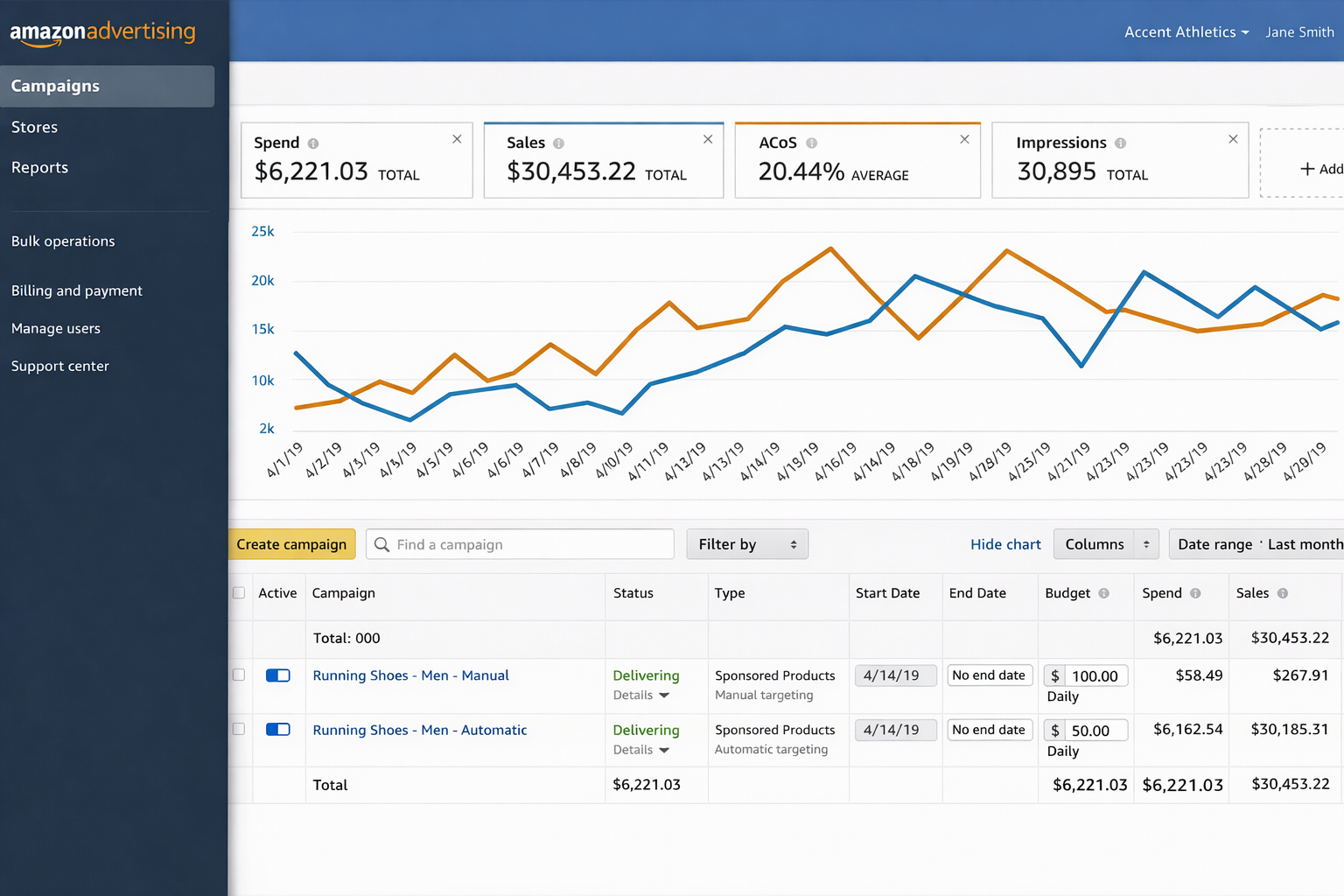
You can find ACoS on your Campaigns Dashboard. Simply click on the arrow next to your one of the metrics shown on your dashboard and there will be a drop down where you can select what KPI you want to display.
You can customize columns to show other metrics including:
- Spend
- Impressions
- Clicks
- CPC
ACoS vs. ROAS
ACoS and ROAS measure the same relationship from different perspectives.
Amazon emphasizes ACoS because it directly relates to margin control. However, some sellers may prefer ROAS because it frames performance in revenue terms.
For a deeper breakdown of ROAS benchmarks and strategy, check out this guide.
How to Calculate ACoS on Amazon
The formula for ACoS is: ACoS = (Ad Spend ÷ Ad Revenue) x 100%.
Take the following example:
- Ad Spend = $500
- Ad Revenue = $2,000
Step 1: Divide spend by revenue
$500 ÷ $2,000 = 0.25
Step 2: Multiply by 100%
0.25 x 100 = 25%
Your ACoS = 25%
What Is Break-Even ACoS?
Break-even ACoS is the maximum ACoS you can afford before losing money. This means it is the same as the product’s profit margin.
If your net margin after all Amazon fees, total cost of goods, and shipping and fulfillment costs equals 30%, then your break-even ACoS is 30%.
If your ACoS exceeds 30%, that means you’d lose money on ad-driven sales.
If your ACoS stays below 30%, you remain profitable.
Understanding this relationship is foundational to improving Amazon PPC ROI.
What Is Considered a Good ACoS on Amazon?
There is no universal “good” ACoS, but industry benchmarks provide context.
Common ACoS Benchmarks
In general, an ACoS under 25% is considered excellent and reflects strong advertising efficiency, while a range between 25% and 40% is typically viewed as average and sustainable for many sellers. An ACoS above 40% is generally considered high and may indicate the need to optimize your ad campaigns, unless you are intentionally prioritizing aggressive growth over short-term profitability.
When a Higher ACoS Makes Sense
ACoS targets vary depending on a seller’s strategic goals; generally, these goals fall into one of two categories: growth or efficiency.
Growth Strategy
- A Higher ACoS is acceptable
- Focus on increasing seller ranking and market share
- Allow for a short-term margin sacrifice
Efficiency Strategy
- Lower ACoS is required
- Focus is more on profitability
- Enhance keyword strategy and narrow it down to key performers
To improve Amazon ROI over time, your ACoS must fit within your profit margin and the long-term value of each customer.
For broader strategies on improving advertising efficiency and overall profitability, check out this blog.
Your Profit Margin is the True Context for ACoS
Two sellers can have the same ACoS and very different profitability outcomes because their individual profit margins determine the real impact.
If both sellers run at a 35% ACoS but Seller A has a 50% margin, they remain profitable, while Seller B with a 30% margin loses money. This is why ACoS should always be evaluated against your own margins and not your competitors.
Ways to Lower Your ACoS (For Beginner and Advanced sellers)
Beginner’s Guide to Reducing ACoS1. Adjust Keyword Bids
Focus on making bid adjustments based on performance data instead of gut feelings.
2. Refine Keyword and Product Targeting
Higher relevance improves conversion rate, which lowers ACoS.
3. Pause or Remove Poor Performers
If a keyword:
Pause it and preserve your funds for better performing keywords.
4. Optimize Product Listings
Your ad performance will only be as good as your listing quality.
Improve:
Higher conversion rate reduces ACoS because more clicks turn into sales.
|
Advanced Guide to Reducing ACoS1. Prioritize Top-Performing ASINs
Allocate more budget toward products with:
Avoid spending your ad budget across underperforming ASINs.
2. Harvest Converting Search Terms
From auto-campaigns:
This improves Amazon PPC ROI through precision targeting.
3. Use Negative Keywords
Apply negative keywords in your ad campaigns to:
Every irrelevant click increases ACoS.
4. Allocate Budgets Around High-Conversion Periods (Dayparting)
Since different times of day can affect ad performance, whether by hour, day, or season, advanced sellers should:
5. Isolate Underperforming Keywords
Instead of deleting underperforming keywords outright, you should try:
While testing other keywords in a separate campaign, you ensure that no potential opportunities are missed.
6. Scale Strong Performers
ASINs with a low ACoS and high conversion rate indicates an opportunity to increase budgets for this ad group to:
7. Organize Campaigns by Root Keyword Themes
Try applying a thematic structure to keywords to:
8. Optimize Ad Placements
Analyze performance of your ads across:
Adjust ad placements based on ROI contribution.
|
BQool AI Advertising Solution to Lower ACOS
Basic and advanced ACoS optimization strategies require consistent oversight. For sellers with larger inventories, managing bids, budgets, and keywords daily becomes time-consuming.
Automation platform, such as AI-driven ad management tools, are commonly used to:
- Adjust bids dynamically
- Detect wasteful spend patterns
- Scale profitable keywords
- Optimize campaigns based on real-time performance
Try out BQool’s AI Advertising solution, designed to help sellers lower ACoS, increase sales and scale more profitably.
Below are some real seller case studies who benefited BQool’s advertising technology:
Conclusion
In conclusion, there is no single “good” ACoS that applies to every seller. It must reflect your margins, business goals, and stage of growth. Benchmarks can provide general guidance, but your break-even point should always anchor decision-making. Sustainable performance comes from balancing efficiency with growth, refining bids and targeting, improving conversion rates, and structuring campaigns intentionally. Advertising is most effective when supported by a strong product, competitive pricing, and a well-optimized listing. Ultimately, ACoS is a strategic variable you manage, but long-term profitability is the real measure of success.
FAQ
What is a good ACoS for Amazon?
A good ACoS on Amazon typically falls between 25% and 40%, depending on your profit margins and business goals. Sellers with higher margins can tolerate higher ACoS, while low-margin products require more control.
What is ACoS and how is it calculated?
ACoS (Advertising Cost of Sales) is the percentage of ad spend relative to ad-attributed revenue. It is calculated using the formula: Ad Spend/Ad Revenue x 100%.
Is a 30% ACoS good?
A 30% ACoS is good if your profit margin exceeds 30%. If your margin is lower than 30%, a 30% ACoS would result in a loss on ad-driven sales.
How does ACoS work?
ACoS works by measuring how much you spend on ads to generate revenue. Lower ACoS means higher advertising efficiency, while higher ACoS indicates more aggressive spending or lower conversion efficiency.
The post What is a Good ACOS on Amazon? appeared first on BQool Blog.
#499 – Steal This 100 Orders A Day TikTok Shop Setup
Audio version above. Video version below
If you’ve been wondering how to hit 100 TikTok Shop orders per day without cannibalizing your Amazon business, this TikTok Thursday episode is built for you. Host Shivali Patel sits down with Alina Vlaic, an Amazon seller, operator, and owner of the AZrank agency, who’s been deep in the trenches, to unpack what it takes to make TikTok Shop work consistently (not just a lucky spike).
Alina walks through the behind-the-scenes journey: what she focused on first, the signals that told her a product could win on TikTok, and the moments where things went sideways. On TikTok Shop, momentum can change fast. This episode gives you the mindset and the practical direction to test smarter, avoid common traps, and keep moving even when the platform throws curveballs.
If you want a repeatable system, not vague motivation, listen through and take notes. Then pick one action to implement today, because the sellers who win on TikTok Shop are not waiting for perfect clarity. They are testing while everyone else is still overthinking.
In episode 499 of the AM/PM Podcast, Shivali and Alina discuss:
- 00:00 – Introduction
- 01:12 – Why Alina’s Known for Ranking and Indexing
- 04:16 – The 10-Point Practical Playbook (Amazon to TikTok Shop)
- 05:13 – The Proof: How They Hit Nearly $1,000/Day and 100 Orders/Day
- 06:27 – Key Setup: Linking TikTok Page & Shop for Shoppable Content
- 08:38 – Don’t Assume It’ll Work: How to Test Your Amazon Catalog Fast
- 11:39 – Content Strategy: Why Your Own Posting Still Matters
- 15:57 – The $2,000 GMV Unlock for More Creator Access
- 18:40 – The Drop: Violations That Crushed Visibility and Limited Orders
- 20:39 – The Fix: Using Tools to Escalate and Clear Violations
- 33:59 – Creative “Reverse Hook” Strategy
- 39:00 – Q&A
Enjoy this episode? Want to be able to ask questions to Leo Sgovio live in a small group with other 7 and 8-figure Amazon sellers? Join the Helium 10 Elite Mastermind and get monthly workshops, training, and networking calls with Leo at h10.me/elite
Make sure to subscribe to the podcast on iTunes, Spotify, or wherever you listen to our podcast!
💰 Get Helium 10 with a special discount to start or scale your e-commerce business here: https://h10.me/h10
Want to absolutely start crushing it on eCommerce and make more money? Follow these steps for helpful resources to get started:
- Get the Ultimate Resource Guide from Bradley Sutton, Carrie Miller, and Shivali Patel for tools and services that he uses every day to dominate on Amazon!
- New to Selling on Amazon? Freedom Ticket offers the best tips, tricks, and strategies for beginners just starting out! Sign up for Freedom Ticket.
- Trying to Find a New Product? Get the most powerful Amazon product research tool in Black Box, available only at Helium 10! Start researching with Black Box.
- Want to Verify Your Product Idea? Use Xray in our Chrome extension to check how lucrative your next product idea is with over a dozen metrics of data! Download the Helium 10 Chrome Extension.
- The Ultimate Software Tool Suite for Amazon Sellers! Get more Helium 10 tools that can help you optimize your listings and increase sales for a low price! Sign up today!
- Does Amazon Owe YOU Money? Find Out for FREE! If you have been selling for over a year on Amazon, you may be owed money for lost or damaged inventory and not even know it. Get a FREE refund report to see how much you’re owed!
- Check out our other Amazon FBA podcasts including the Serious Sellers Podcast, as well as our Spanish version!
- You can also listen to the AM/PM Podcast on YouTube here!

The post #499 – Steal This 100 Orders A Day TikTok Shop Setup appeared first on AM/PM Podcast.
AI Can Now See All Your Amazon Data. Here’s What Sellers Ask First — And What They Find.
You know your ACoS. You can rattle off which campaigns hit 25% and which ones are sitting at 40%.
But here’s a question most sellers can’t answer without spending an afternoon in spreadsheets:
Which of your campaigns are actually profitable once you factor in real product costs, FBA fees, returns, and shipping?
Not ACoS profitable. Actually, money-in-your-pocket profitable.
If you paused on that — you’re not alone. That question is the single most common thing Amazon sellers ask when they finally get AI connected to their real business data. Not inventory questions. Not listing optimization. Not product research.
Advertising. Every time.
The Margin Squeeze Nobody’s Talking About
2026 is hitting Amazon sellers from every direction.
FBA fulfillment fees went up an average of $0.08 per unit in January. That might sound like pocket change until you’re shipping 20,000 units a year and it adds up to $1,600 in extra costs — with zero improvement in service.
But the fulfillment hike is just the headline. Amazon also killed all FBA prep and labeling services in the U.S., started delaying payouts, introduced defect-based fees up to $1.74 per unit for labeling errors, and raised AWD West region storage by 19%.
Meanwhile, ad costs keep climbing. PPC bids in competitive categories have jumped dramatically over the last two years. Sellers in forums are reporting 600% bid increases in some niches. One veteran seller on the Amazon forums put it bluntly: he’d spent over $627,000 on ads lifetime and was questioning whether PPC even makes sense anymore.
And Amazon now takes over 50% of sellers’ revenue through fees — up from 40% five years prior, according to Marketplace Pulse. The margin you had two years ago doesn’t exist anymore.
So where does that leave you? Making faster, smarter decisions about where every dollar goes — especially your ad dollars. And that’s exactly where most sellers are flying blind.
The Daily Grind That Eats Your Time
Be honest about what your Tuesday afternoon actually looks like.
You’re in Campaign Manager. You’re pulling search term reports. You’re adjusting bids on keywords that might be working or might be burning cash — you won’t know for 48-72 hours because Amazon’s reporting is delayed. You’re toggling between tabs trying to figure out if a campaign with a decent ACoS is actually contributing to your bottom line once real costs are factored in.
Listing optimization? You’ll get to it. Product scouting? When there’s time. Profitability analysis at the SKU level? Maybe quarterly, if you’re disciplined.
Advertising is the constant. It’s where the money moves in real time. It’s the part of the business that demands daily attention and punishes you the fastest when you look away.
This isn’t a hot take. It’s the pattern we saw play out in real time when we connected Amazon sellers’ actual Seller Central data to AI.
What Happened When Sellers Could Finally Ask AI About Their Real Numbers
At Seller Labs, we built an MCP server — a secure, read-only bridge that connects your actual Amazon data (sales, advertising, profitability, inventory, keywords, margins) directly to AI models like Claude. No exporting. No spreadsheets. Just ask a question in plain English and get an answer backed by your real numbers.
We expected sellers to explore everything.
They didn’t. They went straight to advertising. Keyword performance. Campaign effectiveness. ACoS. Ad spend. ROAS.
Out of 50+ data tables covering every dimension of an Amazon business, advertising was the overwhelming focus. The question sellers asked most:
“Which campaigns are actually profitable after all costs?”
And the answers surprised people. Campaigns that looked healthy on an ACoS basis were underwater once real product-level COGS, FBA fees, returns, and shipping were factored in. Some sellers’ “best” campaigns turned out to be their most expensive mistakes.
Before AI had access to real data, answering that question meant exporting ad reports, matching them against profitability data in a separate spreadsheet, building pivot tables, and praying the numbers lined up. A full afternoon for one answer.
Now it takes ten seconds and one question.
5 Questions You Should Be Asking AI About Your Ads Right Now
You don’t need our MCP server to start using AI more effectively for your advertising. You can do most of this today with ChatGPT, Claude, or Gemini and a CSV export from your ad reports. The key is asking the right questions.
1. “Which campaigns have the highest ACoS but lowest actual profitability?”
ACoS alone doesn’t tell you if you’re making money. Upload your ad report alongside your COGS data and ask AI to cross-reference them. You’ll find campaigns that look efficient but are actually losing money once all fees are included.
2. “What search terms am I paying for that never convert?”
Export your search term report for the last 60 days. Ask AI to flag every term with more than 20 clicks and zero conversions. These are your negative keyword candidates — and they’re silently draining your budget every day.
3. “How has my TACoS trended over the last 90 days, and what’s driving the change?”
TACoS (Total Advertising Cost of Sale) is the metric that tells you how much of your total revenue depends on advertising. If TACoS is climbing, your organic sales are shrinking relative to your ad-driven sales — which means you’re becoming more dependent on paid traffic, not less.
4. “Which of my products should I stop advertising entirely?”
Not every product should have an active campaign. Ask AI to identify products where the advertising cost exceeds the margin ceiling — meaning no amount of bid optimization will make the campaign profitable. Sometimes the best ad decision is turning one off.
5. “What would happen to my total sales if I cut my bottom 20% of campaigns?”
This is a scenario question that would take hours to model manually. AI can estimate the impact based on your historical data — and the answer is often that the bottom 20% of campaigns contribute almost nothing to total sales while consuming a meaningful chunk of budget.
What the Smartest Sellers Are Building Next
The sellers who started with advertising questions didn’t stop there. They started building systems.
One seller in our community built what he calls a “digital CFO” — AI running daily financial investigations across his entire catalog, digging into shipping costs, margin trends, and product-level performance. His goal: replace the third-party subscription software he’s been paying for monthly with AI conversations connected to his own data.
Another seller built automated agents that check ad performance and business data every morning, then send a summarized briefing to his Slack channel. No dashboards. No manual pulls. Just a daily report waiting before his first cup of coffee. He’s now moving it to the cloud so it runs entirely on its own.
These aren’t features anyone built into a product. They’re experiments sellers designed once they realized what’s possible when AI can actually see their numbers.
The Honest Truth About AI for Amazon Sellers
We could tell you AI is ready to run your Amazon business. But experienced sellers would see through that immediately.
Here’s where things actually stand: AI still makes mistakes. It gets math wrong sometimes. It can drift in longer conversations. One seller in our community told us he was nervous to let his team use it because his employees wouldn’t push back on a wrong answer the way he would.
That’s a valid concern. AI is a tool, not an autopilot.
But it’s improving fast. The latest Claude model retrieves relevant data 76% of the time, up from 18% just months ago. And perhaps most importantly — it now stops and asks for clarification instead of making something up.
The sellers who are furthest ahead didn’t wait for the technology to be perfect. They started building the skill while the competitive advantage was still wide open. By the time everyone else catches up, they’ll have months of experience asking better questions, building better systems, and making faster decisions.
What You Can Do This Week
1. Export your last 60 days of ad data. Campaign reports, search term reports, and if you have it, product-level profitability. Upload it to Claude or ChatGPT and start asking the five questions above.
2. Track TACoS, not just ACoS. If your Total Advertising Cost of Sale is climbing, your business is becoming more ad-dependent — and that’s a fragile position in a year when costs are rising everywhere.
3. Identify your bottom 20%. The campaigns, keywords, and products that consume budget without contributing meaningful revenue. Cut or pause them and redirect that spend to what’s actually working.
4. Ask one question you’ve been avoiding. Every seller has it — the analysis that would take too long, the spreadsheet that never gets built, the number you suspect is bad but haven’t confirmed. That’s your first AI question. Ask it.
5. Build a Monday morning prompt. One saved question that summarizes your ad performance for the week. Run it every Monday. Refine it every week. That’s the beginning of a system — not just a one-time analysis.
FAQ
I don’t use Seller Labs. Can I still use AI for my ad analysis?
Absolutely. Export your campaign and search term reports from Seller Central as CSVs. Upload them to ChatGPT, Claude, or Gemini. Ask specific questions about your data. You won’t have the real-time connection that an MCP server provides, but you’ll still get answers that would take hours to find manually.
What’s the difference between ACoS and TACoS, and why does it matter?
ACoS measures how much you spend on ads relative to ad-attributed sales. TACoS measures how much you spend on ads relative to total sales (including organic). If your ACoS is flat but TACoS is climbing, it means your organic sales are declining — you’re becoming more dependent on paid traffic to maintain revenue.
Won’t AI give me wrong answers about my business?
It can, especially with vague questions. The fix is specificity. “How are my ads doing?” gets you a generic answer. “Show me my top 10 campaigns by spend last 30 days with ACoS above 35% and compare against product-level margins” gets you something actionable. And always ask: “What assumptions did you make?” That one question separates useful analysis from hallucinated noise.
What’s a good prompt to start analyzing my ad data with AI?
Try this. Upload your last 60 days of campaign and search term reports as CSVs to ChatGPT or Claude, then paste this prompt:
“Analyze my Amazon ad campaigns. For each campaign, show me: campaign name, total spend, total sales, ACoS, and total clicks with zero conversions. Sort by spend descending. Then flag any campaign where ACoS is above 35% and highlight search terms with more than 15 clicks and zero orders — those are my negative keyword candidates. Summarize the top 3 actions I should take this week to reduce wasted spend.”
That single prompt replaces hours of spreadsheet work. Save it, refine it each week, and you’ve just built the foundation of an AI-powered ad review system.
The Full Story: When We Gave Sellers AI Access to Their Real Data
Everything above started with a real experiment. We connected Amazon sellers’ actual Seller Central data — sales, ads, profitability, inventory, all of it — to Claude AI through the Seller Labs MCP Server. We gave them access and watched what happened.
They all asked about the same thing. The full story — why advertising dominated every conversation, what sellers discovered when they finally saw their real numbers, and what the smartest sellers are building now — is right here:
The Sellers Who Win in 2026 Won’t Outspend. They’ll Out-Ask.
Amazon sellers have more data than ever and less time to make sense of it. Costs are rising. Margins are thinning. And the sellers who are pulling ahead aren’t the ones working harder — they’re the ones asking better questions, faster.
AI doesn’t replace your judgment. It gives you the answers you need to use it.
Start with advertising. It’s the question every seller asks first — because it’s the one that matters most right now.
Ready to find the money hiding in your shipping data, SKU margins, and ad spend?
Seller Labs gives you SKU-level profitability tracking, AI-powered ad optimization, and the tools to turn your Amazon data into actionable insights.
For a limited time, get 30% off your first month — after your 30-day free trial.
Keep Reading
- Why Target Charges $5.99 for Shipping — And What Amazon Sellers Can Learn From It — A VA mistake revealed a $200K shipping insight. The same behavioral pricing framework Target, Best Buy, and Walmart use — applied to your Amazon business.
- Top 10 Strategies for Amazon Sellers in 2026 — The playbook for navigating rising fees, evolving algorithms, and increasing competition on Amazon this year.
- Amazon MCP Server: How Seller Labs + Claude AI Deliver Insights — How to connect your Amazon data to Claude and ask questions in plain English for instant, data-backed answers.
The post AI Can Now See All Your Amazon Data. Here’s What Sellers Ask First — And What They Find. appeared first on Seller Labs: Amazon Seller Software and Platform.

