
I quit amazon within 25 days.
Hi Everyone,
I’m posting this for new sellers who are planning to start on Amazon.
I began selling in early March with a lot of enthusiasm. My products are genuine and original, and I was already doing fairly well in the offline market. I decided to expand online to increase sales.
I listed my products at reasonable prices, expecting steady growth. However, I soon realized that things are not as straightforward as they seem.
I fulfilled 10 orders. Out of those, 6 had return requests raised incorrectly by buyers. In all these cases, I received completely different products in return, which clearly indicates a swap scam.
As part of my standard process, I record videos of all order packings. I have clear proof showing that the correct products were packed and shipped as per the listings.
I am currently facing two major issues:
Product Swap Fraud:
Buyers are returning different items while keeping the original product. Even with proof, I am required to issue a full refund along with Amazon fees. This results in a triple loss on a single genuine order.
ATS Delivery Issues:
My returned products are not being delivered back to me through ATS. Despite contacting seller support multiple times, there has been no resolution. Surprisingly, seller support claims they do not have access to the ATS system. If that’s the case, why is ATS being used for returns when it cannot be tracked or supported?
This experience has been extremely disappointing and concerning, especially for new sellers trying to build a genuine business.
submitted by /u/CollectionLittle9205
[link] [comments]
How to Find Keywords for Amazon PPC in 2026
Overview
- What Is Amazon PPC and How Keywords Influence Ads
- Types of Amazon PPC Keywords to Target
- How to Discover Amazon PPC Keywords
- How to Identify Profitable Amazon PPC Keywords
- How to Use PPC Keywords in Amazon Listings
- Refining Your PPC Campaign Using Search Terms Reports
- Conclusion
With millions of daily product searches, Amazon has become the go-to platform for high-intent shoppers, over 56% of consumers now start their product searches on Amazon, compared to 42% on search engines like Google (eMarketer, 2024). This makes Amazon PPC a powerful way to reach customers who are ready to buy.
But success depends on your keywords. Amazon only shows your ads when your keywords match what shoppers are searching for, so the right keywords drive visibility and sales, while the wrong ones limit reach or attract irrelevant clicks.
If your targeting is off, you may still get impressions and clicks, but they rarely convert, leading to wasted ad spend.
In this article, we break down how to choose the right keywords and what truly drives results.
Amazon PPC seems straightforward at first. You bid on keywords, your ads appear in search results or on product pages, and you pay when someone clicks.
What makes it effective is relevance. The keywords you choose act as the bridge between your potential customer and the product you are advertising. Choosing highly relevant keywords is like building a short, direct bridge, your ads are more likely to show and at a more efficient cost. In contrast, weaker relevance is like building a longer bridge, your ads may not appear or may become more expensive without delivering results.
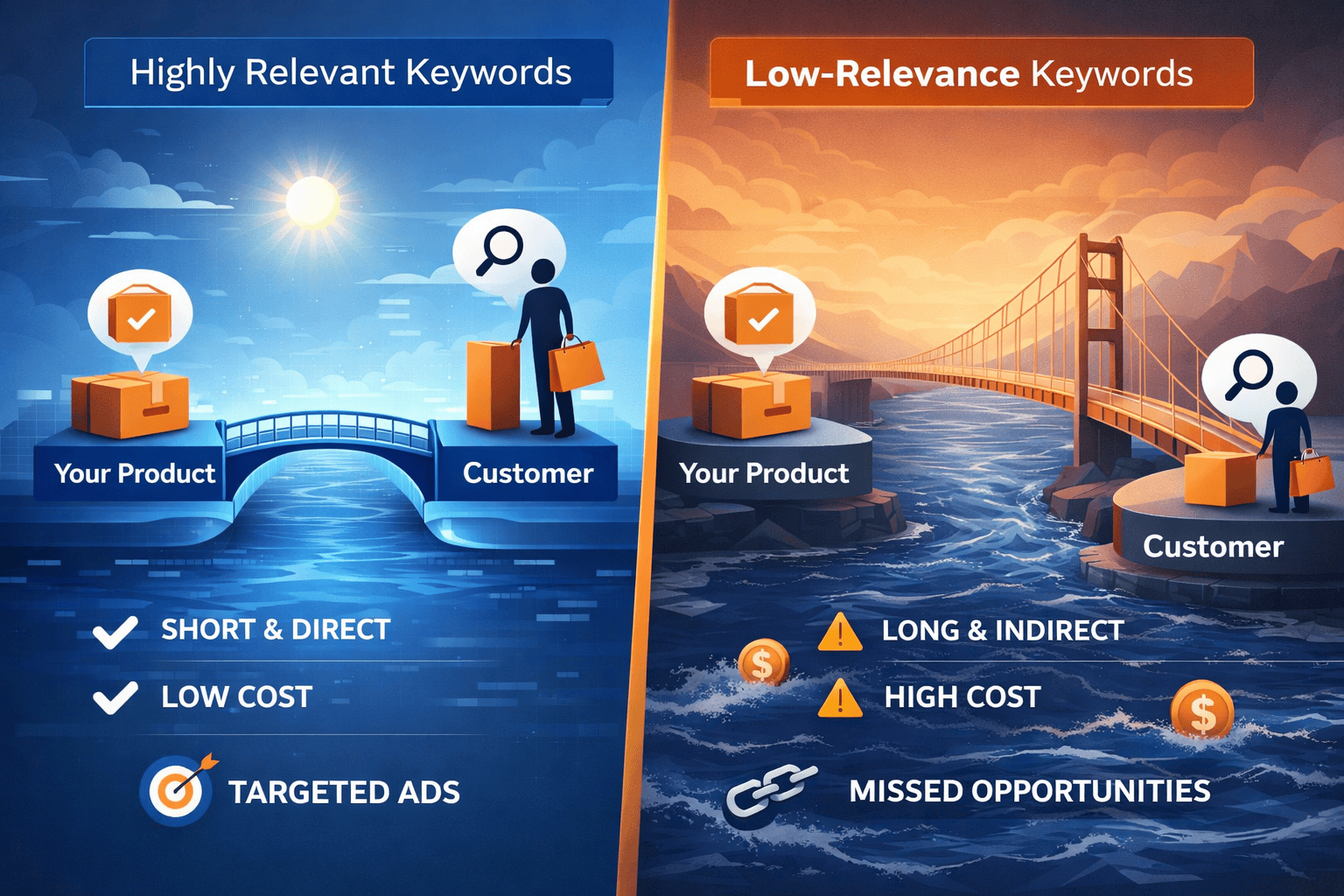
Keywords selection is important because it determines when your ads appear and influence cost-per-click (CPC). More competitive keywords drive higher costs per click, which in turn impacts ad placement and visibility.
When you have the right keywords in place, your campaigns are not just generating traffic, they are attracting shoppers who are more likely to convert.
Types of Amazon PPC Keywords to Target
Not all keywords serve the same purpose and treating them the same leads to inefficient campaigns. A more effective approach is to think in terms of shopper intent and where someone is in their buying journey. There are three main types of keywords to target:
- High-intent keywords are closest to purchase. These are direct product searches, such as “wireless noise-cancelling headphones,” where the shopper already knows what they are looking for. They tend to convert well but come with higher competition and cost.
- Mid-intent keywords reflect “window shopping” behavior. Searches like “best headphones for travel” suggest the shopper is still considering options. While these may not convert immediately, they are useful for capturing attention early and influencing purchase decisions.
- Long-tail keywords are more specific and descriptive. A search like “lightweight noise-cancelling headphones for flights” provides a clearer picture of what the shopper wants. These keywords usually have lower competition and CPC, but often convert at a higher rate because the intent is clearer.
Strong campaigns typically combine all three types. High-intent keywords drive conversions, mid-intent keywords expand reach and awareness, and long-tail keywords improve efficiency.
How to Discover Amazon PPC Keywords
Keyword discovery is not a one-time task. It is an ongoing process that starts with educated guesses and becomes more refined as you collect data.
Analyzing competitors is a strong starting point. Their sponsored ads, product titles, and bullet points can reveal which keywords they prioritize. If the same terms appear across multiple top-performing listings, it usually signals strong demand and relevance.
Another good starting point is seed keywords, core terms related to your product, including its category, key features, and use cases. For example, a Bluetooth speaker might be associated with terms like “portable,” “waterproof,” or “outdoor.” These initial keywords help generate more specific ones over time.
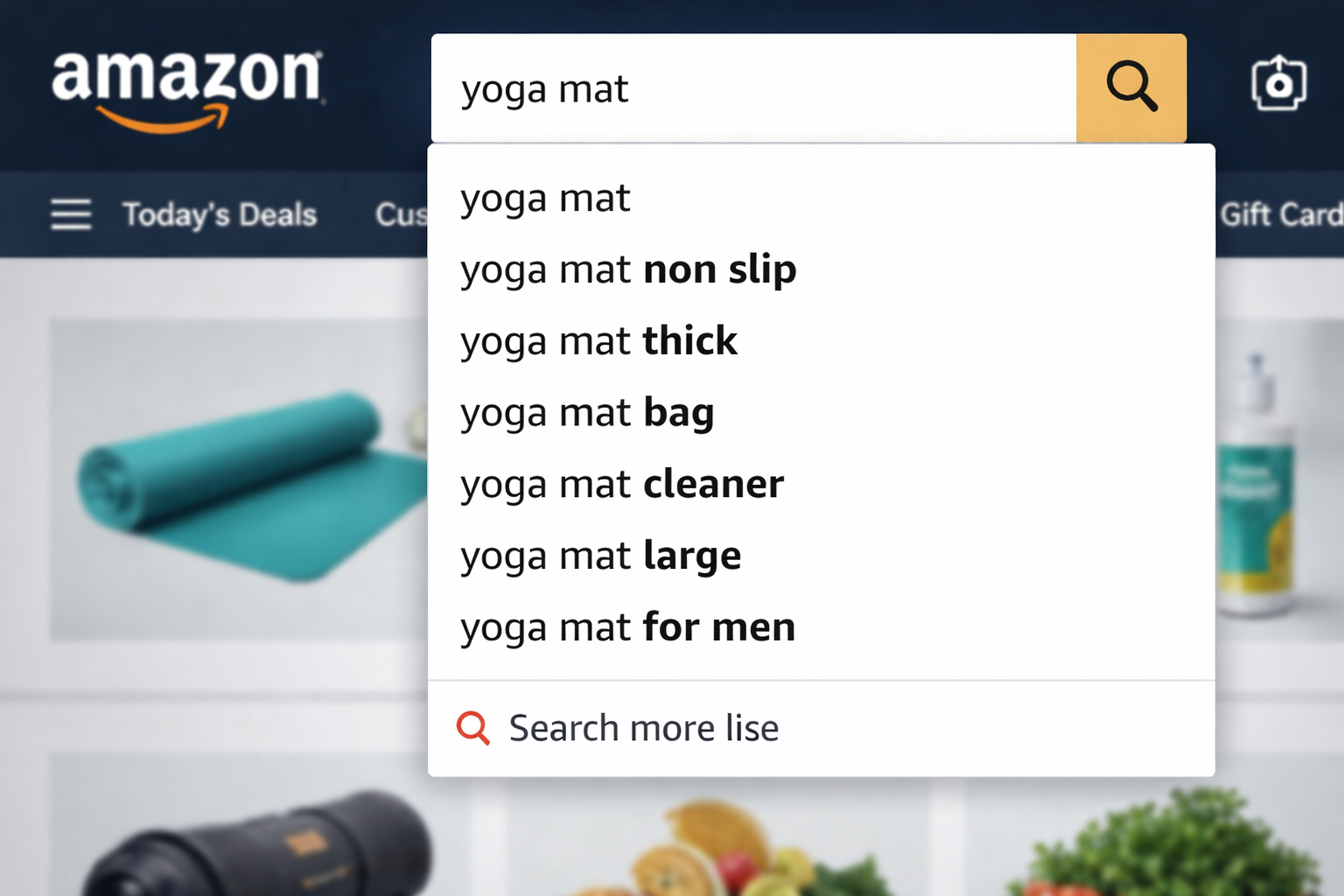
From there, Amazon’s search bar becomes a valuable resource. The autocomplete suggestions are based on real shopper behavior, making them a reliable indicator of what people are actively searching for. If certain phrases consistently appear, it is usually a sign of strong demand.
Keyword research tools and PPC platforms can further support this process by suggesting related keywords and identifying profitable opportunities, this is especially useful when scaling campaigns.
How to Identify Profitable Amazon PPC Keywords
Not every keyword that drives traffic is worth keeping. The goal is to identify keywords that generate profitable sales, not just clicks.
Three key factors to evaluate are:
| Keyword Factor | Metric to Look Out For | Why It’s Important |
|---|---|---|
| Demand | Search volume | Indicates traffic potential |
| Cost | Average CPC | Impacts margin and spend |
| Conversion potential | Sales per click | Determines ROI |
It’s important to consider all three factors rather than focusing on just one. A high-volume keyword may seem appealing, but if it has high costs and low conversion rates, it can quickly drain your budget. On the other hand, a lower-volume keyword with strong conversion and lower cost can deliver better returns over time, even with fewer sales.
In practice, this means regularly reviewing your search term reports and campaign data, then making decisions based on real performance rather than assumptions.
Automation tools can help identify high-performing and under-performing keywords, but understanding what drives profitability allows you to make better strategic decisions.
How to Use PPC Keywords in Amazon Listings
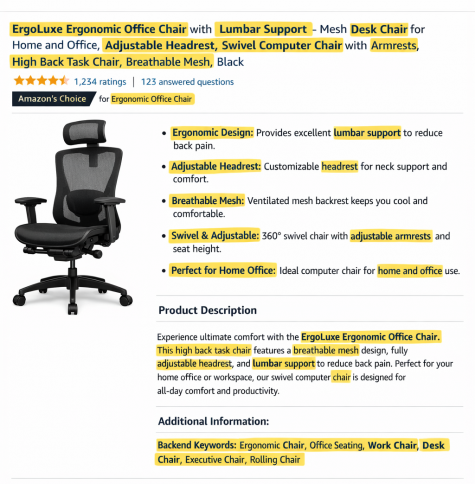
Keywords should not be limited to ads, they should also be integrated into your product listings.
When your listing content aligns with your PPC keywords, it strengthens relevance and can improve both ad performance and organic visibility.
Key areas to include target keywords:
- Product title
- Bullet points
- Product description
- Backend search terms
However, avoid keyword stuffing. Your content should still read naturally and clearly communicate the product’s value.
Refining Your PPC Campaign Using Search Terms Reports
You can also use the Amazon Search Terms report (available to users who are actively running Amazon Sponsored Products and Brands campaigns), which provides insight into actual customer queries that triggered your ads and led to clicks or sales. Over time, this becomes one of the most effective ways to refine your keyword strategy.
1. Get keyword ideas from search term report
Amazon sellers can use their Search Term Reports to uncover high-performing keywords and eliminate wasted spend.
2. Build your negative keywords list
Another effective keyword strategy is not just about inclusion, but also exclusion.
Negative keywords prevent your ads from appearing in irrelevant searches. For example, if you sell a premium product, you might exclude terms like “budget” to avoid attracting low-intent clicks.
3. Refine keyword match type strategy
Many sellers structure campaigns in stages, starting with broader targeting (broad or phrase match) to discover new keywords, then refining into more controlled campaigns using exact match.
This creates a continuous cycle of testing and optimization. High-performing keywords receive more budget and more precise targeting, while under-performing ones are reduced or removed.
Over time, this improves traffic quality. You spend less on unqualified clicks and allocate more budget toward high-intent searches.
Conclusion
When you select keywords effectively, wasted ad spend decreases and return on ad spend (ROAS) improves. While it may seem like a small adjustment, it plays a significant role in increasing Amazon ROI without raising your overall budget.
The post How to Find Keywords for Amazon PPC in 2026 appeared first on BQool Blog.
Online Arbitrage questions for anyone doing it — Need some advice!
Hey Everyone,
I have sold OA/RA in the past (like 10+ years ago) and it was all a manual process. I hired Filipinos to look for products using specific criteria and as the years gone by, it got harder so I gave up and moved to private label instead.
However, today that’s all changed and it seems apps like Tactical Arbitrage have made that process simpler from what I’ve read on their site. They have lists of stores and an automated way to find products on those stores (sounds too good to be true!)
For those who’re ACTIVELY sourcing products online (arbitrage.. NOT wholesale or PL), what do you think of the app Tactical Arbitrage? https://tacticalarbitrage.com
Thanks in advance for your help!!
submitted by /u/LogicalMight
[link] [comments]
Online Arbitrage questions for anyone doing it — Need some advice!
Hey Everyone,
I have sold OA/RA in the past (like 10+ years ago) and it was all a manual process. I hired Filipinos to look for products using specific criteria and as the years gone by, it got harder so I gave up and moved to private label instead.
However, today that’s all changed and it seems apps like Tactical Arbitrage have made that process simpler from what I’ve read on their site. They have lists of stores and an automated way to find products on those stores (sounds too good to be true!)
For those who’re ACTIVELY sourcing products online (arbitrage.. NOT wholesale or PL), what do you think of the app Tactical Arbitrage? https://tacticalarbitrage.com
Thanks in advance for your help!!
submitted by /u/LogicalMight
[link] [comments]
Same customer – same product – 2 different states
So I haven’t sold on Amazon now for some time since I got undercut so bad by competitors. I got an order about a week ago for one of my products. Honestly, I was just going to let it go and let it get cancelled. This was the first order I have gotten in months when I used to get hundreds per month. It’s now a week later and I got an order for the same product, same color, and now I noticed it’s the same customer, but they are now in Orlando instead of Texas.
The original order was from Texas, and the new one is from Orlando. Name is exactly the same and even Amazon shows it’s the same customer (now with 2 orders). Seems really fishy to me.
Would you fulfill it?
submitted by /u/beej1254
[link] [comments]
Same customer – same product – 2 different states
So I haven’t sold on Amazon now for some time since I got undercut so bad by competitors. I got an order about a week ago for one of my products. Honestly, I was just going to let it go and let it get cancelled. This was the first order I have gotten in months when I used to get hundreds per month. It’s now a week later and I got an order for the same product, same color, and now I noticed it’s the same customer, but they are now in Orlando instead of Texas.
The original order was from Texas, and the new one is from Orlando. Name is exactly the same and even Amazon shows it’s the same customer (now with 2 orders). Seems really fishy to me.
Would you fulfill it?
submitted by /u/beej1254
[link] [comments]
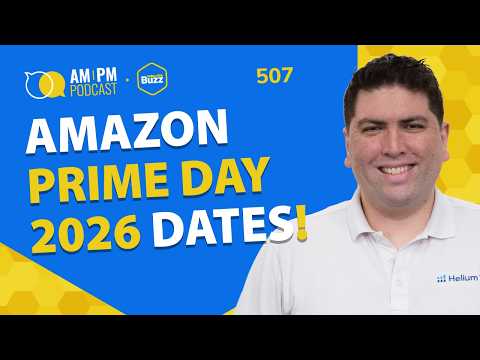
#507 – Amazon Prime Day 2026 Dates Announced + Big Prime Day Deal Fee Changes | Weekly Buzz 3/25/26
Audio version above. Video version below
We’re back with another episode of the Weekly Buzz with Helium 10’s VP of Education and Strategy, Bradley Sutton. Every week, we cover the latest breaking news in the Amazon, TikTok Shop, Walmart, and E-commerce space, talk about Helium 10’s newest features, and provide a training tip for the week for serious sellers of any level.
Amazon is reportedly moving its annual Prime Day sale this year
https://sea.mashable.com/tech/43199/amazon-is-reportedly-moving-its-annual-prime-day-sale-this-year
Did Amazon Make Prime Day Deals More Expensive?
Amazon has outlined key Prime Day planning deadlines in Seller Central, including a May 26 cutoff for deal submissions, a May 27 deadline for AWD inventory and minimal-split FBA shipments, and a June 5 deadline for optimized split shipments, while strongly hinting that the event could land in the final week of June. The update also brings higher promotion costs and stricter pricing rules, including a $100 upfront fee and 1.5% variable fee on Prime Exclusive Discounts, while Bradley highlighted Amazon’s added FAQs sent to Helium 10 to help sellers navigate the changes—clarifying topics like early-submission discounts, how promotional sales are calculated, when fees are charged, how often deal recommendations refresh, whether pricing can be edited, and how coupon activity now affects the 30- and 60-day lowest price requirements.
New Feature Alert: Helium 10 has launched TikTok Shop UK support, letting sellers convert Amazon UK listings into TikTok Shop-ready listings with AI in seconds. The feature is now in Platinum and Diamond members.
Walmart says ChatGPT checkout converted 3x worse than its own website
https://martech.org/walmart-says-chatgpt-checkout-converted-3x-worse-than-its-own-website/
Strategy of the Week: Helium 10’s Search Query Analyzer lets sellers review up to 12 months of Amazon search query performance data with AI insights in seconds, helping uncover top-converting and low-visibility keywords. Upgrade your membership to Diamond with code SSP20 for up to 20% off for 6 months.
Reminder: Amazon’s commingling policy ends March 31st, meaning brand owners can rely on UPCs instead of FNSKU labels for many products. The change could simplify sellers’ prep and labeling.
Commingling practices will end effective March 31, 2026
https://sellercentral.amazon.com/seller-news/articles/QVRWUERLSUtYMERFUiNHSktDTEM5N0s5MkRBWFAy
Amazon is about to make things a lot harder for the post office
https://qz.com/amazon-cuts-usps-package-volumes
Webinar: 10 Strategies That Could Get you $10K
Bradley Sutton and Shivali Patel will host a live March 31 workshop sharing 10 proven strategies that can directly grow sales and profit, including one tactic that added $11K in profit.
Register now at http://h10.me/10tips to save your spot.
That’s it for this week’s Weekly Buzz. Thanks for tuning in, and we’ll see you next Wednesday for more news, updates, and strategies to help you stay ahead in e-commerce.
In episode 507 of the AM/PM Podcast and Weekly Buzz, Bradley covers:
- 00:00 – Introduction
- 00:42 – Amazon announces Prime Day 2026 Dates!
- 04:24 – Did Amazon Make Prime Day Deals More Expensive?
- 12:42 – Migrate your Amazon UK Listings to TikTok Shop UK
- 14:20 – Amazon Big Spring Deals Live
- 17:17 – ChatGPT Checkout on Walmart Was a Failure
- 19:57 – Analyze 1 Year of SQP Data In Seconds
- 23:58 – Reminder: Comingling Ends Next Week!
- 24:49 – Amazon vs. Post Office
- 26:13 – 10 Strategies That Could Get you $10K
Transcript
Bradley Sutton:
Amazon announces 2026 Prime Day dates. There’s a lot of new fee structures for this year’s Prime Day. Walmart giving up on chat GPT for commerce. These stories and more on today’s Weekly Buzz. How cool is that? Pretty cool, I think. Hello, everybody, and welcome to another episode of the AM/PM Podcast by Helium 10. I’m your host, Bradley Sutton. And this is the show that is our Helium 10 Weekly Buzz, where we give you a rundown of all the goings on in the Amazon TikTok shop and e-commerce world. We let you know what new features Helium 10 has, and we also give a training tip of the week. So let’s get started and see what’s buzzing. All right.
Bradley Sutton:
Let’s hop into the news. Sometimes there’s not a lot of news this week. We’ve got a plethora of things to go over. So let’s hop right into it. The first thing, let me admit, guys, a little bit of clickbait. All right. I put in the title, my intro. Hey, Amazon has announced 2026 Prime Day dates. That is true, but it’s not the dates you’re thinking of. They have announced the dates of when you need to get inventory and when you get deals in, et cetera. That being said, I think I know when Amazon Prime Day might be. Here’s some hints.
Bradley Sutton:
Now, first of all, I could find out when Prime Day is. You know, I obviously have a good relationship with Amazon, but I purposely have not found out so I can talk about it because I’m under NDA with Amazon. So if I did find out, that means I wouldn’t be able to tell you guys. But I can speculate on here because I literally don’t exactly know when Prime Day is going to be. However, we have some clues based on these dates where I’m pretty sure I have it locked down to at least a one week period of time. The first clue we have has been in news reports the last few weeks.
Bradley Sutton:
Maybe you guys have seen it here. It says Amazon is reportedly moving its Prime Day annual Prime Day sale this year. All right. So a lot of articles are talking about, hey, there’s rumors that instead of July, like it’s always been before, it is going to move to June. All right. So that’s the first bit of news.
Bradley Sutton:
Now, the second bit of news is what came out in Seller Central. And these are the actual dates that Amazon has announced. All right. It said that, hey, you have to get in your deals for Prime Day between March 24th and May 26th. All right. Remember that date of May 26th. Another thing is here. It says you’ve got to get your AWD inventory in by May 27th. As well as FBA shipments with a minimal shipment splits. All right. That’s like if you’re just sending it to one or two places. Right. You’ve got to get that in by May 27th. They also announced a date of June 5th as when you need to have the Amazon optimized shipments splits sent in for those who don’t regularly send inventory. And that’s when you like send it to like six different places to lessen your fees.
Bradley Sutton:
If you’re using that method, you’ve got June 5th. Now, that being said. I am taking a guess or educated guess at that, at when Prime Day is going to be based on the history of when Amazon announces these dates, what Prime Day ended up being that coupled with this clue of June, you know, a June Prime Day. I think that it’s going to be June 30th. All right. That’s just what I’m going to throw out there.
Bradley Sutton:
First of all, Prime Day usually has started on a Tuesday and the 30th of June is a Tuesday. Also, there’s usually between 25 and 35 days between when you have to get your inventory into Amazon with when Prime Day has historically been. Now, that being said, if we’re sticking to the Tuesday, it doesn’t work out as perfectly as it has in my previous predictions in other years.
Bradley Sutton:
So is there a chance it could be the 23rd if it’s going to be Tuesday? 10 percent chance. I’m like 90 percent sure it’s got to be on the 30th. But yes, it could be on the 23rd. Why I don’t think it’s on the 23rd is that’s too tight of a window historically from when you have to get your inventory in. That means there would have only been like 18 days have passed.
Bradley Sutton:
It’s possible. All right. So I think 23rd or 30th or somewhere in between. Like there’s always a chance that Amazon might make it more than four days. And so who knows? Maybe it’ll start on a Monday or a different day of the week. But I do believe it’s going to be sometimes in that last week or last seven days of June. But what is set in stone are these dates of when you have to get your deals in and when you have to get your inventory into Amazon. Now, there are a lot of new updates on this Seller Central report, guys.
Bradley Sutton:
All right. That might make. Advertising on Prime Day more difficult and or more expensive, we’re going to take a few minutes here to go into this, because I’ve got some extra information that I did get from Amazon that you guys might not have in Seller Central that might clarify some of these things.
Bradley Sutton:
OK, so the first thing is that there’s an upfront fee of one hundred dollars per promotion. Now, you guys remember like three years ago for prime exclusive discounts, there is no fee. And then last year was the first year you had to start getting a fee. Every prime exclusive discount, I believe, was 50 bucks, if I’m not mistaken. But now it’s going to be one hundred dollars. In addition, not only best deals, not only lightning deals, but now the prime exclusive discounts will have a variable fee also of one and a half percent.
Bradley Sutton:
Right. Capped at five thousand dollars, one and a half percent of the promotional sales. So that might be new to some of you now to offset that 50 extra dollars you’re having to pay. If you submit your deals early by April 30th, you can get a 50 dollar discount. Whoo. All right. But unless I’m reading this wrong, it’s only on the best deal or lightning deal. It sounds like unless this is wrong, the prime exclusive discount, you’re not going to get that 50 dollars back on. Now, another thing you guys know, I keep it real when it comes to Amazon.
Bradley Sutton:
And I’ve always called them out about gaslighting in some of these messages. They haven’t done it a while. But whoever was writing their previous messages last year, and I call them, I think they’re back. All right. They came back to Amazon because here is where they’re again painting something in the light of, hey, we’re doing you a favor. Here with this price increase. Take a look here at what it says. It says here we’ve simplified promotion fees to better align your cost and set FBA inbound dates to ensure your products are primary. OK, that part’s good.
Bradley Sutton:
But we’ve simplified it. You know, oh, thank you, Amazon, for increasing my fees. And because it’s I really needed that simplification. But anyway, I’m just having fun, you know, like Amazon still is the best place, obviously, guys, right to to sell on. But what is this new simplification? I don’t think you guys are going to like this.
Bradley Sutton:
All right. You’re going to have to be now priced at the lowest sales price. All right. Now, here’s the thing. That’s that’s never changed. But it’s going to include promotional prices from previous deals, coupons and price discounts over the last 60 days. Did you get that, guys? Coupons. So what would people do in the past?
Bradley Sutton:
You would have like, let’s say, a 50 dollar price point. But maybe you had a 30 percent off coupon, but your regular price stayed at 50 dollars. Well, you could go in and do like a deal of, you know, primacy discount for 40 dollars or let’s say 45 bucks because it was cheaper than the price that you had your product at 50 hours.
Bradley Sutton:
But now if you have a coupon there, that now counts. All right. Another thing, offer at least five percent off of the lowest sales price, including promotional prices from previous deals, coupons and price discounts over the last 30 days. All right. So now there’s a 60 day and 30 day kind of like tiers that you have to know what you have and have not done as far as lightning deals, you know, regular price changing sale prices, coupons, previous prime exclusive discounts, et cetera. All right.
Bradley Sutton:
I don’t think anybody’s thinking Amazon for this simplification nor this new these new fees, but whatever. I think this is kind of straightforward. And we’re going to have to make sure that starting what? End of April, I guess. You’ve got to really know what your product price was at, because now you’ve got this 30 day window to look at and this 60 day window to look at. Now, now that you have to get your deals in earlier, there’s some FAQs.
Bradley Sutton:
Now, this is some extra information that you guys might not see in Seller Central. Amazon wants me to convey this. So thank you. Thank you. Credit where credit is due. Thank you, Amazon, for providing this extra information for us. A question you might be wondering is, hey, what if I submit a deal by April 30th, you know, super early, but then I edit in May, do I lose that $50 discount? No, you don’t lose that discount. One more clarification.
Bradley Sutton:
Can I get that discount for prime exclusive discounts or is it only best deals and lightning deals? Only best deals and lightning deals scheduled by April 30th. I had mentioned that there’s the promotional sales for that 1.5 percent variable fee. What exactly is promotional sales? What does that refer to? Amazon says this refers to the total ordered product sales generated by the promotion during the scheduled promotional period. They would use the discounted price for ordered product sales. All right. So if your regular price is $100, you got a prime exclusive discount of 40 percent off.
Bradley Sutton:
Well, the 1.5 percent is going to be charged on $60, not your $100. All right. This also excludes shipping and gift wrap. When will I be charged these fees for these discounts during while it’s going on or after it ends? Answer. These promotional fees are charged 10 days after the completion of the promotion, which is obviously whatever dates Prime Day is going to be.
Bradley Sutton:
Question. If deal recommendations refresh weekly, which is almost an answer in itself, and that’s giving you guys information. FYI, if you go there right now, you don’t see anything. Go there next week. You might see more recommendations. So if these refresh weekly, when should I submit to get the best time slots? Answer. You can choose to create a deal from the list of eligible ASINs and in the select products tab of the deals dashboard. And since it’s refreshed every week, an eligible ASIN you see this week might not be there next week.
Bradley Sutton:
Interesting. So in other words, if you see one and you think you might want to do that deal, better jump on it. Don’t be like waiting on it. Can I edit my deal pricing after submission? You can edit your deal pricing before or while your deal is running to match or improve the maximum deal price threshold. Once it’s in running status, you can only correct deal price related issues or you can cancel it. So you can’t be like, all right, day one of Prime Day. I’m going to do a 10 percent discount day to 15 percent discount day three. 17.
Bradley Sutton:
No, like only if Amazon is saying, oh, you have to update it because you don’t hit the threshold correctly. Where can I find the lowest 30 or 60 day price of an ASIN? This is the first time this has ever been an answer. But guess what? The answer is Rufus. All right.
Bradley Sutton:
Amazon says, hey, you can see the featured offer price from the past 30 and 90 days using the Rufus price graph on Amazon. What that doesn’t show, though, is like the coupon price. All right. So if you’re doing coupons on top of that, you got to calculate that in now. Which brings us to the next question from Amazon and says, what’s the difference between the featured offer price that is reflected in the Rufus price history compared to the lowest sales price? Where can I find this?
Bradley Sutton:
Well, the answer is, hey, the buy box price is what shows up in Rufus. All right. However, it could show a price that was briefly displayed during a 30 or 90 day period, but never resulted in a completed purchase.
Bradley Sutton:
So the lowest sales price reflects the actual transaction price at which a sale occurred. Right. That actually is a little bit confusing to me. I’m just reading that, you know, as it comes out. Speaking of which, next question, if I ran a coupon 45 days ago, does that count toward my 60 day lowest price? Yes.
Bradley Sutton:
The 60 day lowest price calculation includes coupon prices. We’ve said that like five times now. But Amazon really wants to make sure that when they get that point across, because this is new. All right. So, guys, you know, there there is some more details in Seller Central. Make sure to check it out. But what do you think? What do you think of the new price requirements? What do you think of some of these new fees? The one point five percent variable. There’s also one more point I’m going to bring up in the next article that has to do with Prime Day, a little warning that’s different. So stay tuned for that.
Bradley Sutton:
Now for a new feature alert from Helium 10 completely switching platforms is TikTok Shop. We’ve had a lot of tools for TikTok Shop, but it’s all been TikTok Shop USA. But now we have launched for TikTok Shop UK.
Our listing converter tool, which allows you to take your Amazon listing and copy it from Amazon UK and not copy it completely, but take your images and then transfer via A.I. because, you know, what makes a good listing on TikTok is not the same as Amazon using A.I. transfer that listing to TikTok Shop.
Bradley Sutton:
So what you guys can do is connect your TikTok Shop token for UK if you’re shipping there or if you’re selling there. And then what you’re going to be able to do is connect all your ASINs to, you know, from from Amazon and create in seconds your TikTok Shop listings. This is available Platinum plan as well as Diamond plan. By the way, guys, I’ve seen some misinformation that comes out there. There are some new different limits on Platinum.
Bradley Sutton:
It was not necessarily a price increase. Actually, we have added way more things to the Platinum plan than taken away. The TikTok being one of them. All right. So like this, you know, TikTok UK is available in Platinum until a couple of months ago was only available in Diamond. All of our other TikTok Shop tools is available in limited amounts.
Bradley Sutton:
Also in the Platinum plan. And just another one quick thing I want to throw out something new for Platinum members is you can now use up to five times our new listing builder A.I. tool. Couldn’t use that one before. So a lot of, you know, fun new stuff for Platinum members, including TikTok Shop UK listing conversion.
Bradley Sutton:
All right. Next up today, depending on when you guys are watching this, the Amazon big spring deals has gone live. That’s like the prime day for spring. Right. And there’s some interesting things I wanted to point out. And this also has to do with Prime Day before you could do Prime exclusive discounts like up until during the event or like the day before. And so they had said, hey, there was a limit on when you could get it in for these prime spring deal days. And I didn’t do it kind of on purpose.
Bradley Sutton:
I wasn’t sure if I was going to do it, but I want to see what would happen, how it’s going to show up different. Take a look at what is going on now. So I just did a prime exclusive discount yesterday. There was not the option to say, hey, this is for big spring days. All right. So now take a look at what somebody who did do it in time has they’ve got this big spring deal page and now their product potentially could be featured here in the big Springdale.
Bradley Sutton:
But look at my products. All right. You see here, I don’t have that badge of big Springdale. I just have a big red badge of 16 percent because I do have a discount going on. So the question is, which one? You know, like, is that really a big bad thing? Because now this is what we’re going to do for Prime Day. Did you remember that article I talked about a few minutes ago, how it said, hey, you’ve got to get your deals in by this date? Well, if you don’t, you’re just going to get this red badge.
Bradley Sutton:
But the question is, is this really that bad of a conversion thing? A big, huge red badge that says save 16 percent as opposed to a big red badge that doesn’t even say how much you save. It just says big spring deal. I’m not sure that one is guaranteed to be better than the other. So this might be something you can think about when you’re thinking about those deadlines. A couple other new things when you search like collagen peptides.
Bradley Sutton:
Yes, you can see some people aren’t doing spring deal days at all. Other people have big Spring deal. But take a look at this. I don’t think I have seen this before. Now, earlier, in addition to big spring deal, there was a couple of hours where on this very page of collagen peptides instead of big Springdale, it would say lowest price in 90 days. So that’s something I hadn’t seen before.
Bradley Sutton:
But when I refresh this page right now, it’s all gone. So and only the lowest price in 30 days is back. So I’m not sure, you know, maybe Amazon was doing some kind of experiment, but that would be interesting. Where instead of this red big Springdale, why do I keep saying Dale Springdale? Is that like a that’s a that’s a city, right? And I or something like that.
Bradley Sutton:
Anyways, a big spring deal instead of that big red badge and instead of just the save thing in a red badge, it was saying lowest price in 90 days. But now that seems to completely have disappeared, at least in my Amazon. I don’t see it anywhere. So anyways, what are you guys doing for the big spring deals? Did you guys do a prime exclusive discount lightning deal? We’re in day one.
Bradley Sutton:
How’s it going for you? Let me know in the comments. The next article is from MarTech.org, and it’s entitled Walmart says Chat GPT checkout converted three times worse than its own website, which should come to a shot as a shock to absolutely nobody unless you’ve been drinking Kool-Aid, thinking that everybody is going to be trying to order things from Chat GPT where you can’t see images and stuff like that. Now, guys, I’m not going to be here and say, oh, there is nothing going to be shopping related or Chat GPT and e-commerce or, you know, Chat GPT is completely out of game. Of course not. But it didn’t take a rocket scientist to know that, hey, if you knew what you wanted to buy from Walmart, if I wanted a 64 ounce water bottle, that it is not advantageous to go into Chat GPT and start having a conversation with chat, you know, trying to find this product at Walmart.
Bradley Sutton:
No, I’m just going to go to Walmart, type in 64 ounce water bottle, take a look at some nice images without even scrolling. There’ll be 10, 15 there. I can see the price, click on one and buy one like nothing beats that. Yet I still think I is going to going to change the game even more as far as even in the shopping cart experience. But Chat GPT was never, you know, the instant checkout thing was never meant to be something that’s going to, you know, replace traditional search. So now, you know, Chat GPT is going back to the drawing board.
Bradley Sutton:
Walmart’s kind of just like doubling down on its own AI things like, like Sparky this article is talking about. And, and let’s see what is the next phase of what open AI Chat GPT is going to do to try and kind of like change that shopping experience. This is one of the things I’m talking about when I go on stage this year is about how there’s discovery commerce and there’s like product searches, right?
Bradley Sutton:
A product search. It’s just much better to just type into a search bar on Amazon or Walmart and do the traditional thing if you already know what you want. But when you don’t know what you want yet, like you don’t know the solution, this solution or discoverability search, that’s where I think Chat GPT and other, you know, even things like Rufus and stuff could potentially have a big impact and change on the way that people shop.
Bradley Sutton:
You know, instead of going to Google, instead of trying to look up videos or blogs on trying to figure out, Hey, what’s the kind of gift I need? You would do that in Rufus, Sparky, Chat GPT, et cetera. But anyways, if you were putting a whole bunch of money into, Hey, let me make sure my Walmart product is, is recommended in Chat GPT. If somebody makes a search, put a little pause on that because that is, you know, is not what the direction Walmart’s going in at this time. All right, next up we’ve got our strategy of the week and Shivali has that. It’s going to be about search query performance.
Shivali Patel:
What if you could instantly analyze up to 12 months of your Amazon search query performance data using Helium 10’s search query analyzer and AI analysis? That would save you a whole lot of time, right? Your search query performance data tells you exactly which keywords are driving sales, which keywords convert better than the market, and where your click-through rate outperforms competitors.
Shivali Patel:
That’s direct revenue insight. When you know which keywords are generating purchases, which ones are giving you low a costs and where you have high conversion, but low visibility, well, you can optimize your listings, adjust BBC bids and double down on profitable traffic. That is what makes you money because instead of guessing what to scale, you get to make decisions based on one full year of real conversion and sales data instantly.
Shivali Patel:
And with Helium 10, you can do it in seconds. Now, even if you don’t have Helium 10, you can technically do this inside of Seller Central. It’ll just take a few hours, but if you are using Helium 10, here’s how you analyze up to a year’s worth of data in seconds.
Shivali Patel:
Go into search query analyzer, select month of, and the last 12 months here of your account, if you wish, then go in and choose the products. Let me go ahead and type in coffin shelf here and put on our main product. We select it. We also are going to have AI analysis on. That’s going to give us some other options here. And we’re about to show you once you’ve hit apply AI analysis.
Shivali Patel:
The first thing it’s going to show is all 12 months of search query performance data, all the keywords that have ever come up in any of those months. So we can see here, for example, we can sort by our purchases and we can see, oh my goodness, we’ve got 50 purchases for the keyword coffin shelf. We’ve got six purchases for coffin box.
Shivali Patel:
We’ve sold for coffin shelves. We’ve sold for coffin bookshelf, et cetera. But then if we go ahead and look at the AI analysis, we hit this button view AI analysis here. And now we can instantly see what were the best conversion rate keywords for us. What were the market top sales keywords? What were the top search volume keywords here in our keyword performance matrix?
Shivali Patel:
We can even see, Hey, what got us low ACOS, right? Because that ties to our PPC data. We can look at funnel analytics and see, Hey, how are things going overall? How do things progress between the impression all the way down to the purchase for our product? What are some of our high value, low visibility keywords? In other words, where might we not be showing up at the top of search, but we’ve got really good data.
Shivali Patel:
AI summarizes a lot of what you need to look at when you’re looking at your search query performance data, because sometimes it might be a little overwhelming and I get that that will help you kind of laser focus on what actions you need to take. So again, if you want to be able to look at 12 months of search query performance data, almost instantaneously, then use Helium 10 for that. Even if you don’t have Helium 10, well, just go to seller central, go to search query performance, download the 12 different reports, do a pivot table and then put all that data together.
Shivali Patel:
It’s still some of the most important data that you can have. It’ll take a little bit more time. So again, if you want to be able to look at 12 months of search query performance data, almost right away, then use Helium 10 for that. Even if you don’t have Helium 10, well, guess what? You can go to seller central, go to search query performance, download 12 different reports, do a pivot table, put all the data together. Cause it’s still valuable information. And then yeah, use some sort of outside AI to give you some summaries, but with Helium 10, you can do it all with just two clicks inside of your dash.
Bradley Sutton:
Thank you very much Shivali. Uh, you need the diamond plan for that. So if you guys want a special discount, uh, use the code SSP20 to save up to, uh, six months, 20% off the Diamond plan. Uh, anybody who signs up can get a one-on-one call with me. You sign up to that Diamond plan SSP20, to be able to do that search query performance along with all the other cool stuff. Our Diamond plan has next up is a reminder.
Bradley Sutton:
Uh, this is something we reported on the buzz months ago when, when it first came out, but now it’s the date is finally here. Commingling is ending next week guys. All right. March 31st, no more commingling, which I think every Amazon seller is like, Hey, this is a great thing. Meaning you don’t have to put, if you don’t want to, if you’re a brand owner, FNSKU barcodes on your product. If you already have a UPC on it, you could just go by the UPC and only like resellers are going to have to use that FNSKU.
Bradley Sutton:
That’s might change the way you guys label your products. Now, now you don’t have to put that FNSKU on. You can just print the UPC, which is what you’ve been probably doing for Walmart and TikTok, et cetera.
Bradley Sutton:
But then you’ll, you have to do these extra labels for Amazon. That’s no more as of 31st. So check out the link. If this is new information to you, um, installer central, and you know, this might be something that you need to take some action on next up. Um, article from qz.com. It says Amazon is going to make things a lot harder for the post office, right?
Bradley Sutton:
So the, this article talks about Amazon supposedly planning to slash USPS post office in the United States delivery by two thirds represents billions in revenue. Now you might be wondering why does this even matter to me? I don’t care who Amazon uses to deliver the products.
Bradley Sutton:
Well, guys, you should care about this because you know, post office is handling millions of products for Amazon to deliver. So if this all of a sudden goes down, what’s that, does that mean? That could potentially mean a difference in delivery times for the products and what your buy box says, you know, especially in these rural areas where Amazon or the post office is the one who delivers it.
Bradley Sutton:
Like also what about like a military addresses, APO, FPO addresses, only the post office can deliver that. You know, there’s not going to be this Amazon prime drone that’s going to deliver your product to this military base in, in, in Guam or something like that. That’s only the post office that can deliver that.
Bradley Sutton:
So, so there might be impacts if this kind of like fight or negotiation, you know, keeps if they keep being at odds over what is going to happen with this relationship, it’s something that we should monitor and let’s see how it affects our businesses. Hopefully Amazon’s got some backup plans if they do pivot away from the post office. All right, last up, I’m doing a special workshop with a Shivali next week on Tuesday, March 31st and it’s at 11am and it’s entitled 10 strategies that could mean 10K or your brand.
Bradley Sutton:
All right. These are Helium 10 strategies that are moneymaking. All right. It’s not just like, Oh, isn’t this a nice little tool? I’m showing you stuff that has made me money or other people money, including like one where this one move that somebody did and they’re not even like that. They’re not like a $1 billion seller or a hundred million dollars or anything like that.
Bradley Sutton:
One small move. One of these 10 things represent an $11,000 difference in a profit for a company and I’m going to show you exactly what that is. There’s nothing that special. Any Helium 10 member is going to be able to take advantage of that. So this is one of 10 super cool things that Shivali and I will be promoting. So next week if you want to register, go to h10.me forward slash 10 tips, one zero T IPS and you will be able to register for that awesome workshop. All right guys, thank you very much for tuning in. Make sure to tune in next Wednesday to see what’s buzzing.
Enjoy this episode? Want to be able to ask questions to Leo Sgovio live in a small group with other 7 and 8-figure Amazon sellers? Join the Helium 10 Elite Mastermind and get quarterly workshops, monthly training, and networking calls with Leo at h10.me/elite
Make sure to subscribe to the podcast on iTunes, Spotify, or wherever you listen to our podcast!
💰 Get Helium 10 with a special discount to start or scale your e-commerce business here: https://h10.me/h10
Want to absolutely start crushing it on eCommerce and make more money? Follow these steps for helpful resources to get started:
- Get the Ultimate Resource Guide from Bradley Sutton, Carrie Miller, and Shivali Patel for tools and services that he uses every day to dominate on Amazon!
- New to Selling on Amazon? Freedom Ticket offers the best tips, tricks, and strategies for beginners just starting out! Sign up for Freedom Ticket.
- Trying to Find a New Product? Get the most powerful Amazon product research tool in Black Box, available only at Helium 10! Start researching with Black Box.
- Want to Verify Your Product Idea? Use Xray in our Chrome extension to check how lucrative your next product idea is with over a dozen metrics of data! Download the Helium 10 Chrome Extension.
- The Ultimate Software Tool Suite for Amazon Sellers! Get more Helium 10 tools that can help you optimize your listings and increase sales for a low price! Sign up today!
- Does Amazon Owe YOU Money? Find Out for FREE! If you have been selling for over a year on Amazon, you may be owed money for lost or damaged inventory and not even know it. Get a FREE refund report to see how much you’re owed!
- Check out our other Amazon FBA podcasts including the Serious Sellers Podcast, as well as our Spanish and German versions!
- You can also listen to the AM/PM Podcast on YouTube here!
The post #507 – Amazon Prime Day 2026 Dates Announced + Big Prime Day Deal Fee Changes | Weekly Buzz 3/25/26 appeared first on AM/PM Podcast.
Is Your Amazon PPC Keyword Profitable? The 60-Second Test
You know your break-even ACoS. You’ve audited your Search Term Report. You’ve cut the keywords that never convert and graduated the winners to exact match.
And you’re still not sure if the bids you’re running are actually profitable.
Knowing whether an Amazon PPC keyword is actually profitable — not just low ACoS — requires one calculation most sellers have never done.
That’s because ACoS answers the wrong question. It tells you how much you spent relative to what you earned. But it has zero visibility into your actual costs — your COGS, your FBA fees, your return rate, your inbound placement fees. A keyword with a beautiful 20% ACoS on a product with a 15% real margin is losing money on every sale. And your campaign dashboard will never flag it.
There’s a number that does flag it. Your max profitable CPC — the exact ceiling above which every click on that keyword costs you more than the sale is worth. It’s different for every keyword because it depends on two things: your true margin on that ASIN and that specific keyword’s conversion rate.
Most sellers have never calculated it. They bid based on Amazon’s suggestion, their gut, or a flat ACoS target across the whole campaign. That’s how profitable-looking campaigns quietly bleed thousands of dollars a quarter.
This is the formula, the reference table, and the calculator. Ten minutes with your top keywords tonight and you’ll know exactly which ones are making money and which ones aren’t.
One Formula That Shows If Any Amazon PPC Keyword Is Profitable
Max Profitable CPC = True Profit Per Sale × Keyword Conversion Rate
That’s it. Your margin on the ASIN times how often this specific keyword converts. Not your account average — this keyword specifically.
WORKED EXAMPLE:
You sell a product for $29.99. After referral fee, FBA fulfillment, storage, inbound placement, COGS, and return costs, your true profit per sale is $7.20.
You check your Search Term Report for the keyword “portable charger camping.” It has 47 clicks and 5 orders over the last 30 days. That’s a 10.6% conversion rate.
$7.20 × 10.6% = $0.76
Seventy-six cents. That’s your ceiling. Every click above that price means the revenue from the one sale that converts doesn’t cover the cost of the ten clicks it took to get there.
Amazon suggests $1.50 on this keyword. The average CPC across Amazon in 2026 is $1.18. At $1.50 per click, you’d need this keyword to convert at over 20% just to break even. Most keywords in most categories don’t come close — the platform average is 10-12%.
Here’s what that looks like over a month. Say this keyword gets 300 clicks at $1.50. That’s $450 in ad spend. At 10.6% conversion, you get about 32 sales. Your profit per sale before ad costs is $7.20, so that’s $230.40 in gross profit — minus $450 in ad spend. You lost $219.60 on a keyword that showed a 20% ACoS.
ACoS said it was profitable. The math said you lost two hundred dollars.
The Reference Table — Bookmark This
Find your row. Find your column. That cell is the most you should pay per click on that keyword. If your actual CPC is above it, you’re paying more than the sale is worth.
| True Profit Per Unit | 8% CVR | 10% CVR | 12% CVR | 15% CVR | 20% CVR |
|---|---|---|---|---|---|
| $5.00 | $0.40 | $0.50 | $0.60 | $0.75 | $1.00 |
| $7.00 | $0.56 | $0.70 | $0.84 | $1.05 | $1.40 |
| $10.00 | $0.80 | $1.00 | $1.20 | $1.50 | $2.00 |
| $12.00 | $0.96 | $1.20 | $1.44 | $1.80 | $2.40 |
| $15.00 | $1.20 | $1.50 | $1.80 | $2.25 | $3.00 |
| $20.00 | $1.60 | $2.00 | $2.40 | $3.00 | $4.00 |
Two things change this number dramatically. First, your margin — and not the one you calculated six months ago. If you haven’t recalculated since the January 2026 FBA fee increases, your real margin shifted. Second, conversion rate at the keyword level, not the account average. A keyword converting at 15% gives you almost double the ceiling of one converting at 8%. Same product. Same margin. Completely different max bid.
Calculate Your Ceiling Right Now
Calculate Your Keyword Ceiling
Every keyword has a maximum cost per click before it starts losing money. This calculator finds that number using your real margin and that keyword’s conversion rate.
Your result is compared against $1.18 — the average Amazon CPC in 2026 (source: Ad Badger). If your ceiling is below $1.18, you’ll need to bid below the platform average to stay profitable on that keyword.
Selling price minus ALL costs — COGS, referral fee, FBA fee, storage, inbound, returns. Not sure? Calculate it here.
From your Search Term Report: orders ÷ clicks × 100. Amazon average is 10-12% for most categories.
Your ceiling is below the platform average. You’ll need to bid below $1.18 on this keyword to stay profitable — or improve your margin or conversion rate.
Where to Find Your Keyword Conversion Rate
This is the number most sellers have never looked at — and it’s the one that makes the entire formula work.
It’s sitting in your Search Term Report right now.
Campaign Manager → Reporting → Search Term Report → download → filter by the keyword you want to check → divide orders by clicks.
47 clicks. 5 orders. 10.6% conversion rate. That’s your column in the table above.
Here’s why this matters so much: the account-wide average might be 10-12%. But individual keywords swing wildly. Some convert at 25% — branded terms, high-intent long-tail keywords. Some convert at 3% — broad discovery terms that bring in browsers, not buyers.
Using the account average to set bids is like setting the same speed limit on a highway and a school zone. A keyword converting at 25% can support a $1.80 bid on a $7.20 margin product. A keyword converting at 3% on the same product? Your ceiling is $0.22. Same ASIN. Wildly different max bids.
That gap is invisible if you’re using a blanket bid strategy or letting Amazon’s suggested bids drive everything.
Which Keywords to Check First
You don’t need to audit every keyword tonight. But to know if an Amazon PPC keyword is profitable, you need to check the ones eating the most budget first. Start where the money is — these four categories are where the biggest leaks hide.
HIGH SPEND, “GOOD” ACOS
Your top 10 keywords by spend. These eat the most budget. A keyword spending $30/day at 22% ACoS looks profitable — it’s below your 25% target, so it stays. But if the ASIN’s real margin is 18% after all current fees, that keyword’s true break-even ACoS is 18%. At 22%, it’s been quietly losing money every day and nobody’s touching it because it looks fine. These are the most dangerous keywords in any account.
HIGH-CPC CATEGORIES
If you sell supplements ($1.30 to $7.00+ average CPC in 2026), beauty ($1.45 to $2.30), or electronics ($1.12 to $1.60), your ceiling math matters more because every click costs more. A $0.15 difference between your CPC and your ceiling adds up to hundreds of dollars across thousands of clicks per month. In these categories, getting the ceiling right isn’t optimization — it’s survival.
HIGH-RETURN ASINS
Returns destroy the math. Every return wipes the profit from that sale AND hits you with a return processing fee AND a refund administration fee (Amazon keeps $5 or 20% of the referral fee — most sellers don’t even know this fee exists). A keyword can convert well and still lose money if the ASIN’s return rate is above category average. Your effective margin on high-return products is lower than you think — which means the ceiling is lower too. Recalculate margin on any ASIN with returns above 5%.
KEYWORDS ON RECENTLY-CHANGED ASINS
If you raised prices, changed your listing, swapped images, or got hit with a fee increase in the last 90 days — the conversion rate on those keywords may have shifted. A keyword that converted at 12% before a price increase might be at 8% now. Your ceiling just dropped by a third and your bids didn’t adjust. Check any keyword where the underlying ASIN changed recently.
Why This Matters More in 2026 Than Any Year Before
Amazon’s AI is placing more suggested bids in your account than ever.
Campaign Manager recommendations, dynamic bidding adjustments, bid suggestions inside Opportunity Explorer — the number of accept buttons showing up in Seller Central is growing every quarter.
900,000 sellers use Amazon’s built-in AI tools. 90% accept the suggestions with little to no edits. That stat comes directly from Amazon at Accelerate 2025.
Every one of those suggestions optimizes for Amazon’s auction — what other advertisers are paying, conversion probability, placement performance. None of them know your margin on that ASIN. None of them check whether you can actually afford the click. Determining if an Amazon PPC keyword is profitable requires your data — and Amazon’s AI doesn’t have it.
The suggested bid and your ceiling are answering two completely different questions. Amazon’s suggestion answers “what does it cost to win this placement?” Your ceiling answers “can I actually make money winning it?”
When those numbers are far apart — and with CPCs up 12-18% year over year while most sellers’ margins are moving the other direction, they’re getting further apart — every accept click costs real money.
This is the same blind spot across every AI-generated suggestion in Seller Central. Bids, product recommendations, listing rewrites — all built on Amazon’s view of your market, none of it connected to your actual business data. If this clicks for you and you want to understand the full picture of what Amazon’s AI can and can’t see across every tool in your account, this video breaks it all down:
Five Keywords. Ten Minutes. Tonight.
Open Campaign Manager. Sort by spend, highest first. Pick the top five keywords.
For each one:
1. Find your true margin on that ASIN. Not the rough number in your head — the real one with current 2026 fees. If you haven’t recalculated since January, your margin shifted when FBA fulfillment fees went up. Our profitability guide has the complete formula with all 11 cost items.
2. Find this keyword’s conversion rate. Search Term Report → filter → orders ÷ clicks. That’s your number.
3. Multiply. Margin × conversion rate = your ceiling. Or use the calculator above.
4. Compare to your actual CPC on that keyword. Campaign Manager shows this.
Above ceiling = losing money on every click. Lower the bid immediately or pause the keyword.
At ceiling = breaking even. You’re working for free on this keyword. Consider whether the organic rank benefit justifies it.
Below ceiling = actually profitable. This keyword is earning its spot.
Five keywords. Sixty seconds of math each. Whatever you find tonight stops bleeding tomorrow morning. That’s the fastest Amazon PPC keyword profitable-or-not test you’ll ever run.
Frequently Asked Questions
What is a max profitable CPC on Amazon?
Your max profitable CPC is the highest cost per click you can pay on a keyword and still break even on the resulting sales. It answers the core question every Amazon PPC keyword profitable analysis starts with: can this keyword actually make money at the bid I’m paying? The formula: True Profit Per Sale × Keyword Conversion Rate. Above this number, you lose money on every click — even if your ACoS percentage looks healthy. It’s the single most useful number in your PPC account that almost nobody calculates.
Why doesn’t ACoS tell me if a keyword is profitable?
ACoS measures ad spend as a percentage of ad revenue. That’s it. It has no visibility into your actual costs — COGS, FBA fees, storage, returns, inbound placement. A keyword with 20% ACoS is profitable if your margin is 30%. The same keyword at 20% ACoS is a straight loss if your margin is 15%. ACoS literally cannot tell the difference because it doesn’t know what anything costs you.
What is the average Amazon CPC in 2026?
The overall platform average is $1.18 per click as of early 2026, up 12-18% year over year. Category ranges vary dramatically: Supplements $1.30-$7.00+, Beauty $1.45-$2.30, Electronics $1.12-$1.60, Home & Kitchen $0.80-$1.20. Sponsored Brands and Display campaigns typically run higher per click than Sponsored Products. These numbers are from Ad Badger’s 2026 Amazon Advertising benchmarks.
How often should I recalculate my keyword ceilings?
Every time your costs change — FBA fee updates, supplier price changes, new inbound placement fees, Q4 storage spikes, return rate changes. At minimum, recalculate monthly. Your ceiling moves when your margin moves, and in 2026, margins are moving more often than most sellers realize. The January FBA fee increase alone shifted margins by $0.08-$0.51 per unit depending on size and price tier.
Can AI calculate this for every keyword automatically?
Yes. Tools like Claude connected to a Seller Labs MCP server can pull your real margins, keyword-level conversion rates, and actual CPCs across your entire account — then flag every keyword currently bidding above its ceiling. What takes ten minutes manually for five keywords takes seconds for five hundred when your actual business data is connected to AI. That’s the difference between spot-checking and full coverage.
Skip the Spreadsheet. Let AI Check Every Keyword Against Your Real Numbers.
Seller Labs connects your real Amazon ad data to Claude through an MCP server — so you can run this ceiling calculation across every keyword in your account conversationally, without exporting files or building formulas.
Start your 14-day free trial, then get 30% off your first month.
Keep Reading
Amazon PPC Audit: The System That Finds and Fixes Wasted Ad Spend Every Month
The three-tier framework for negating, throttling, and harvesting keywords — and three Claude prompts to run it.
Amazon Seller Profitability in 2026: The Numbers That Look Fine Until They Don’t
Per-SKU profitability audit with the complete cost formula and an interactive calculator.
How to Calculate Real Amazon Profit in 2025: Fees, PPC, and Hidden Costs
True profit calculation at the SKU level — the foundation for every ceiling calculation in this post.
Amazon Fee Increases 2026: How to Protect Profit Before It’s Too Late
Full breakdown of every 2026 fee change and strategies to protect your margins.
Amazon Ads MCP Server: What Sellers Need to Know in 2026
What Amazon’s own Ads MCP can and can’t do — and the data gaps sellers should watch for.
Amazon MCP Server: How Seller Labs + Claude Deliver AI-Powered Insights
How the Seller Labs MCP Server connects your real Amazon data to Claude for instant answers.
Watch Next
You Clicked Accept. Amazon’s AI Made the Decision.
Amazon’s Campaign Manager, Opportunity Explorer, and Enhance My Listing all suggest actions without seeing your margins. This video breaks down what’s happening inside those tools.
Amazon Just Gave AI the Keys to Your Ad Account — Here’s What It Can’t See
Amazon’s AI ad tools explained — what data they work with and what’s completely invisible to them.
5 Hours of Ad Spend. Zero Sales. Nobody Told You.
Silent automation failure — when your bid tools and repricers look green on the dashboard but the logic has stalled.
Same Amazon Product. Same Price. 24% Less Profit.
The 2026 fee changes that are silently eroding your margins — the same margins your bid ceilings are built on.
The Amazon Report Every Seller Downloads But Nobody Reads
Your Search Term Report holds the conversion data that makes the ceiling formula work. Here’s how to actually use it.
The post Is Your Amazon PPC Keyword Profitable? The 60-Second Test appeared first on Seller Labs: Amazon Seller Software and Platform.
allocate freight costs across multiple SKUs?
Hey there, I’ve been selling for a few years, and I have always had trouble allocating supplier invoices, freight bills, etc manually, each shipment take hours. That was without the tariff shifting. For those who do multi-SKU shipments, what’s your allocation method – weight, volume, or something else? any excel template I can find around here? thanks!
submitted by /u/ES-188
[link] [comments]
Chargeback came in before the product even shipped
Got an order for $290 worth of skincare products on a Wednesday. Started processing and fulfilling Thursday morning. Chargeback notification hits my inbox Thursday afternoon claiming unauthorized transaction. The package hadn’t even left my warehouse yet. Immediately cancelled the shipment and submitted proof that nothing was delivered. Lost the dispute because the bank said the charge was still processed regardless of fulfillment status. So I’m being penalized for a transaction I literally stopped before completion. Does this make sense to anyone or is the system just fundamentally broken?
submitted by /u/arrowheadman221
[link] [comments]

